<?xml version="1.0" encoding="UTF-8"?>
<feed xmlns="http://www.w3.org/2005/Atom">
  <id>http://www.akafugu.jp/</id>
  <title>akafugu.jp English Atom feed</title>
  <updated>2013-04-30T15:00:00Z</updated>
  <link rel="alternate" href="http://www.akafugu.jp/"/>
  <link rel="self" href="http://www.akafugu.jp/atom.xml"/>
  <author>
    <name>Akafugu</name>
    <uri>http://akafugu.jp</uri>
  </author>
  <entry>
    <id>tag:www.akafugu.jp,2013-05-01:/posts/blog/2013_05_01-New-Product_IV22_6_digit-VFD-Modular-Clock-Shield/</id>
    <title type="html">New Product - IV-22 6-digit VFD Modular Clock Shield</title>
    <published>2013-04-30T15:00:00Z</published>
    <updated>2013-04-30T15:00:00Z</updated>
    <link rel="alternate" href="http://www.akafugu.jp/posts/blog/2013_05_01-New-Product_IV22_6_digit-VFD-Modular-Clock-Shield/"/>
    <content type="html">&lt;p&gt;&lt;img src="/images/products/vfdclock/vfd-19.jpg" /&gt;&lt;/p&gt;

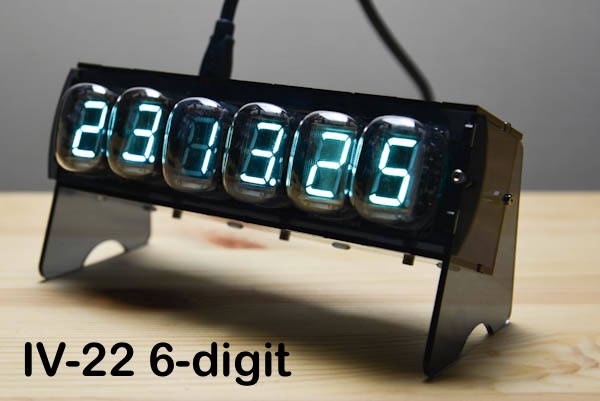
&lt;p&gt;Today we release another display shield for our VFD Modular Clock:
The much-requested &lt;a href="/posts/products/vfd-modular-clock/"&gt;
IV-22 shield&lt;/a&gt;
, that we
showed a prototype of over a year ago.&lt;/p&gt;

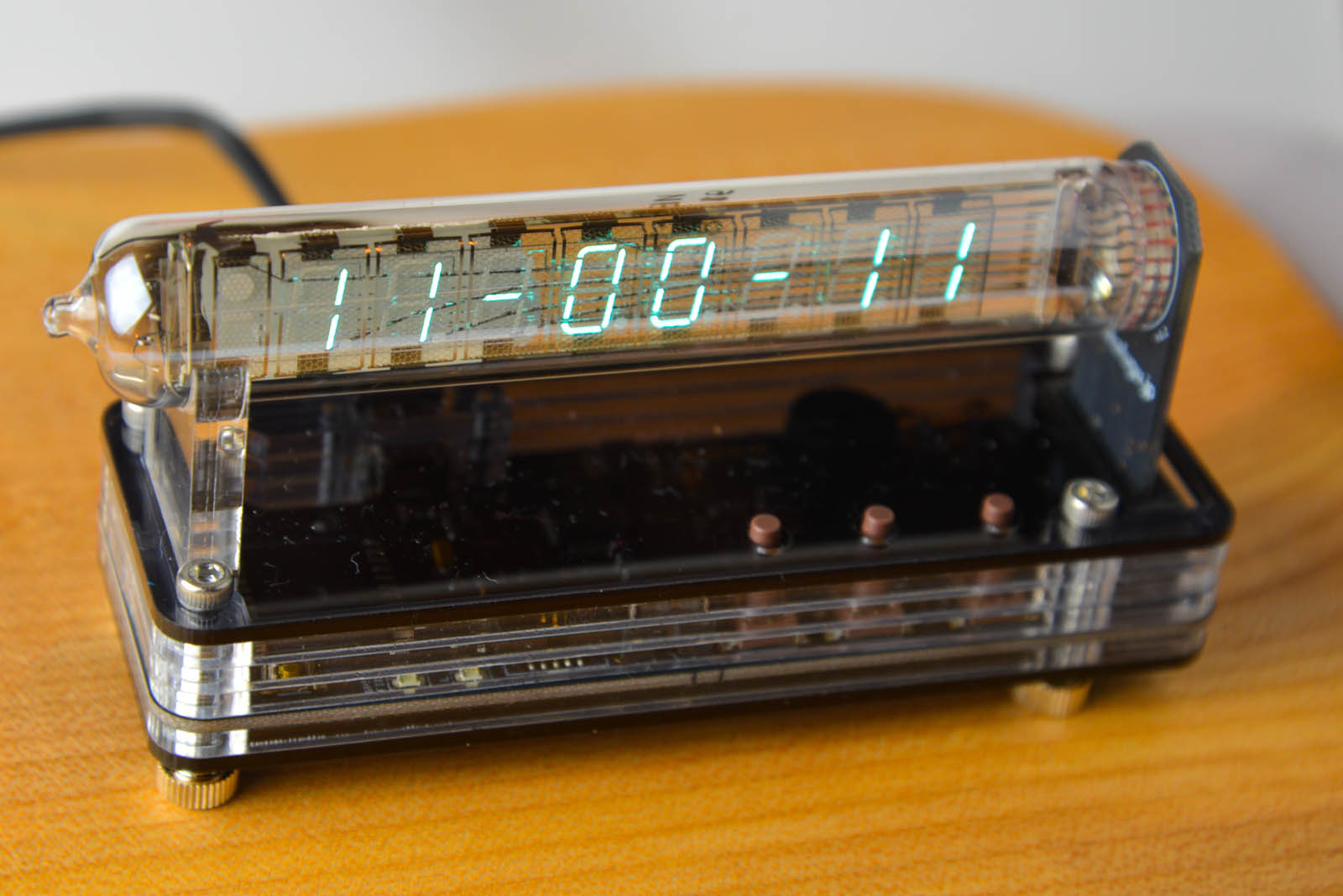
&lt;p&gt;IV-22 are top-view single-digit Russian VFD Tubes. They have excellent
brightness and large easy-to-read segments.&lt;/p&gt;

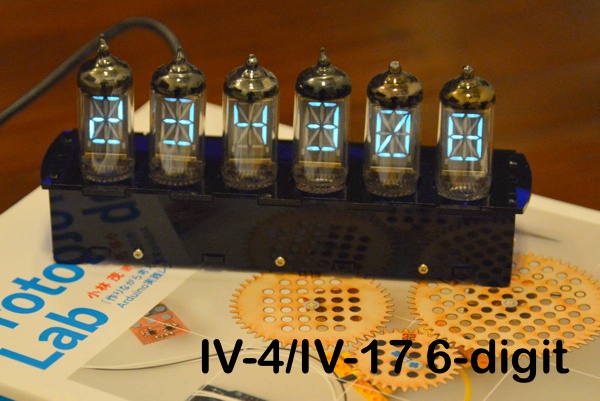
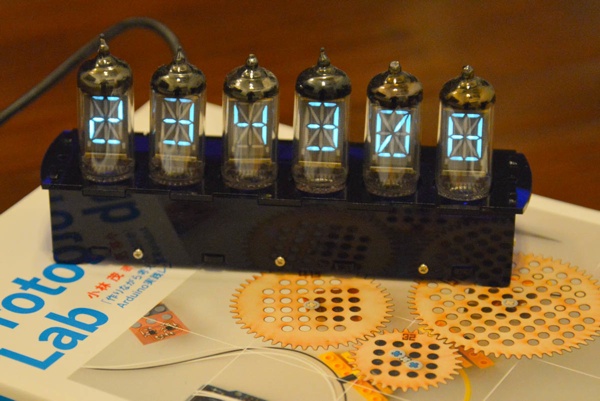
&lt;p&gt;We decided to go for a 6-digit shield, which makes it wider than the
IV-4/17 and IV-6 shields. We’re working on a case too, but it is not
quite ready yet. In other words, you are on your own when it comes to the
case.&lt;/p&gt;

&lt;p&gt;&lt;img src="/images/products/vfdclock/vfd-18.jpg" /&gt;
&lt;img src="/images/products/vfdclock/iv22-assembly-1.jpg" /&gt;&lt;/p&gt;

&lt;p&gt;&lt;a href="/posts/products/vfd-modular-clock/"&gt;
Have a look at the product page for more information.&lt;/a&gt;&lt;/p&gt;
</content>
  </entry>
  <entry>
    <id>tag:www.akafugu.jp,2013-04-17:/posts/blog/2013_04_17-Akafugu-products-on-display-in-Osaka/</id>
    <title type="html">Akafugu products on display in Osaka</title>
    <published>2013-04-16T15:00:00Z</published>
    <updated>2013-04-16T15:00:00Z</updated>
    <link rel="alternate" href="http://www.akafugu.jp/posts/blog/2013_04_17-Akafugu-products-on-display-in-Osaka/"/>
    <content type="html">&lt;p&gt;Our friend Yamada-san from Emerge Plus recently went to Osaka to join an event there.
While there, he stopped by the Kyohritsu Silicon House shop in Den-den Town, where
Akafugu products are now prominently displayed near the shop entrance.&lt;/p&gt;

&lt;p&gt;He took this snapshot:&lt;/p&gt;

&lt;p&gt;&lt;img src="/images/blog/kyohritsu-1.jpg" width="650px" /&gt;&lt;/p&gt;
</content>
  </entry>
  <entry>
    <id>tag:www.akafugu.jp,2013-04-16:/posts/blog/2013_04_16-Raspberry-Pi-Reference-Sheet-from-Surrey-Hampshire-Hackspace/</id>
    <title type="html">Raspberry Pi Reference Sheet from Surrey Hampshire Hackspace</title>
    <published>2013-04-15T15:00:00Z</published>
    <updated>2013-04-15T15:00:00Z</updated>
    <link rel="alternate" href="http://www.akafugu.jp/posts/blog/2013_04_16-Raspberry-Pi-Reference-Sheet-from-Surrey-Hampshire-Hackspace/"/>
    <content type="html">&lt;p&gt;Albert, from the Surrey Hampshire Hackspace held a Raspberry Pi event this weekend.&lt;/p&gt;

&lt;p&gt;He put together this useful handout, incorporating our electronics reference sheet
and various other useful resources, including a command line reference for beginners
to Linux.&lt;/p&gt;

&lt;p&gt;&lt;a href="/images/blog/Egham_Raspberry_Jam_Surrey_Hampshire_Hackspace_Handout_April_2013_Foot.pdf"&gt;&lt;img src="/images/blog/raspberry-pi-reference-1-thumb.jpg" /&gt;&lt;/a&gt;&lt;/p&gt;

&lt;p&gt;&lt;a href="/images/blog/Egham_Raspberry_Jam_Surrey_Hampshire_Hackspace_Handout_April_2013_Foot.pdf"&gt;Click on image for PDF&lt;/a&gt;&lt;/p&gt;
</content>
  </entry>
  <entry>
    <id>tag:www.akafugu.jp,2013-04-02:/posts/blog/2013_04_02-New-Product---Vetinari-Clock/</id>
    <title type="html">New Product - Vetinari Clock</title>
    <published>2013-04-01T15:00:00Z</published>
    <updated>2013-04-01T15:00:00Z</updated>
    <link rel="alternate" href="http://www.akafugu.jp/posts/blog/2013_04_02-New-Product---Vetinari-Clock/"/>
    <content type="html">&lt;iframe width="640" height="360" src="http://www.youtube.com/embed/M2ijmn_pm7I" frameborder="0" allowfullscreen=""&gt;&lt;/iframe&gt;

&lt;center&gt;
&lt;table width="60%" border="0"&gt;
  &lt;tr&gt;
	&lt;td&gt;
	  &lt;a href="/images/products/vetinariclock/vetinariclock-21.jpg" class="highslide" onclick="return hs.expand(this)"&gt;
  &lt;img src="/images/products/vetinariclock/vetinariclock-21-thumb.jpg" title="Click to enlarge" width="200px" height="200px" /&gt;
&lt;/a&gt;
&lt;to_s /&gt;

	&lt;/td&gt;
	&lt;td&gt;
	  &lt;a href="/images/products/vetinariclock/vetinariclock-22.jpg" class="highslide" onclick="return hs.expand(this)"&gt;
  &lt;img src="/images/products/vetinariclock/vetinariclock-22-thumb.jpg" title="Click to enlarge" width="200px" height="200px" /&gt;
&lt;/a&gt;
&lt;to_s /&gt;

	&lt;/td&gt;
	&lt;td&gt;
	  &lt;a href="/images/products/vetinariclock/vetinariclock-23.jpg" class="highslide" onclick="return hs.expand(this)"&gt;
  &lt;img src="/images/products/vetinariclock/vetinariclock-23-thumb.jpg" title="Click to enlarge" width="200px" height="200px" /&gt;
&lt;/a&gt;
&lt;to_s /&gt;

	&lt;/td&gt;
 &lt;/tr&gt;
&lt;/table&gt;
&lt;/center&gt;

&lt;p&gt;It is no secret that we’re fascinated by clocks at Akafugu.
We’re also big fans of the hugely popular Discworld series
by the venerable Sir Terry Pratchett.&lt;/p&gt;

&lt;p&gt;Lord Vetinari is one of the many recurring characters in the
series. He is a powerful man, and the ruler of the biggest
city on Discworld, Ankh-Morpork.&lt;/p&gt;

&lt;p&gt;He is in possession of a very strange clock: It ticks irregularly
but still keeps accurate time. It hangs in his waiting room, and
is designed to be unnerving for the people who are waiting to meet
him.&lt;/p&gt;

&lt;p&gt;We’ve turned this concept into an easy to solder electronics kit!
&lt;a href="http://store.akafugu.jp/products/44"&gt;Available now in our store&lt;/a&gt;, either
bundled with a wall clock to modify or standalone so that you can
modify your own clock!&lt;/p&gt;

&lt;p&gt;&lt;a href="http://www.waitingforfriday.com/index.php/Vetinari%27s_Clock"&gt;The concept and firmware is based on a design by Simon Inns&lt;/a&gt;,
and everything is released as 
&lt;a href="http://github.com/akafugu/vetinari_clock"&gt;open source hardware&lt;/a&gt;.&lt;/p&gt;

&lt;p&gt;&lt;a href="http://akafugu.jp/posts/products/vetinariclock"&gt;Product page&lt;/a&gt;&lt;/p&gt;
</content>
  </entry>
  <entry>
    <id>tag:www.akafugu.jp,2013-03-14:/posts/blog/2013_03_14-New-Product---Four-Letter-Word-Generator-add-on/</id>
    <title type="html">New Product - Four Letter Word Generator add-on</title>
    <published>2013-03-13T15:00:00Z</published>
    <updated>2013-03-13T15:00:00Z</updated>
    <link rel="alternate" href="http://www.akafugu.jp/posts/blog/2013_03_14-New-Product---Four-Letter-Word-Generator-add-on/"/>
    <content type="html">&lt;p&gt;&lt;img src="/images/products/fourletterword/fourletterword-4.jpg" /&gt;&lt;/p&gt;

&lt;p&gt;About &lt;a href="http://www.akafugu.jp/posts/blog/2012_02_08%20-%20Four%20Letter%20Word%20Generator/"&gt;a year ago&lt;/a&gt;
we published an article about adding a Four Letter Word generator to our &lt;a href="/posts/products/vfd-modular-clock/"&gt;
VFD Modular Clock&lt;/a&gt;
.&lt;/p&gt;

&lt;p&gt;The result was a Four Letter Word (FLW) generator based on a real-life word association dictionary. It
requires an EEPROM to run, so it was a bit cumbersome to set up. &lt;/p&gt;

&lt;p&gt;To make it easier for anyone to add Four Letter Word functionality, either to their 
&lt;a href="/posts/products/vfd-modular-clock/"&gt;
VFD Modular Clock&lt;/a&gt;
 or to any Arduino project, we’ve made a small add-on board.
It comes with a pre-programmed EEPROM and we’ve create a simple Arduino library.&lt;/p&gt;

&lt;p&gt;&lt;a href="/posts/products/fourletterword/"&gt;
The board is available here&lt;/a&gt;&lt;/p&gt;

&lt;iframe width="640" height="360" src="http://www.youtube.com/embed/8_o5Vvqx5xU" frameborder="0" allowfullscreen=""&gt;&lt;/iframe&gt;

&lt;h1 id="usage-with-vfd-modular-clock"&gt;Usage with VFD Modular Clock&lt;/h1&gt;

&lt;p&gt;The latest firmware supports the FLW Addon.&lt;/p&gt;

&lt;p&gt;To update the firmware you will require an ISP programmer.
&lt;a href="http://www.akafugu.jp/posts/blog/2013_02_07-Reprogramming-the-VFD-Modular-Clock/"&gt;See our guide for details&lt;/a&gt;.&lt;/p&gt;

&lt;p&gt;The Four Letter Word Generator add-on board can be soldered directly to the expansion header of the IV-17
shield or underneath the base board.&lt;/p&gt;

&lt;h1 id="usage-with-arduino"&gt;Usage with Arduino&lt;/h1&gt;

&lt;p&gt;&lt;a href="http://github.com/akafugu/FourLetterWord/"&gt;Get our Arduino library from github!&lt;/a&gt;&lt;/p&gt;

&lt;p&gt;Just hook up VCC, GND, SDA and SCL and run the simple example included in the library to
see four letter words generated in the serial console.&lt;/p&gt;

&lt;p&gt;Depending on the board and whether or not you have other I2C/TWI devices attached at the
same time, you may also need to add pull-up resistors to the SDA and SCL lines (around 4.7k)&lt;/p&gt;
</content>
  </entry>
  <entry>
    <id>tag:www.akafugu.jp,2013-02-27:/posts/blog/2013_02_27-Diet-Nixie-Sneak-Preview/</id>
    <title type="html">Diet Nixie Sneak Preview</title>
    <published>2013-02-26T15:00:00Z</published>
    <updated>2013-02-26T15:00:00Z</updated>
    <link rel="alternate" href="http://www.akafugu.jp/posts/blog/2013_02_27-Diet-Nixie-Sneak-Preview/"/>
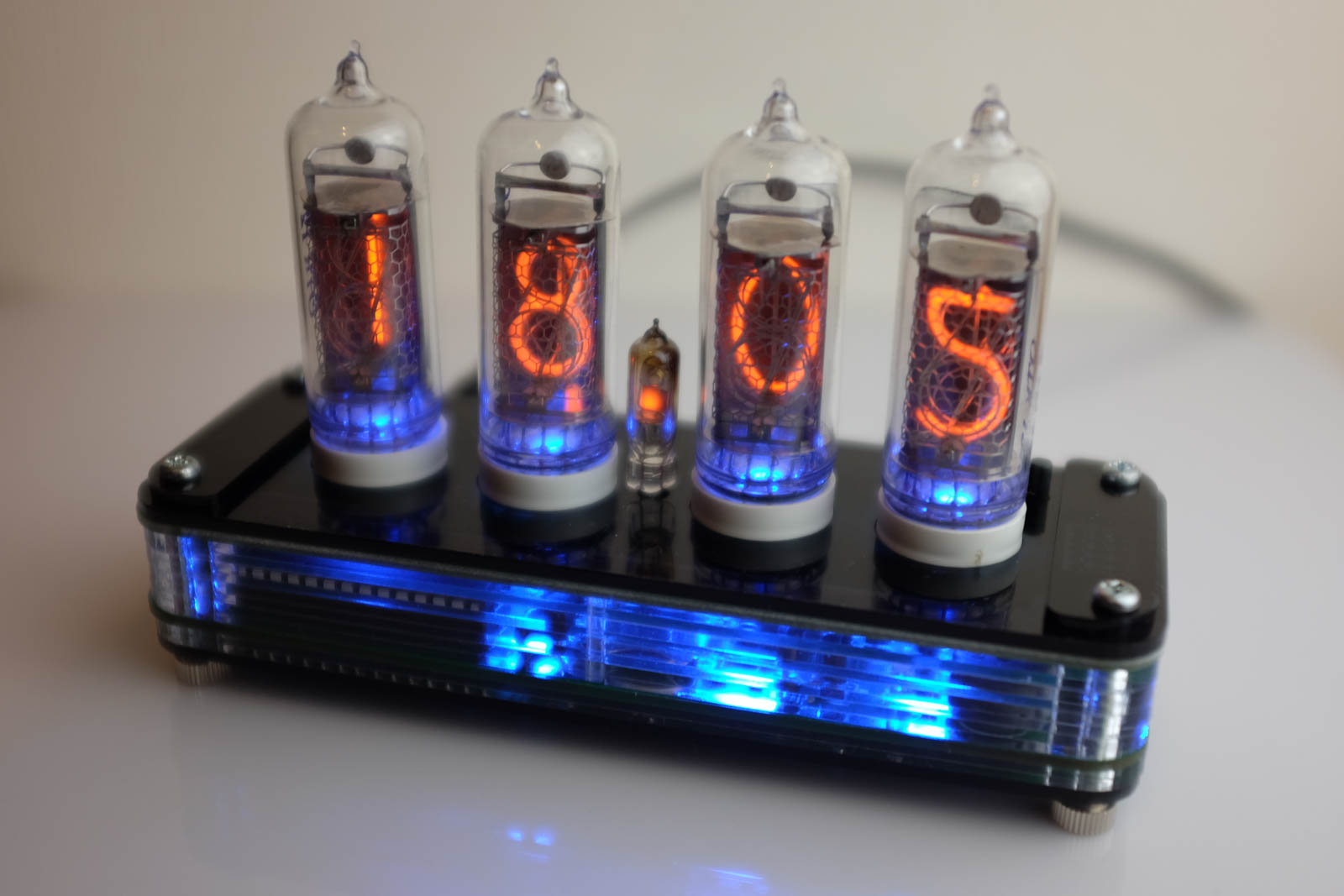
    <content type="html">&lt;p&gt;Here’s a sneak preview of our upcoming new Nixie clock: Diet Nixie!&lt;/p&gt;

&lt;p&gt;&lt;img src="/images/blog/diet-nixie-proto-1.jpg" /&gt;&lt;/p&gt;

&lt;p&gt;It was pretty difficult to photograph, so rest assured that the display
brightness is better than it appears in this picture.&lt;/p&gt;

&lt;p&gt;We showed an earlier prototype at the Tokyo Maker Faire in December,
and now we’ve finalized the PCB design and are working the case design.&lt;/p&gt;

&lt;p&gt;The name Diet Nixie comes from the fact that the development of the
clock started out as a desire to create a more economical version of
our original &lt;a href="/posts/products/nixie/"&gt;
Nixie clock&lt;/a&gt;
.&lt;/p&gt;

&lt;p&gt;To do this, we slimmed it down from 3 PCB boards to just one board,
and went with even smaller IN-2 nixie tubes. The new board has only
four SMT parts (the backlight LEDs), which cuts down on our assembly
time, meaning a lower end price.&lt;/p&gt;

&lt;p&gt;Of course, just making a cut-down version of our original Nixie clock
would be boring, so we decided to rewamp the circuit design. We’ve
replaced the original КМ155ИД1 (K155ID1) Nixie driver with a more modern
HV5812 driver. This driver has 20 outputs and lets us drive the Nixie
tubes at 1/2 duty cycle instead of 1/4 duty cycle. The end result of
this is a cleaner and brighter display.&lt;/p&gt;

&lt;p&gt;Here’s a picture with the blue backlight on: (only single-color
backlight this time)&lt;/p&gt;

&lt;p&gt;&lt;img src="/images/blog/diet-nixie-proto-2.jpg" /&gt;&lt;/p&gt;

&lt;p&gt;We’re very happy with the way the backlight enhances the look of the
semi-transparent dark blue acrylic case. The electronics inside are
visible, without the effect being too “noisy.”&lt;/p&gt;

&lt;p&gt;For the next revision of the case, we will remove the “akafugu.jp”
lettering as it ended up being a bit overpowering… we’ll keep the
fish though!&lt;/p&gt;

&lt;p&gt;We expect the clock to be available for sale on our site by the
end of March.&lt;/p&gt;
</content>
  </entry>
  <entry>
    <id>tag:www.akafugu.jp,2013-02-07:/posts/blog/2013_02_07-Reprogramming-the-VFD-Modular-Clock/</id>
    <title type="html">Reprogramming the VFD Modular Clock</title>
    <published>2013-02-06T15:00:00Z</published>
    <updated>2013-02-06T15:00:00Z</updated>
    <link rel="alternate" href="http://www.akafugu.jp/posts/blog/2013_02_07-Reprogramming-the-VFD-Modular-Clock/"/>
    <content type="html">&lt;p&gt;The open source firmware for the open the &lt;a href="/posts/products/vfd-modular-clock/"&gt;
VFD Modular Clock&lt;/a&gt;
 can be downloaded from
&lt;a href="https://github.com/akafugu/VFD-Modular-Clock"&gt;github&lt;/a&gt;. It has recently undergone
a series of improvements with lots of new exciting features (more about that in
a later blog post).&lt;/p&gt;

&lt;h1 id="getting-an-isp-programmer"&gt;Getting an ISP Programmer&lt;/h1&gt;

&lt;p&gt;To program the &lt;a href="/posts/products/vfd-modular-clock/"&gt;
VFD Modular Clock&lt;/a&gt;
, an ISP programmer is required. We do not sell one, so here are a few
options:&lt;/p&gt;

&lt;h2 id="arduino-isp-programmer"&gt;Arduino ISP Programmer&lt;/h2&gt;

&lt;p&gt;Most Arduino boards can be used as an ISP programmer by using the ArduinoISP
sketch. If you already own an Arduino board, this is probably the easiest way,
but it requires some wiring.&lt;/p&gt;

&lt;p&gt;&lt;a href="http://arduino.cc/en/Tutorial/ArduinoISP"&gt;Have a look here for details&lt;/a&gt;&lt;/p&gt;

&lt;h2 id="avr-isp-mkii"&gt;AVR ISP mkii&lt;/h2&gt;

&lt;p&gt;This is Atmels own programmer. It is relatively affordable and can be purchased
from Mouser, Digikey or similar shops.&lt;/p&gt;

&lt;p&gt;&lt;a href="http://www.atmel.com/tools/AVRISPMKII.aspx"&gt;See here for details&lt;/a&gt;&lt;/p&gt;

&lt;h2 id="usbtinyisp"&gt;USBTinyISP&lt;/h2&gt;

&lt;p&gt;This is Adafruit’s low-cost programmer. It is quite a bit slower than the
AVR ISP mkii, but works just as well as a programmer for the ATMega328P
chip on the &lt;a href="/posts/products/vfd-modular-clock/"&gt;
VFD Modular Clock&lt;/a&gt;
.&lt;/p&gt;

&lt;p&gt;&lt;a href="http://www.ladyada.net/make/usbtinyisp/"&gt;See here for details&lt;/a&gt;&lt;/p&gt;

&lt;h1 id="setting-up-the-compiler-toolchain"&gt;Setting up the Compiler Toolchain&lt;/h1&gt;

&lt;p&gt;The VFD Modular Clock firmware is written for avr-gcc. The installation procedure differs
depending on your OS. &lt;/p&gt;

&lt;p&gt;&lt;a href="http://www.akafugu.jp/posts/resources/avr-gcc/"&gt;See our installation instructions for details&lt;/a&gt;&lt;/p&gt;

&lt;h1 id="getting-the-source-code"&gt;Getting the Source Code&lt;/h1&gt;

&lt;p&gt;The latest source code is 
&lt;a href="https://github.com/akafugu/VFD-Modular-Clock"&gt;on github&lt;/a&gt;.&lt;/p&gt;

&lt;p&gt;Click the ZIP button to download.&lt;/p&gt;

&lt;h1 id="setting-up-usermk"&gt;Setting up user.mk&lt;/h1&gt;

&lt;p&gt;The user.mk file is used by the makefile in the VFD Modular Clock firmware to read information
about your programmer.&lt;/p&gt;

&lt;p&gt;If you’ve set up an Arduino as an ISP programmer, use this:&lt;/p&gt;

&lt;div class="sourcecode"&gt;&lt;script type="syntaxhighlighter" class="brush: c; toolbar: false;"&gt;&lt;![CDATA[AVRDUDE_PROGRAMMER=avrisp
AVRDUDE_PORT=&lt;the COM port of the device&gt;
AVRDUDE_SPEED=19200
]]&gt;&lt;/script&gt;&lt;/div&gt;

&lt;p&gt;If you have a AVR ISP mkii, use this:&lt;/p&gt;

&lt;div class="sourcecode"&gt;&lt;script type="syntaxhighlighter" class="brush: c; toolbar: false;"&gt;&lt;![CDATA[AVRDUDE_PROGRAMMER=avrispmkii
AVRDUDE_PORT=usb
AVRDUDE_SPEED=
]]&gt;&lt;/script&gt;&lt;/div&gt;

&lt;p&gt;If you have an USBTinyISP, use this:&lt;/p&gt;

&lt;div class="sourcecode"&gt;&lt;script type="syntaxhighlighter" class="brush: c; toolbar: false;"&gt;&lt;![CDATA[AVRDUDE_PROGRAMMER=usbtiny
AVRDUDE_PORT=
AVRDUDE_SPEED=
]]&gt;&lt;/script&gt;&lt;/div&gt;

&lt;h1 id="programming"&gt;Programming&lt;/h1&gt;

&lt;p&gt;Everything’s ready. Connect the ISP cable of your programmer to the ISP header
on the &lt;a href="/posts/products/vfd-modular-clock/"&gt;
VFD Modular Clock&lt;/a&gt;
. If your programmer doesn’t power the device (which
is the case for the AVR ISP mkii), you’ll need to connect the 9V power adapter too.&lt;/p&gt;

&lt;p&gt;Now open a command prompt and change to the directory where you put the source code:&lt;/p&gt;

&lt;div class="sourcecode"&gt;&lt;script type="syntaxhighlighter" class="brush: c; toolbar: false;"&gt;&lt;![CDATA[make
make flash
]]&gt;&lt;/script&gt;&lt;/div&gt;

&lt;p&gt;This will compile the source code and flash it to the microcontroller. Once it is
finished, the device will reboot and you will have the latest firmware!&lt;/p&gt;

&lt;h1 id="other-uses"&gt;Other uses&lt;/h1&gt;

&lt;p&gt;The method described here also works for many of our other products, such as
&lt;a href="/posts/products/xmas/"&gt;
XMAS&lt;/a&gt;
 and &lt;a href="/posts/products/ledcandle/"&gt;
LED Candle&lt;/a&gt;
.&lt;/p&gt;

&lt;p&gt;The TWI/I2C slave firmware in &lt;a href="/posts/products/twi-7-segment/"&gt;
TWIDisplay&lt;/a&gt;
, &lt;a href="/posts/products/twilcd/"&gt;
TWILCD&lt;/a&gt;
 and &lt;a href="/posts/products/twi-keyboard/"&gt;
TWIKeyboard&lt;/a&gt;
 can also be updated with an ISP programmer.&lt;/p&gt;

&lt;p&gt;Note that &lt;a href="/posts/products/nixie/"&gt;
The Akafugu Nixie Clock&lt;/a&gt;
 and &lt;a href="/posts/products/simpleclock/"&gt;
Simpleclock&lt;/a&gt;
 both ship with
an Arduino bootloader and are programmed in the Arduino environment using an FTDI adapter
instead of an ISP programmer.&lt;/p&gt;
</content>
  </entry>
  <entry>
    <id>tag:www.akafugu.jp,2013-02-04:/posts/blog/2013_02_04-VFD-Soldering-Class-Pictures/</id>
    <title type="html">VFD Soldering Class Pictures</title>
    <published>2013-02-03T15:00:00Z</published>
    <updated>2013-02-03T15:00:00Z</updated>
    <link rel="alternate" href="http://www.akafugu.jp/posts/blog/2013_02_04-VFD-Soldering-Class-Pictures/"/>
    <content type="html">&lt;p&gt;We just had another soldering class at &lt;a href="http://tokyohackerspace.org/"&gt;Tokyo Hacker Space&lt;/a&gt;.
This time, we constructed the VFD Modular Clock.&lt;/p&gt;

&lt;p&gt;A couple of the participants were completely new to soldering, but this turned out
to be no problem at all since they were very fast learners!&lt;/p&gt;

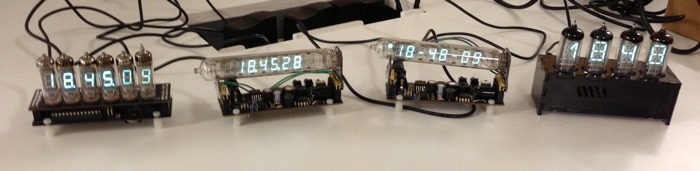
&lt;p&gt;The picture below shows the finished clocks: IV-4, IV-6 and IV-18!&lt;/p&gt;

&lt;p&gt;&lt;img src="/images/blog/vfdclass-1.jpg" width="550px" /&gt;&lt;/p&gt;

&lt;p&gt;Here’s a picture of our students:&lt;/p&gt;

&lt;p&gt;&lt;img src="/images/blog/vfdclass-2.jpg" width="550px" /&gt;&lt;/p&gt;
</content>
  </entry>
  <entry>
    <id>tag:www.akafugu.jp,2013-01-31:/posts/blog/2013_01_31-Arduino-Spectrum-Analyzer/</id>
    <title type="html">Arduino Spectrum Analyzer</title>
    <published>2013-01-30T15:00:00Z</published>
    <updated>2013-01-30T15:00:00Z</updated>
    <link rel="alternate" href="http://www.akafugu.jp/posts/blog/2013_01_31-Arduino-Spectrum-Analyzer/"/>
    <content type="html">&lt;p&gt;John of &lt;a href="http://tronixstuff.wordpress.com/"&gt;tronixstuff&lt;/a&gt;, an excellent
resource for Arduino tutorials and reviews, has made a nifty audio spectrum
analyzer using our &lt;a href="/posts/products/twilcd/"&gt;
TWILCD&lt;/a&gt;
 board:&lt;/p&gt;

&lt;div class="embed-vimeo" style="text-align:center;"&gt;
	&lt;iframe src="http://player.vimeo.com/video/58581706" width="400" height="300" frameborder="0"&gt;
	&lt;/iframe&gt;
&lt;/div&gt;

&lt;p&gt;&lt;a href="http://tronixstuff.wordpress.com/2013/01/31/tutorial-arduino-and-the-msgeq7-spectrum-analyzer/"&gt;The full tutorial is here.&lt;/a&gt;&lt;/p&gt;
</content>
  </entry>
  <entry>
    <id>tag:www.akafugu.jp,2013-01-30:/posts/blog/2013_01_30-Nixie-Clock-Firmware-Issue-Discovered/</id>
    <title type="html">Nixie Clock Firmware Issue Discovered</title>
    <published>2013-01-29T15:00:00Z</published>
    <updated>2013-01-29T15:00:00Z</updated>
    <link rel="alternate" href="http://www.akafugu.jp/posts/blog/2013_01_30-Nixie-Clock-Firmware-Issue-Discovered/"/>
    <content type="html">&lt;p&gt;We’ve received reports from some customers that there are
issues with display ghosting on some Nixie Clocks.&lt;/p&gt;

&lt;p&gt;Display ghosting means that in addition to showing the
desired numeral inside a tube, a weak version of the
neighboring numeral will also be visible.&lt;/p&gt;

&lt;p&gt;If you see this effect on your Nixie clock, you should
update the firmware.&lt;/p&gt;

&lt;p&gt;If you see no ghosting on your clock, it is not neccesary
to update the firmware, but doing so will do absolutely no
harm.&lt;/p&gt;

&lt;p&gt;Download the firmware:&lt;/p&gt;

&lt;p&gt;&lt;a href="/arduino/akafugu_nixie_clock-version_1_1.zip"&gt;The Akafugu Nixie Clock version firmware version 1.1&lt;/a&gt; (recommended)&lt;br /&gt;
&lt;a href="/arduino/akafugu_nixie_clock-version_1_0.zip"&gt;The Akafugu Nixie Clock version firmware version 1.0&lt;/a&gt;&lt;br /&gt;&lt;/p&gt;

&lt;p&gt;The follow our
&lt;a href="http://next.akafugu.jp/posts/blog/2013_01_28-Reprogramming-the-Akafugu-Nixie-Clock-and-Simpleclock/"&gt;Firmware update guide&lt;/a&gt;&lt;/p&gt;

&lt;p&gt;So far, the issue has only been discovered on &lt;em&gt;some&lt;/em&gt;
clocks delivered after mid-December 2012.&lt;/p&gt;

&lt;p&gt;The optoisolator (TLP627-1) we use to drive the Nixie
anodes (high-side drivers) were bought from two
different manufacturers and have slightly different
specifications. &lt;/p&gt;

&lt;p&gt;The optoisolators from the two different manufacturers
look slightly different:&lt;/p&gt;

&lt;p&gt;&lt;img src="/images/blog/optoisolators.jpg" /&gt;&lt;/p&gt;

&lt;p&gt;We’ve never seen the ghosting issue on the left type, with weak
print. The ghosting issue shows up on some, but not all clocks
delivered with the right type, with strong print.&lt;/p&gt;

&lt;p&gt;There is no need to change out the optoisolator as we’ve
adjusted the firmware to be compatible with both types.&lt;/p&gt;

&lt;p&gt;PS: If you have bought a Nixie clock with a ghosting issue and
do not own an FTDI adapter, or have problems with the update
procedure, please contact us by email and we will
be happy to help.&lt;/p&gt;
</content>
  </entry>
  <entry>
    <id>tag:www.akafugu.jp,2013-01-30:/posts/blog/2013_01_30-Reprogramming-the-Akafugu-Nixie-Clock-and-Simpleclock/</id>
    <title type="html">Reprogramming the Akafugu Nixie Clock and Simpleclock</title>
    <published>2013-01-29T15:00:00Z</published>
    <updated>2013-01-29T15:00:00Z</updated>
    <link rel="alternate" href="http://www.akafugu.jp/posts/blog/2013_01_30-Reprogramming-the-Akafugu-Nixie-Clock-and-Simpleclock/"/>
    <content type="html">&lt;p&gt;&lt;img src="/images/blog/nixie-workshop-2-thumb.jpg" width="250px" style="float: right;" /&gt;&lt;/p&gt;

&lt;p&gt;New firmware updates are available for both our 
&lt;a href="/posts/products/nixie/"&gt;
Nixie Clock&lt;/a&gt;
 and &lt;a href="/posts/products/simpleclock/"&gt;
Simpleclock&lt;/a&gt;&lt;/p&gt;

&lt;p&gt;Follow these instructions to upgrade!&lt;/p&gt;

&lt;p&gt;First, a rundown of the new features:&lt;/p&gt;

&lt;p&gt;The Akafugu Nixie Clock:&lt;/p&gt;

&lt;ul&gt;
  &lt;li&gt;Improved display multiplexing routine for better display brightness&lt;/li&gt;
&lt;/ul&gt;

&lt;p&gt;Simpleclock:&lt;/p&gt;

&lt;ul&gt;
  &lt;li&gt;Date and time setting&lt;/li&gt;
&lt;/ul&gt;

&lt;p&gt;The new Simpleclock firmware is courtesy of our friend William Phelps.
He is also hard at work adding even more features to our VFD Modular Clock
(if you are interested in trying out the current code, which is very stable
by now, get it from github.)&lt;/p&gt;

&lt;p&gt;Note that the procedure for programming the VFD Modular Clock is different,
and we’ll get back with information on that at a later time.&lt;/p&gt;

&lt;h2 id="step-1---ftdi-adapter"&gt;Step 1 - FTDI Adapter&lt;/h2&gt;

&lt;p&gt;You’ll need an FTDI adapter to program the Akafugu Nixie Clock or Simpleclock.
The same adapter can be used for both, so you’ll only need one.&lt;/p&gt;

&lt;p&gt;There are many versions available, so if you already have one, you can probably
use it directly. It should have a 6-pin female header. If you don’t already have
one, &lt;a href="/posts/products/ftdi-adapter/"&gt;
you can get it from our store&lt;/a&gt;
.&lt;/p&gt;

&lt;p&gt;The 6 pins on an FTDI adapter are normally labelled as follows:
DTR - RXI - TXO - VCC - CTS/GND - GND&lt;/p&gt;

&lt;h2 id="step-2---setting-up-drivers"&gt;Step 2 - Setting up Drivers&lt;/h2&gt;

&lt;p&gt;The FTDI adapter requires driver installation on all supported OSs, they can be
downloaded from the &lt;a href="http://www.ftdichip.com/FTDrivers.htm"&gt;FTDI webpage.&lt;/a&gt;&lt;/p&gt;

&lt;p&gt;You will need a USB mini-B cable. Plug the cable into your computer and attach the
mini-B connector to the FTDI adapter. You should see the LEDs light up briefly.&lt;/p&gt;

&lt;p&gt;The first time you connect the adapter, your computer will assign a serial port.&lt;/p&gt;

&lt;p&gt;On OS X, the serial port will typically look like this: /dev/tty.usbserial-A700ft5E&lt;/p&gt;

&lt;p&gt;On Linux, the serial port will typically look like this: /dev/tty.usbserial-A700ft5E&lt;/p&gt;

&lt;p&gt;On Windows, the serial port will typically look like this: COM5&lt;/p&gt;

&lt;p&gt;&lt;a href="http://www.akafugu.jp/posts/products/ftdi-adapter/usage/"&gt;More information is available here&lt;/a&gt;.&lt;/p&gt;

&lt;h2 id="step-3---setting-up-arduino"&gt;Step 3 - Setting up Arduino&lt;/h2&gt;

&lt;p&gt;If you do not already have Arduino installed on your computer, 
&lt;a href="http://www.akafugu.jp/ja/posts/resources/arduino-ide-akafugu/"&gt;follow our guide&lt;/a&gt;.&lt;/p&gt;

&lt;p&gt;If you already have Arduino IDE version 1.0.1 or later installed, you should first
download and install our library package:&lt;/p&gt;

&lt;ul&gt;
  &lt;li&gt;&lt;a href="/arduino/akafugu-arduino-libraries-1.06.zip"&gt;Akafugu Libraries Package with all our libraries&lt;/a&gt;.&lt;/li&gt;
&lt;/ul&gt;

&lt;p&gt;(The easiest place to install libaries is in the Arduino/libraries folder located in your documents directory.)&lt;/p&gt;

&lt;p&gt;Next, it is neccesary to edit the boards.txt file located in hardware\arduino
inside your Arduino directory in your favorite text editor. Scroll down to the
bottom, and add the following at the very end of the file:&lt;/p&gt;

&lt;div class="sourcecode"&gt;&lt;script type="syntaxhighlighter" class="brush: c; toolbar: false;"&gt;&lt;![CDATA[##############################################################

nixieclock.name=Akafugu Nixie Clock

nixieclock.upload.protocol=arduino
nixieclock.upload.maximum_size=30720
nixieclock.upload.speed=57600

nixieclock.bootloader.low_fuses=0xe2
nixieclock.bootloader.high_fuses=0xD8
nixieclock.bootloader.extended_fuses=0x05
nixieclock.bootloader.path=atmega
nixieclock.bootloader.file=ATmegaBOOT_168_atmega328_pro_8MHz.hex
nixieclock.bootloader.unlock_bits=0x3F
nixieclock.bootloader.lock_bits=0x0F

nixieclock.build.mcu=atmega328p
nixieclock.build.f_cpu=8000000L
nixieclock.build.core=arduino
nixieclock.build.variant=standard
]]&gt;&lt;/script&gt;&lt;/div&gt;

&lt;p&gt;OS X users will need to right-click the Arduino application and select “Show Package Contents.”
The boards.txt file is in Contents/Resources/Java/hardware/arduino&lt;/p&gt;

&lt;h2 id="step-4---getting-the-firmware"&gt;Step 4 - Getting the firmware&lt;/h2&gt;

&lt;p&gt;The easiest way to get the firmware is to download it from the
&lt;a href="https://github.com/akafugu/akafugu_nixie_clock"&gt;github page&lt;/a&gt;&lt;/p&gt;

&lt;p&gt;Click the button labelled ZIP to get the file, and a filed called
akafugu_nixie_clock-master.zip should download to your computer.&lt;/p&gt;

&lt;p&gt;When you unzip the file, the firmware will end up in a directory
called akafugu_nixie_clock-master. Before opening the file in Arduino,
you must rename the directory to akafugu_nixie_clock.&lt;/p&gt;

&lt;p&gt;PS: If you want to learn about git and github, have a look at
&lt;a href="http://learn.github.com/p/intro.html"&gt;github’s own tutorial&lt;/a&gt;&lt;/p&gt;

&lt;h2 id="step-5---compiling-and-uploading"&gt;Step 5 - Compiling and Uploading&lt;/h2&gt;

&lt;p&gt;Now open the file akafugu_nixie_clock.ino in Arduino.&lt;/p&gt;

&lt;!--
Look at the the row of tabs, and click on the file named global.h

Towards the top of the file, you will see the following:

// define the type of board we are compiling for
// The Akafugu Nixie Clock (http://www.akafugu.jp/posts/products/nixie/)
//#define BOARD_STANDARD
// Diet Nixie board (http://www.akafugu.jp/posts/products/diet_nixie/)
//#define BOARD_DIET
// The Akafugu Nixie Clock mk2 (http://www.akafugu.jp/posts/products/nixie/)
//#define BOARD_MK2

Comment out the line with the #define for the board you are using, and press the 
verify button (upper left corner). It should now compile correctly.
--&gt;

&lt;p&gt;In the menu, select Tools -&amp;gt; Board and then select “Akafugu Nixie Clock”
Also, in the menu, select Tools -&amp;gt; Serial Port and select the serial port for your FTDI adapter.&lt;/p&gt;

&lt;p&gt;Now, make sure that the FTDI adapter is connected to 6-pin connector on the Nixie clock
(left side of the control board/diet nixie board). It is neccesary to open up the case
of the clock to access the programming header.&lt;/p&gt;

&lt;p&gt;Press upload, and the firmware should be uploaded to the microcontroller, after which the
clock will reboot.&lt;/p&gt;

&lt;p&gt;PS: You can program the clock by only using the FTDI adapter and no 9V power adapter attached.
When powered like this from 5V only, the clock will run, but the Nixies will not light up
unless you attach the 9V power adapter as well.&lt;/p&gt;

&lt;h1 id="simpleclock"&gt;Simpleclock&lt;/h1&gt;

&lt;p&gt;The instructions above are also valid for reprogramming Simpleclock.&lt;/p&gt;

&lt;p&gt;The firmware for Simpleclock is at our &lt;a href="https://github.com/akafugu/simpleclock"&gt;github page&lt;/a&gt;&lt;/p&gt;

&lt;p&gt;If you already have Arduino installed, edit the boards.txt file as described above, but use
the following text:&lt;/p&gt;

&lt;div class="sourcecode"&gt;&lt;script type="syntaxhighlighter" class="brush: c; toolbar: false;"&gt;&lt;![CDATA[##############################################################

simpleclock.name=Akafugu SimpleClock

simpleclock.upload.protocol=arduino
simpleclock.upload.maximum_size=30720
simpleclock.upload.speed=57600

simpleclock.bootloader.low_fuses=0xe2
simpleclock.bootloader.high_fuses=0xD8
simpleclock.bootloader.extended_fuses=0x05
simpleclock.bootloader.path=atmega
simpleclock.bootloader.file=ATmegaBOOT_168_atmega328_pro_8MHz.hex
simpleclock.bootloader.unlock_bits=0x3F
simpleclock.bootloader.lock_bits=0x0F

simpleclock.build.mcu=atmega328p
simpleclock.build.f_cpu=8000000L
simpleclock.build.core=arduino
simpleclock.build.variant=standard
]]&gt;&lt;/script&gt;&lt;/div&gt;
</content>
  </entry>
  <entry>
    <id>tag:www.akafugu.jp,2013-01-21:/posts/blog/2013_01_21-Nixie-clock-back-in-stock/</id>
    <title type="html">Nixie clock back in stock</title>
    <published>2013-01-20T15:00:00Z</published>
    <updated>2013-01-20T15:00:00Z</updated>
    <link rel="alternate" href="http://www.akafugu.jp/posts/blog/2013_01_21-Nixie-clock-back-in-stock/"/>
    <content type="html">&lt;center&gt;
  &lt;table border="0"&gt;
    &lt;tr&gt;
      &lt;td&gt;
        &lt;a href="/images/products/nixie/nixie-12.jpg" class="highslide" onclick="return hs.expand(this)"&gt;
          &lt;img src="/images/products/nixie/nixie-12.jpg" title="Click to enlarge" width="466px" height="310px" /&gt;
        &lt;/a&gt;
      &lt;/td&gt;
      &lt;td&gt;
        &lt;table border="0"&gt;
          &lt;tr&gt;
            &lt;td&gt;
              &lt;a href="/images/products/nixie/nixie-1.jpg" class="highslide" onclick="return hs.expand(this)"&gt;
                &lt;img src="/images/products/nixie/nixie-1-thumb.jpg" title="Click to enlarge" width="150px" height="150px" /&gt;
              &lt;/a&gt;
            &lt;/td&gt;
          &lt;/tr&gt;
          &lt;tr&gt;
            &lt;td&gt;
              &lt;a href="/images/products/nixie/nixie-3.jpg" class="highslide" onclick="return hs.expand(this)"&gt;
                &lt;img src="/images/products/nixie/nixie-3-thumb.jpg" title="Click to enlarge" width="150px" height="150px" /&gt;
              &lt;/a&gt;
            &lt;/td&gt;
          &lt;/tr&gt;
        &lt;/table&gt;
      &lt;/td&gt;
    &lt;/tr&gt;
  &lt;/table&gt;
&lt;/center&gt;

&lt;p&gt;Now back in stock: &lt;a href="http://store.akafugu.jp/products/42"&gt;The Akafugu Nixie Clock&lt;/a&gt;&lt;/p&gt;

&lt;p&gt;The Akafugu Nixie Clock is a fun to build stylish clock kit that
uses old-fashioned neon Nixie tubes. It comes as a kit complete
with three PCBs, all neccesary components, four IN-12 Nixie tubes and
smoke black acrylic enclosure.&lt;/p&gt;

&lt;p&gt;&lt;a href="http://store.akafugu.jp/products/19"&gt;&lt;img src="/images/products/vfdclock/vfd-7.jpg" /&gt;&lt;/a&gt;&lt;/p&gt;

&lt;p&gt;We also have the IV-4 version of the &lt;a href="http://store.akafugu.jp/products/19"&gt;VFD Modular Clock&lt;/a&gt; back in stock!&lt;/p&gt;

&lt;p&gt;The VFD Modular Clock is a clock based on old-fashioned VFD Display Tubes.&lt;/p&gt;
</content>
  </entry>
  <entry>
    <id>tag:www.akafugu.jp,2013-01-20:/posts/blog/2013_01_20-Nixie-class-at-Tokyo-Hacker-Space/</id>
    <title type="html">Nixie and VFD clock classes at Tokyo Hacker Space</title>
    <published>2013-01-19T15:00:00Z</published>
    <updated>2013-01-19T15:00:00Z</updated>
    <link rel="alternate" href="http://www.akafugu.jp/posts/blog/2013_01_20-Nixie-class-at-Tokyo-Hacker-Space/"/>
    <content type="html">&lt;p&gt;&lt;a href="/ja/posts/blog/2013_01_20-Nixie-class-at-Tokyo-Hacker-Space/"&gt;日本語はここにあります。&lt;/a&gt;&lt;/p&gt;

&lt;p&gt;&lt;center&gt;
  &lt;table border="0"&gt;
    &lt;tr&gt;
      &lt;td&gt;
        &lt;a href="/images/blog/nixie-workshop-1.jpg" class="highslide" onclick="return hs.expand(this)"&gt;
          &lt;img src="/images/blog/nixie-workshop-1-thumb.jpg" /&gt;
        &lt;/a&gt;
      &lt;/td&gt;
      &lt;td&gt;
        &lt;table border="0"&gt;
          &lt;tr&gt;
            &lt;td&gt;
              &lt;a href="/images/blog/nixie-workshop-2.jpg" class="highslide" onclick="return hs.expand(this)"&gt;
                &lt;img src="/images/blog/nixie-workshop-2-thumb.jpg" /&gt;
              &lt;/a&gt;
            &lt;/td&gt;
          &lt;/tr&gt;
          &lt;tr&gt;
            &lt;td&gt;
              &lt;a href="/images/blog/nixie-workshop-3.jpg" class="highslide" onclick="return hs.expand(this)"&gt;
                &lt;img src="/images/blog/nixie-workshop-3-thumb.jpg" /&gt;
              &lt;/a&gt;
            &lt;/td&gt;
          &lt;/tr&gt;
        &lt;/table&gt;
      &lt;/td&gt;
    &lt;/tr&gt;
  &lt;/table&gt;
&lt;/center&gt;&lt;/p&gt;

&lt;p&gt;Tokyo HackerSpace arranges classes about all kind of subjects.&lt;/p&gt;

&lt;p&gt;We’ve had a few classes there in the past, the pictures above are of all the finished clocks
from one of the Nixie clock classes we held last year.&lt;/p&gt;

&lt;p&gt;We’re holding two more classes: One for the &lt;a href="/posts/products/nixie/"&gt;Akafugu Nixie Clock&lt;/a&gt; and
one for the &lt;a href="/posts/products/vfd-modular-clock/"&gt;VFD Modular Clock&lt;/a&gt;. See below for more information.&lt;/p&gt;

&lt;p&gt;The classes will be hold in both English and Japanese, and are open to people of all soldering experience levels.
Tokyo HackerSpace is located in Shibuya, for direction check &lt;a href="http://tokyohackerspace.org/en/book/map"&gt;this page&lt;/a&gt;.&lt;/p&gt;

&lt;p&gt;&lt;a href="/posts/products/nixie/"&gt;&lt;img src="/images/products/nixie/nixie-12.jpg" alt="Nixie clock" /&gt;&lt;/a&gt;&lt;/p&gt;

&lt;h1 id="nixie-clock-class-saturday-january-26th-2013"&gt;Nixie Clock class, Saturday January 26th, 2013&lt;/h1&gt;

&lt;p&gt;In this class we will build the &lt;a href="/posts/products/nixie/"&gt;Akafugu Nixie Clock&lt;/a&gt;. A clock is included in the registration fee that you can take home with you after the class.&lt;/p&gt;

&lt;p&gt;Sign up &lt;a href="http://tokyohackerspace.org/en/event/2013-01-26-nixie-clock-class"&gt;here&lt;/a&gt;.&lt;/p&gt;

&lt;p&gt;&lt;a href="/posts/products/vfd-modular-clock/"&gt;&lt;img src="/images/products/vfdclock/vfd-7.jpg" alt="VFD Modular Clock" /&gt;&lt;/a&gt;&lt;/p&gt;

&lt;h1 id="vfd-modular-clock-class-saturday-february-2nd-2012"&gt;VFD Modular Clock class, Saturday February 2nd, 2012&lt;/h1&gt;

&lt;p&gt;In this class we will build &lt;a href="/posts/products/vfd-modular-clock/"&gt;VFD Modular Clock&lt;/a&gt;. A clock is included in the registration fee that you can take home with you after the class.&lt;/p&gt;

&lt;p&gt;Sign up &lt;a href="http://tokyohackerspace.org/en/event/2013-02-02-vfd-display-workshop"&gt;here&lt;/a&gt;.&lt;/p&gt;
</content>
  </entry>
  <entry>
    <id>tag:www.akafugu.jp,2013-01-05:/posts/blog/2013_01_05-Nixie-Clock-Out-of-Stock/</id>
    <title type="html">Nixie Clock Out of Stock</title>
    <published>2013-01-04T15:00:00Z</published>
    <updated>2013-01-04T15:00:00Z</updated>
    <link rel="alternate" href="http://www.akafugu.jp/posts/blog/2013_01_05-Nixie-Clock-Out-of-Stock/"/>
    <content type="html">&lt;p&gt;&lt;img src="/images/blog/nixie-power.jpg" width="250px" style="float: right;" /&gt;&lt;/p&gt;

&lt;p&gt;We’re temporarily out of stock of “The Akafugu Nixie Clock”. If you were looking to get one, there’s no need to worry as we will have stock again in about two weeks. &lt;/p&gt;

&lt;p&gt;If you’re interested, 
&lt;a href="http://store.akafugu.jp/products/42#back_in_stock_notification_form"&gt;you can sign up for a back in stock notification email&lt;/a&gt;.
We will not send any other information or spam to you other than the back in stock notification.&lt;/p&gt;

&lt;p&gt;We will offer a complimentary  &lt;a href="/posts/products/ftdi-adapter/"&gt;
FTDI Adapter&lt;/a&gt;
, that can be used to reprogram the clock to the first 10 people who sign up for the back in stock noficication and subsequently order the clock when it comes back online.&lt;/p&gt;

&lt;p&gt;To qualify for this offer, you must do the following&lt;/p&gt;

&lt;ul&gt;
  &lt;li&gt;Sign up for the back in stock noficication.&lt;/li&gt;
  &lt;li&gt;After you receive the back in stock notification, you must order the clock from our store within 30 days.&lt;/li&gt;
&lt;/ul&gt;

&lt;p&gt;This offer is only valid for the first 10 people to complete the purchase after receiving the back in stock notification.&lt;/p&gt;
</content>
  </entry>
  <entry>
    <id>tag:www.akafugu.jp,2013-01-04:/posts/blog/2013_01_04-VFD-Modular-Clock-IV-4_IV-17-and-IV-6-Shield-Pinouts/</id>
    <title type="html">VFD Modular Clock IV-4/IV-17 and IV-6 Shield Pinouts</title>
    <published>2013-01-03T15:00:00Z</published>
    <updated>2013-01-03T15:00:00Z</updated>
    <link rel="alternate" href="http://www.akafugu.jp/posts/blog/2013_01_04-VFD-Modular-Clock-IV-4_IV-17-and-IV-6-Shield-Pinouts/"/>
    <content type="html">&lt;p&gt;Here are pictures of the pinouts for the IV-4/IV-17 and IV-6 shields for the VFD Modular Clock.
The pinout for the tube sockets as seen from the top and bottom is shown as well as where the
segments and grids are connected on the right-hand connector.&lt;/p&gt;

&lt;p&gt;Use this diagram to diagnose errors (for instance: if a segment is not lighting up, you can locate
where to check for continuity) or as a basis for mods.&lt;/p&gt;

&lt;p&gt;&lt;img src="/images/blog/iv4-iv17-pinout.png" width="500px" /&gt;
&lt;img src="/images/blog/iv6-pinout.png" width="500px" /&gt;&lt;/p&gt;
</content>
  </entry>
  <entry>
    <id>tag:www.akafugu.jp,2013-01-02:/posts/blog/2013_01_02-Awesome-VFD-Modular-Clock-Case/</id>
    <title type="html">Awesome VFD Modular Clock Case</title>
    <published>2013-01-01T15:00:00Z</published>
    <updated>2013-01-01T15:00:00Z</updated>
    <link rel="alternate" href="http://www.akafugu.jp/posts/blog/2013_01_02-Awesome-VFD-Modular-Clock-Case/"/>
    <content type="html">&lt;p&gt;Our friend John from Australia has created an awesome enclosure for his IV-17 VFD Modular Clock.
The case is built around parts taken from an old decomissioned anaesthetic machine on top of a
cigar box base in steampunk style.&lt;/p&gt;

&lt;p&gt;Have a look at the video of the “Dräger-Punk Sorba-Clock:”&lt;/p&gt;

&lt;iframe width="640" height="360" src="http://www.youtube.com/embed/HhJvyvmIUq0" frameborder="0" allowfullscreen=""&gt;&lt;/iframe&gt;

&lt;p&gt;The clock itself runs the latest firmware, which John has helped test extensively.
(Available on &lt;a href="https://github.com/akafugu/VFD-Modular-Clock/tree/date_and_gps"&gt;github&lt;/a&gt;)&lt;/p&gt;

&lt;p&gt;The four letter word functionality is running using a small EEPROM addon board with the word database on it. You can also see the
new date scrolling functionality in the video. Time is updated automatically via GPS.&lt;/p&gt;

&lt;p&gt;On the hardware side there are a bunch of mods and enhancements. There is a custom-built RGB light-bar to add mood lightning.
Instead of the normal tactile switches on the backside of the clock, the cigar box base houses nice big brass buttons.&lt;/p&gt;

&lt;p&gt;Instead of connecting the GPS module directly to the UART, John has connected his GPS module to a low-cost 433MHz transmitter
module set up so that it simply transmits all the NMEA sentences from the GPS module. Then there are receivers connected to the VFD Modular Clock as well as other clocks in his collection (that also support GPS).&lt;/p&gt;

&lt;p&gt;This way, only one GPS module is required. The 433MHz transmission is noisy and the receivers will pick up a great deal of garbage data. This is filtered out by the error correction in the firmware, so the clock still syncs just fine.&lt;/p&gt;

&lt;p&gt;Here is a picture of the backside:&lt;/p&gt;

&lt;p&gt;&lt;img src="/images/blog/sorba-clock.jpg" width="500px" /&gt;&lt;/p&gt;

&lt;p&gt;And the inside of the cigar box where all the extra wiring is neatly arranged.&lt;/p&gt;

&lt;p&gt;&lt;img src="/images/blog/sorba-clock2.jpg" width="500px" /&gt;&lt;/p&gt;
</content>
  </entry>
  <entry>
    <id>tag:www.akafugu.jp,2012-12-21:/posts/blog/2012_12_21-Christmas-and-New-Year-Break-and-Sale/</id>
    <title type="html">Christmas and New Year Break and Sale</title>
    <published>2012-12-20T15:00:00Z</published>
    <updated>2012-12-20T15:00:00Z</updated>
    <link rel="alternate" href="http://www.akafugu.jp/posts/blog/2012_12_21-Christmas-and-New-Year-Break-and-Sale/"/>
    <content type="html">&lt;p&gt;Akafugu would like to take this opportunitiy to wish everyone happy holidays and
to  thank everyone for a wonderful year!
We’re thankful for the great reception of our new products, and promise to work our
hardest to continue to bring you new exciting things in the years to come as well!&lt;/p&gt;

&lt;p&gt;We will be taking a few days off for the holidays, and starting today we will be
working at reduced capacity.&lt;/p&gt;

&lt;p&gt;On the following days, we will be completely closed:&lt;/p&gt;

&lt;p&gt;We will be closed the following days:&lt;/p&gt;

&lt;p&gt;Monday 24th December
Tuesday 1st January ~ Thursday 3rd January&lt;/p&gt;

&lt;p&gt;On other days than this, we will work at reduced capacity, and certain items may not ship until December 30th.&lt;/p&gt;

&lt;p&gt;Starting January 4th we will go back to our normal schedule.&lt;/p&gt;

&lt;p&gt;To compensate for the inconvenience, we are offering 5 % OFF for any item purchased in the store between now and January 3rd. Enter the coupon code HOLIDAYS2012 on checkout to receive the discount.&lt;/p&gt;
</content>
  </entry>
  <entry>
    <id>tag:www.akafugu.jp,2012-12-10:/posts/blog/2012_12_10-New-firmware-for-Simpleclock/</id>
    <title type="html">New firmware for Simpleclock</title>
    <published>2012-12-09T15:00:00Z</published>
    <updated>2012-12-09T15:00:00Z</updated>
    <link rel="alternate" href="http://www.akafugu.jp/posts/blog/2012_12_10-New-firmware-for-Simpleclock/"/>
    <content type="html">&lt;p&gt;&lt;img src="/images/products/simpleclock/simpleclock-1.jpg" width="300px" style="float: right;" /&gt;&lt;/p&gt;

&lt;p&gt;We’ve updated the firmware on Simpleclock, our easy-to-solder 4-digit LCD clock kit!&lt;/p&gt;

&lt;p&gt;The new firmware includes the following new features:&lt;/p&gt;

&lt;ul&gt;
  &lt;li&gt;Date setting&lt;/li&gt;
  &lt;li&gt;Date automatically scrolls across the screen once every minute&lt;/li&gt;
  &lt;li&gt;Auto DST (rules are hardcoded, so this feature is turned off by default)&lt;/li&gt;
&lt;/ul&gt;

&lt;p&gt;New kits are shipping with the new firmware already installed. To
update your own firmware, you will need an FTDI adapter.&lt;/p&gt;

&lt;p&gt;The new features can be controlled from the menu:&lt;/p&gt;

&lt;ul&gt;
  &lt;li&gt;BRIGHTNESS - Sets the display brightness&lt;/li&gt;
  &lt;li&gt;24H - Toggles between 24h and 12h mode&lt;/li&gt;
  &lt;li&gt;YEAR - Sets the year&lt;/li&gt;
  &lt;li&gt;MNTH - Sets the month&lt;/li&gt;
  &lt;li&gt;DAY  - Sets the day&lt;/li&gt;
  &lt;li&gt;ADTE - Auto date: Turn on to have date scroll across the screen once a minute&lt;/li&gt;
  &lt;li&gt;REGN - Sets date format to match your region: YMD, DMY or MDY.&lt;/li&gt;
  &lt;li&gt;DST  - Turns on/off automatic DST&lt;/li&gt;
&lt;/ul&gt;

&lt;p&gt;Big thanks to William Phelps who made the Date setting and Auto DST!&lt;/p&gt;

&lt;p&gt;William is also working on a huge feature update for VFD Modular Clock
that includes all the features added to Simpleclock as well as lots
of new stuff:&lt;/p&gt;

&lt;ul&gt;
  &lt;li&gt;GPS support! Just add a GPS receiver to the TX/RX pins of your
VFD Modular Clock and time and date will be set automatically * Auto dimming: Dims the display at night&lt;/li&gt;
  &lt;li&gt;Four Letter Word support: The FLW support we added a while back will be integrated and become part of the main firmware.&lt;/li&gt;
  &lt;li&gt;Improved menu system with submenus&lt;/li&gt;
&lt;/ul&gt;

&lt;p&gt;If you’re interested in trying out the new firmware, it can be
found at &lt;a href="https://github.com/akafugu/VFD-Modular-Clock/tree/date_and_gps"&gt;Github in the date_and_gps branch&lt;/a&gt;&lt;/p&gt;

&lt;p&gt;You’ll need an ISP programmer to update VFD Modular Clock.&lt;/p&gt;

&lt;p&gt;The Four Letter Word functionality will still require an EEPROM. We
will offer a small add-on board with a pre-programmed EEPROM for
sale. Feel free to mail us if you are interested in early access
to the EEPROM board!&lt;/p&gt;
</content>
  </entry>
  <entry>
    <id>tag:www.akafugu.jp,2012-12-08:/posts/blog/2012_12_08-VFD-Modular-Clock-kit-contents-update/</id>
    <title type="html">VFD Modular Clock kit contents update</title>
    <published>2012-12-07T15:00:00Z</published>
    <updated>2012-12-07T15:00:00Z</updated>
    <link rel="alternate" href="http://www.akafugu.jp/posts/blog/2012_12_08-VFD-Modular-Clock-kit-contents-update/"/>
    <content type="html">&lt;p&gt;We recently changed one of the resistors included in our VFD Modular Clock
kits from a 2.4kΩ resistor to a 1.6kΩ resistor.&lt;/p&gt;

&lt;p&gt;This resistor is used to set the high voltage generated by the clock.
With a 2.4kΩ resistor the voltage is about 26V, but with
an 1.6kΩ one it increases to around 38V.&lt;/p&gt;

&lt;p&gt;This increase in voltage will lead to a slightly higher maximum brightness
for the display, which some customers have requested.&lt;/p&gt;

&lt;p&gt;If you have a kit with a 2.4kΩ resistor, there is no need to
change it unless you specifically need higher brightness. We do not
recommend using a resistor value below 1.6kΩ as this will
lead to diminished tube life and may cause instability.&lt;/p&gt;
</content>
  </entry>
  <entry>
    <id>tag:www.akafugu.jp,2012-12-05:/posts/blog/2012_12_05-Thank-you-everyone-that-visited-us-at-Maker-Faire-Tokyo-2012/</id>
    <title type="html">Thank you everyone that visited us at Maker Faire Tokyo 2012</title>
    <published>2012-12-04T15:00:00Z</published>
    <updated>2012-12-04T15:00:00Z</updated>
    <link rel="alternate" href="http://www.akafugu.jp/posts/blog/2012_12_05-Thank-you-everyone-that-visited-us-at-Maker-Faire-Tokyo-2012/"/>
    <content type="html">&lt;p&gt;&lt;img src="/images/blog/makerfaire-2012.jpg" alt="MFT2012" /&gt;&lt;/p&gt;

&lt;p&gt;We just want to say thank you to everyone we met at Maker Faire Tokyo 2012. It was two incredibly intensive days with a lot of interesting meetings and things to see.&lt;/p&gt;
</content>
  </entry>
  <entry>
    <id>tag:www.akafugu.jp,2012-12-05:/posts/blog/2012_12_05-Using-TWILCD-with-Adafruit-RGB-displays/</id>
    <title type="html">Using TWILCD with Adafruit RGB displays</title>
    <published>2012-12-04T15:00:00Z</published>
    <updated>2012-12-04T15:00:00Z</updated>
    <link rel="alternate" href="http://www.akafugu.jp/posts/blog/2012_12_05-Using-TWILCD-with-Adafruit-RGB-displays/"/>
    <content type="html">&lt;div id="redtable" style="float: right; margin-left: 5px;"&gt;&lt;table&gt;
&lt;tr&gt;&lt;th colspan="3"&gt;TWILCD RGB edition&lt;br /&gt;&lt;a href="/posts/products/twilcd/assembly-1x18-rgb/"&gt;
Pin 1x18&lt;/a&gt;
&lt;/th&gt;&lt;/tr&gt;
&lt;tr&gt;&lt;th&gt;Pin&lt;/th&gt;&lt;th&gt;Function&lt;/th&gt;&lt;th&gt;Comment&lt;/th&gt;&lt;/tr&gt;
&lt;tr&gt;&lt;td&gt;1&lt;/td&gt;&lt;td&gt;GND&lt;/td&gt;&lt;td&gt;VSS&lt;/td&gt;&lt;/tr&gt;
&lt;tr&gt;&lt;td&gt;2&lt;/td&gt;&lt;td&gt;VCC&lt;/td&gt;&lt;td&gt;VDD&lt;/td&gt;&lt;/tr&gt;
&lt;tr&gt;&lt;td&gt;3&lt;/td&gt;&lt;td&gt;V0&lt;/td&gt;&lt;td&gt;Contrast&lt;/td&gt;&lt;/tr&gt;
&lt;tr&gt;&lt;td&gt;4&lt;/td&gt;&lt;td&gt;RS&lt;/td&gt;&lt;td /&gt;&lt;/tr&gt;
&lt;tr&gt;&lt;td&gt;5&lt;/td&gt;&lt;td&gt;RW&lt;/td&gt;&lt;td /&gt;&lt;/tr&gt;
&lt;tr&gt;&lt;td&gt;6&lt;/td&gt;&lt;td&gt;E&lt;/td&gt;&lt;td /&gt;&lt;/tr&gt;
&lt;tr&gt;&lt;td&gt;7&lt;/td&gt;&lt;td&gt;DB0&lt;/td&gt;&lt;td /&gt;&lt;/tr&gt;
&lt;tr&gt;&lt;td&gt;8&lt;/td&gt;&lt;td&gt;DB1&lt;/td&gt;&lt;td /&gt;&lt;/tr&gt;
&lt;tr&gt;&lt;td&gt;9&lt;/td&gt;&lt;td&gt;DB2&lt;/td&gt;&lt;td /&gt;&lt;/tr&gt;
&lt;tr&gt;&lt;td&gt;10&lt;/td&gt;&lt;td&gt;DB3&lt;/td&gt;&lt;td /&gt;&lt;/tr&gt;
&lt;tr&gt;&lt;td&gt;11&lt;/td&gt;&lt;td&gt;DB4&lt;/td&gt;&lt;td /&gt;&lt;/tr&gt;
&lt;tr&gt;&lt;td&gt;12&lt;/td&gt;&lt;td&gt;DB5&lt;/td&gt;&lt;td /&gt;&lt;/tr&gt;
&lt;tr&gt;&lt;td&gt;13&lt;/td&gt;&lt;td&gt;DB6&lt;/td&gt;&lt;td /&gt;&lt;/tr&gt;
&lt;tr&gt;&lt;td&gt;14&lt;/td&gt;&lt;td&gt;DB7&lt;/td&gt;&lt;td /&gt;&lt;/tr&gt;
&lt;tr&gt;&lt;td&gt;15&lt;/td&gt;&lt;td&gt;LED -&lt;/td&gt;&lt;td&gt;GND to backlight&lt;/td&gt;&lt;/tr&gt;
&lt;tr&gt;&lt;td&gt;16&lt;/td&gt;&lt;td&gt;+ RED&lt;/td&gt;&lt;td /&gt;&lt;/tr&gt;
&lt;tr&gt;&lt;td&gt;17&lt;/td&gt;&lt;td&gt;+ GREEN&lt;/td&gt;&lt;td /&gt;&lt;/tr&gt;
&lt;tr&gt;&lt;td&gt;18&lt;/td&gt;&lt;td&gt;+ BLUE&lt;/td&gt;&lt;td /&gt;&lt;/tr&gt;
&lt;/table&gt;&lt;/div&gt;

&lt;p&gt;We have recently got a couple of questions about using &lt;a href="/posts/products/twilcd/"&gt;
TWILCD 40x2/40x4/RGB edition&lt;/a&gt;
 together with Adafruits 16x2 and 20x4 RGB character displays.&lt;/p&gt;

&lt;p&gt;The RGB displays from Adafruit are unfortunately not directly compatible. We constructed the TWILCD board for Newhaven RGB displays which are configured
 as common cathode RGB light. Adafruit’s RGB displays are common anode.&lt;/p&gt;

&lt;p&gt;Adafruit RGB displays expect:&lt;/p&gt;
&lt;ul&gt;
 &lt;li&gt;pin 15: LED +5V&lt;/li&gt;
 &lt;li&gt;pin 16: Red GND&lt;/li&gt;
 &lt;li&gt;pin 17: Green GND&lt;/li&gt;
 &lt;li&gt;pin 18: Blue GND&lt;/li&gt;
&lt;/ul&gt;

&lt;p&gt;It is possible to make it work with a couple of hacks:&lt;/p&gt;

&lt;p&gt;Do not connect pin 15 to the board (it is marked with GND on the board.)
Instead you need to pull a wire to connect pin 15 on the display to VCC.&lt;/p&gt;

&lt;p&gt;In the Arduino library the color value will be inverted, so use this instead:&lt;/p&gt;

&lt;div class="sourcecode"&gt;&lt;script type="syntaxhighlighter" class="brush: c; toolbar: false;"&gt;&lt;![CDATA[lcd.setColor(255 - rValue, 255 - gValue, 255 - bValue)]]&gt;&lt;/script&gt;&lt;/div&gt;

&lt;p&gt;We have added all pinouts for our two TWILCD versions (standard and 40x2/40x4/RGB) to the TWILCD &lt;a href="/posts/products/twilcd/resources/"&gt;
Resources&lt;/a&gt;
 page.&lt;/p&gt;
</content>
  </entry>
  <entry>
    <id>tag:www.akafugu.jp,2012-12-04:/posts/blog/2012_12_04-Interesting-blog_-Run-Arduino-Code-on-an-ATtiny/</id>
    <title type="html">Interesting blog - Using an Arduino to program ATTiny chips</title>
    <published>2012-12-03T15:00:00Z</published>
    <updated>2012-12-03T15:00:00Z</updated>
    <link rel="alternate" href="http://www.akafugu.jp/posts/blog/2012_12_04-Interesting-blog_-Run-Arduino-Code-on-an-ATtiny/"/>
    <content type="html">&lt;p&gt;We found &lt;a href="http://www.forkrobotics.com/2012/04/run-arduino-code-on-an-attiny/"&gt;this&lt;/a&gt; interesting blog from Fork Robotics about subject “Using an Arduino to program ATTiny chips”. Similar methods can be used to program the microcontroller in &lt;a href="/posts/products/xmas/"&gt;
XMAS&lt;/a&gt;
 and &lt;a href="/posts/products/ledcandle/"&gt;
LED Candle&lt;/a&gt;
. (Please note that both these products comes with a preprogrammed microcontroller.)&lt;/p&gt;

&lt;div class="blockquote"&gt;
&lt;p&gt;I’ve been in this situation many times: I just finished an Arduino project, I’m happy with it and would love to save it, but I only have 2 Arduino boards.  Do I sacrifice one to keep this project intact or pull everything off the breadboard and move on? For all the Arduino enthusiasts that can relate to this, thankfully that’s not the only 2 choices.&lt;/p&gt;&lt;/div&gt;
</content>
  </entry>
  <entry>
    <id>tag:www.akafugu.jp,2012-11-28:/posts/blog/2012_11_28-Preparing-for-Maker-Faire/</id>
    <title type="html">Preparing for Maker Faire</title>
    <published>2012-11-27T15:00:00Z</published>
    <updated>2012-11-27T15:00:00Z</updated>
    <link rel="alternate" href="http://www.akafugu.jp/posts/blog/2012_11_28-Preparing-for-Maker-Faire/"/>
    <content type="html">&lt;p&gt;&lt;a href="/images/blog/makerfaire-map.png"&gt;&lt;img src="/images/blog/makerfaire-map-small.jpg" alt="MFT2012-map" /&gt;&lt;/a&gt;&lt;/p&gt;

&lt;p&gt;This weekend it’s time for Maker Faire Tokyo 2012. It is being held at Miraikan in Odaiba, and we’re very excited to be there!&lt;/p&gt;

&lt;p&gt;We’re in the middle of preparations right now: We will offer all our products for sale at the Maker Faire as well as show off some demos of products in development.&lt;/p&gt;

&lt;p&gt;We hope to meet old and new customers alike! Please drop by and say Hi!&lt;/p&gt;

&lt;p&gt;We’re neighbors with Tokyo Hacker Space (where we’ve held a few soldering classes), and we will
share a small soldering area with them. Customers will be able to assemble kits they buy from
us or Tokyo Hacker Space directly (Space will be limited so it will be on a first-come-first-served
basis. We may also impose a limit on how long you’ll be able to use the soldering station.&lt;/p&gt;

&lt;p&gt;Information about pricing and access can be found in 
&lt;a href="http://akafugu.jp/posts/blog/2012_10_06-Akafugu-at-Maker-Faire-2012/"&gt;this previous blog entry&lt;/a&gt;&lt;/p&gt;
</content>
  </entry>
  <entry>
    <id>tag:www.akafugu.jp,2012-11-21:/posts/blog/2012_11_21-Black-Friday---Cyber-Monday-sale/</id>
    <title type="html">Black Friday - Cyber Monday sale</title>
    <published>2012-11-20T15:00:00Z</published>
    <updated>2012-11-20T15:00:00Z</updated>
    <link rel="alternate" href="http://www.akafugu.jp/posts/blog/2012_11_21-Black-Friday---Cyber-Monday-sale/"/>
    <content type="html">&lt;p&gt;Black Friday and Cyber Monday are just around the corner!&lt;/p&gt;

&lt;p&gt;To celebrate we are running a sale starting November 23rd (Black Friday) and running through the weekend until the end of Monday November 26th.&lt;/p&gt;

&lt;p&gt;Use the following coupon for 10 % off any purchase:
BFCM2012&lt;/p&gt;
</content>
  </entry>
  <entry>
    <id>tag:www.akafugu.jp,2012-11-15:/posts/blog/2012_11_15-Testing-serial-devices-with-Akafuino-L/</id>
    <title type="html">Testing serial devices with Akafuino L</title>
    <published>2012-11-14T15:00:00Z</published>
    <updated>2012-11-14T15:00:00Z</updated>
    <link rel="alternate" href="http://www.akafugu.jp/posts/blog/2012_11_15-Testing-serial-devices-with-Akafuino-L/"/>
    <content type="html">&lt;p&gt;Here’s a little neat trick.
Have you ever found yourself with a new serial device that you want to connect to a Arduino, but you want to try it out and talk to it directly first?
On Arduino UNO it was pretty easy, just connect the device to pin 0 and 1 (Serial) and hold the reset down, the computer would then talk directly to the device. As the uC would be resetting it would not interupt the communication. &lt;/p&gt;

&lt;p&gt;On the new Akafuino L the USB port and the serial port is not connected directly, in fact pin 0 and 1 are connected to a second serial port (Serial1), so it is even easier to do it.
We tried google for some code to pass through communication from USB to the second serial port, but found nothing, so we decided to write a small tutorial.&lt;/p&gt;

&lt;p&gt;All you need is to connect VCC, GND and cross rx and tx between the device and your Akafuino1 L. Then upload the following program and all characters sent to your device will be passed through to the Akafuino L. &lt;/p&gt;

&lt;div class="sourcecode"&gt;&lt;script type="syntaxhighlighter" class="brush: c; toolbar: false;"&gt;&lt;![CDATA[byte incomingByte = 0;   // for incoming serial data

void setup() {
         Serial.begin(9600);   // opens USB serial port
         Serial1.begin(9600);  // open second serial port
}

void loop() {

         // Check if we send data from computer and forward it 
         // to Serial1
         if (Serial.available() &gt; 0) {
                 // read the incoming byte:
                 incomingByte = Serial.read();

                 Serial1.write(incomingByte);
         }
         // Check if we have data from Serial1 and forward it
         // to USB (computer)
         if (Serial1.available() &gt; 0) {
                 // read the incoming byte:
                 incomingByte = Serial1.read();

                 Serial.write(incomingByte);
         }
}
]]&gt;&lt;/script&gt;&lt;/div&gt;

&lt;p&gt;This works on official Arduino Leonardo as well.&lt;/p&gt;
</content>
  </entry>
  <entry>
    <id>tag:www.akafugu.jp,2012-11-13:/posts/blog/2012_11_12-New-Arduino-1_0_2/</id>
    <title type="html">New Version 1.0.2 of Arduino Released</title>
    <published>2012-11-12T15:00:00Z</published>
    <updated>2012-11-12T15:00:00Z</updated>
    <link rel="alternate" href="http://www.akafugu.jp/posts/blog/2012_11_12-New-Arduino-1_0_2/"/>
    <content type="html">&lt;p&gt;Arduino just released a new version 1.0.2 of Arduino with a lot of fixes for Arduino Leonardo.
We recommend all our customers to upgrade to this version.&lt;/p&gt;

&lt;p&gt;More info in the &lt;a href="http://arduino.cc/en/Main/ReleaseNotes"&gt;Release Notes&lt;/a&gt;.&lt;/p&gt;

&lt;p&gt;We have updated our packages with all Akafugu Libraries already included.&lt;/p&gt;

&lt;h1 id="downloads"&gt;Downloads&lt;/h1&gt;

&lt;p&gt;Arduino IDE with Akafugu Libraries included:&lt;/p&gt;

&lt;ul&gt;
  &lt;li&gt;&lt;a href="http://akafugu.jp/arduino/arduino-1.0.2-akafugu-windows.zip"&gt;Windows 1.0.2&lt;/a&gt;&lt;/li&gt;
  &lt;li&gt;&lt;a href="http://akafugu.jp/arduino/arduino-1.0.2-akafugu-macosx.zip"&gt;Mac OS X 1.0.2&lt;/a&gt;&lt;/li&gt;
  &lt;li&gt;&lt;a href="http://akafugu.jp/arduino/arduino-1.0.2-akafugu-linux.tgz"&gt;Linux 32-bit 1.0.2&lt;/a&gt;&lt;/li&gt;
  &lt;li&gt;&lt;a href="http://akafugu.jp/arduino/arduino-1.0.2-akafugu-linux64.tgz"&gt;Linux 64-bit 1.0.2&lt;/a&gt;&lt;/li&gt;
&lt;/ul&gt;
</content>
  </entry>
  <entry>
    <id>tag:www.akafugu.jp,2012-10-29:/posts/blog/2012_10_29-Nixie-Clock-enclosure/</id>
    <title type="html">Nixie Clock enclosure</title>
    <published>2012-10-28T15:00:00Z</published>
    <updated>2012-10-28T15:00:00Z</updated>
    <link rel="alternate" href="http://www.akafugu.jp/posts/blog/2012_10_29-Nixie-Clock-enclosure/"/>
    <content type="html">&lt;p&gt;&lt;a href="/schematics/nixie_enclosure.pdf"&gt;&lt;img src="/images/blog/nixie-enclosure.jpg" alt="nixie-enclosure" /&gt;&lt;/a&gt;&lt;/p&gt;

&lt;p&gt;Today we have released the design files for the Nixie Clock enclosure. The case that is included in the kit is in 3mm acrylic.&lt;/p&gt;

&lt;p&gt;We include both &lt;a href="/schematics/nixie_enclosure.pdf"&gt;PDF&lt;/a&gt; and &lt;a href="/schematics/nixie_enclosure.svg"&gt;Inkscape SVG&lt;/a&gt;.&lt;/p&gt;

&lt;p&gt;Available from the resource section &lt;a href="/posts/products/nixie/resources/"&gt;
here.&lt;/a&gt;&lt;/p&gt;
</content>
  </entry>
  <entry>
    <id>tag:www.akafugu.jp,2012-10-28:/posts/blog/2012_10_28-Halloween-Sale/</id>
    <title type="html">Halloween Sale</title>
    <published>2012-10-27T15:00:00Z</published>
    <updated>2012-10-27T15:00:00Z</updated>
    <link rel="alternate" href="http://www.akafugu.jp/posts/blog/2012_10_28-Halloween-Sale/"/>
    <content type="html">&lt;p&gt;&lt;img src="/images/blog/halloween.jpg" alt="http://www.publicdomainpictures.net/pictures/10000/nahled/1-1224530219O3HL.jpg" style="align: right;" /&gt;&lt;/p&gt;

&lt;p&gt;We’re running a site-wide Halloween sale starting today!&lt;/p&gt;

&lt;p&gt;To get 5 % off any purchase, enter the coupon code TRICKORTREAT on check out.&lt;/p&gt;

&lt;p&gt;The code is valid until November 4th.&lt;/p&gt;
</content>
  </entry>
  <entry>
    <id>tag:www.akafugu.jp,2012-10-17:/posts/blog/2012_10_17-Teensy-3_0-support-for-our-TWI_I2C-products/</id>
    <title type="html">Teensy 3.0 support for our TWI/I2C products</title>
    <published>2012-10-16T15:00:00Z</published>
    <updated>2012-10-16T15:00:00Z</updated>
    <link rel="alternate" href="http://www.akafugu.jp/posts/blog/2012_10_17-Teensy-3_0-support-for-our-TWI_I2C-products/"/>
    <content type="html">&lt;p&gt;&lt;img src="/images/blog/teensy3-twilcd.jpg" alt="Teensy 3.0 with twilcd" /&gt;&lt;/p&gt;

&lt;p&gt;PJRC, creator of the Teensy line of Arduino compatible boards with native USB support (the forebear to the Arduino Leonardo) recently ran a &lt;a href="http://www.kickstarter.com/projects/paulstoffregen/teensy-30-32-bit-arm-cortex-m4-usable-in-arduino-a?ref=live"&gt;Kickstarter project&lt;/a&gt;. The project was the new Teensy 3.0, with an ARM Cortex-M4 processor (32 bit, 96 Mhz, 128 kByte flash etc etc). It was successful, and a special version of the Arduino-1.0.1 IDE was released to support the board.&lt;/p&gt;

&lt;p&gt;Akafugu pledged and received a few boards recently. Naturally, one of the first things we tried was to see if our TWI/I2C boards would work properly. Turns out there was little need for worry, all our TWI/I2C products (&lt;a href="/posts/products/twi-7-segment/"&gt;
TWIDisplay&lt;/a&gt;
, &lt;a href="/posts/products/twilcd/"&gt;
TWILCD&lt;/a&gt;
, &lt;a href="/posts/products/twi-keyboard/"&gt;
TWIKeyboard&lt;/a&gt;
 and &lt;a href="/posts/products/rtc/"&gt;
RTC Breakout&lt;/a&gt;
) are compatible with Teensy 3.0 without any library or source code changes. (our libraries are written using the Wire library, which has been ported to the ARM processor of the Teensy 3.0 by PJRC)&lt;/p&gt;

&lt;p&gt;The Teensy 3.0 is a 3.3V board, meaning that SDA and SCL are at this level. Our boards work fine with this, and you can still connect VCC to the 5V port to get better display brighness on TWIDisplay and TWILCD. The RTC board should be run from 3.3V VCC.&lt;/p&gt;
</content>
  </entry>
  <entry>
    <id>tag:www.akafugu.jp,2012-10-13:/posts/blog/2012_10_13-Our-shop-is-now-available-in-Japanese/</id>
    <title type="html">Our shop is now available in Japanese</title>
    <published>2012-10-12T15:00:00Z</published>
    <updated>2012-10-12T15:00:00Z</updated>
    <link rel="alternate" href="http://www.akafugu.jp/posts/blog/2012_10_13-Our-shop-is-now-available-in-Japanese/"/>
    <content type="html">&lt;p&gt;&lt;a href="/ja/posts/blog/2012_10_13-Our-shop-is-now-available-in-Japanese/"&gt;日本語はここにあります。&lt;/a&gt;&lt;/p&gt;

&lt;p&gt;&lt;a href="http://store.akafugu.jp/?language=ja&amp;amp;currency=jpy"&gt;&lt;img src="/images/blog/japanese-store.jpg" alt="Japanese Store" /&gt;&lt;/a&gt;&lt;/p&gt;

&lt;p&gt;We are happy to announce that our store is now translated to Japanese.&lt;/p&gt;

&lt;p&gt;&lt;a href="http://store.akafugu.jp/?language=ja&amp;amp;currency=jpy"&gt;Japanese store&lt;/a&gt;&lt;/p&gt;
</content>
  </entry>
  <entry>
    <id>tag:www.akafugu.jp,2012-10-08:/posts/blog/2012_10_08-New-Nixie-class-at-Tokyo-Hacker-Space/</id>
    <title type="html">New Nixie class at Tokyo Hacker Space</title>
    <published>2012-10-07T15:00:00Z</published>
    <updated>2012-10-07T15:00:00Z</updated>
    <link rel="alternate" href="http://www.akafugu.jp/posts/blog/2012_10_08-New-Nixie-class-at-Tokyo-Hacker-Space/"/>
    <content type="html">&lt;p&gt;&lt;a href="/ja/posts/blog/2012_10_08-New-Nixie-class-at-Tokyo-Hacker-Space/"&gt;日本語はここにあります。&lt;/a&gt;&lt;/p&gt;

&lt;p&gt;&lt;center&gt;
  &lt;table border="0"&gt;
    &lt;tr&gt;
      &lt;td&gt;
        &lt;a href="/images/blog/nixie-workshop-1.jpg" class="highslide" onclick="return hs.expand(this)"&gt;
          &lt;img src="/images/blog/nixie-workshop-1-thumb.jpg" /&gt;
        &lt;/a&gt;
      &lt;/td&gt;
      &lt;td&gt;
        &lt;table border="0"&gt;
          &lt;tr&gt;
            &lt;td&gt;
              &lt;a href="/images/blog/nixie-workshop-2.jpg" class="highslide" onclick="return hs.expand(this)"&gt;
                &lt;img src="/images/blog/nixie-workshop-2-thumb.jpg" /&gt;
              &lt;/a&gt;
            &lt;/td&gt;
          &lt;/tr&gt;
          &lt;tr&gt;
            &lt;td&gt;
              &lt;a href="/images/blog/nixie-workshop-3.jpg" class="highslide" onclick="return hs.expand(this)"&gt;
                &lt;img src="/images/blog/nixie-workshop-3-thumb.jpg" /&gt;
              &lt;/a&gt;
            &lt;/td&gt;
          &lt;/tr&gt;
        &lt;/table&gt;
      &lt;/td&gt;
    &lt;/tr&gt;
  &lt;/table&gt;
&lt;/center&gt;&lt;/p&gt;

&lt;p&gt;Tokyo HackerSpace arranges classes about all kind of subjects.&lt;/p&gt;

&lt;p&gt;Yesterday we arranged a Nixie Clock class there. It was a success, and everyone managed to finish
their Nixie clock without problems. In the pictures above, you can see all the clocks that were
made during the class. If you also want to build a nixie clock, please look below for information
about our next class. Also check out the Simpleclock class.&lt;/p&gt;

&lt;p&gt;&lt;a href="/posts/products/nixie/"&gt;&lt;img src="/images/products/nixie/nixie-12.jpg" alt="Nixie clock" /&gt;&lt;/a&gt;&lt;/p&gt;

&lt;h1 id="nixie-clock-class-sunday-november-4th-2012"&gt;Nixie Clock class, Sunday November 4th, 2012&lt;/h1&gt;

&lt;p&gt;In this class we will build the &lt;a href="/posts/products/nixie/"&gt;Akafugu Nixie Clock&lt;/a&gt;, a clock is included in the registration fee that you can take home with you after the class.&lt;/p&gt;

&lt;p&gt;Sign up &lt;a href="http://tokyohackerspace.org/en/event/2012-11-04-build-a-nixie-tube-clock"&gt;here&lt;/a&gt;.&lt;/p&gt;

&lt;p&gt;&lt;a href="/posts/products/simpleclock/"&gt;&lt;img src="/images/products/simpleclock/simpleclock-1.jpg" alt="Simpleclock" /&gt;&lt;/a&gt;&lt;/p&gt;

&lt;h1 id="simpleclock-class-saturday-october-27th-2012"&gt;Simpleclock class, Saturday October 27th, 2012&lt;/h1&gt;

&lt;p&gt;In this class we will build &lt;a href="/posts/products/simpleclock/"&gt;Simpleclock&lt;/a&gt;, an easy to solder LCD clock kit. A clock is included in the registration fee that you can take home with you after the class.&lt;/p&gt;

&lt;p&gt;Sign up &lt;a href="http://tokyohackerspace.org/en/event/2012-10-27-simpleclock-soldering-workshop"&gt;here&lt;/a&gt;.&lt;/p&gt;

&lt;p&gt;Classes will be hold in both English and Japanese.
Tokyo HackerSpace is located in Shibuya, for direction check &lt;a href="http://tokyohackerspace.org/en/book/map"&gt;this page&lt;/a&gt;.&lt;/p&gt;
</content>
  </entry>
  <entry>
    <id>tag:www.akafugu.jp,2012-10-06:/posts/blog/2012_10_06-Akafugu-at-Maker-Faire-2012/</id>
    <title type="html">Akafugu at Maker Faire Tokyo 2012</title>
    <published>2012-10-05T15:00:00Z</published>
    <updated>2012-10-05T15:00:00Z</updated>
    <link rel="alternate" href="http://www.akafugu.jp/posts/blog/2012_10_06-Akafugu-at-Maker-Faire-2012/"/>
    <content type="html">&lt;p&gt;&lt;img src="/images/blog/makerfaire-logo.jpg" alt="Maker Faire" /&gt;&lt;/p&gt;

&lt;p&gt;Akafugu is joining the upcoming Maker Faire Tokyo 2012. We are very excited to meet our customers and supporters at our table.&lt;br /&gt;
赤フグはMaker Faire 東京２０１２に参加します！&lt;/p&gt;

&lt;p&gt;Maker Faire is an event created by Make magazine to “celebrate arts, crafts, engineering, science projects and the Do-It-Yourself (DIY) mindset”.&lt;/p&gt;

&lt;p&gt;&lt;a href="http://jp.makezine.com/blog/2012/09/mft2012_site_open.html"&gt;http://jp.makezine.com/blog/2012/09/mft2012_site_open.html&lt;/a&gt;&lt;/p&gt;

&lt;p&gt;&lt;a href="http://makezine.jp/"&gt;http://makezine.jp/&lt;/a&gt;&lt;/p&gt;

&lt;ul&gt;
  &lt;li&gt;Time/Date: 2012-12-01 (Sat) 12:00 - 17:00, 2012-12-02 (Sun) 10:00 - 17:00&lt;/li&gt;
  &lt;li&gt;Admission:
    &lt;ul&gt;
      &lt;li&gt;Pre-order: Adult: 1,000 JPY, Under 18: 500 JPY&lt;/li&gt;
      &lt;li&gt;At the door: Adult: 1,500 JPY, Under 18: 700 JPY&lt;/li&gt;
    &lt;/ul&gt;
  &lt;/li&gt;
&lt;/ul&gt;

&lt;p&gt;Pre-order online here: &lt;a href="http://eplus.jp/sys/main.jsp?prm=U=14:P1=0402:P2=086254:P5=0001:P6=001"&gt;Eplus&lt;/a&gt; (only in Japanese)&lt;/p&gt;

&lt;p&gt;This year’s Tokyo Maker Faire promises to be the biggest one in Japan yet.
The venue has been moved to &lt;a href="http://www.miraikan.jst.go.jp/"&gt;The National Museum of Emerging Science and Innovation (Miraikan)&lt;/a&gt; which is located in &lt;a href="http://en.wikipedia.org/wiki/Odaiba"&gt;Odaiba&lt;/a&gt; in Tokyo.&lt;/p&gt;

&lt;iframe width="640" height="480" frameborder="0" scrolling="no" marginheight="0" marginwidth="0" src="https://maps.google.com/maps?f=q&amp;amp;source=s_q&amp;amp;hl=en&amp;amp;geocode=&amp;amp;q=Miraikan,+Koto,+Tokyo,+Japan&amp;amp;aq=0&amp;amp;oq=Miraikan&amp;amp;sll=37.0625,-95.677068&amp;amp;sspn=63.12754,93.076172&amp;amp;t=m&amp;amp;ie=UTF8&amp;amp;hq=Miraikan,+Koto,+Tokyo,+Japan&amp;amp;ll=35.627163,139.760513&amp;amp;spn=0.033487,0.054932&amp;amp;z=14&amp;amp;output=embed"&gt;&lt;/iframe&gt;
&lt;p&gt;&lt;br /&gt;&lt;small&gt;&lt;a href="https://maps.google.com/maps?f=q&amp;amp;source=embed&amp;amp;hl=en&amp;amp;geocode=&amp;amp;q=Miraikan,+Koto,+Tokyo,+Japan&amp;amp;aq=0&amp;amp;oq=Miraikan&amp;amp;sll=37.0625,-95.677068&amp;amp;sspn=63.12754,93.076172&amp;amp;t=m&amp;amp;ie=UTF8&amp;amp;hq=Miraikan,+Koto,+Tokyo,+Japan&amp;amp;ll=35.627163,139.760513&amp;amp;spn=0.033487,0.054932&amp;amp;z=14" style="color:#0000FF;text-align:left"&gt;View Larger Map&lt;/a&gt;&lt;/small&gt;&lt;/p&gt;
</content>
  </entry>
  <entry>
    <id>tag:www.akafugu.jp,2012-10-05:/posts/blog/2012_10_05-Two-new-schematics-added/</id>
    <title type="html">Two new schematics added</title>
    <published>2012-10-04T15:00:00Z</published>
    <updated>2012-10-04T15:00:00Z</updated>
    <link rel="alternate" href="http://www.akafugu.jp/posts/blog/2012_10_05-Two-new-schematics-added/"/>
    <content type="html">&lt;h1 id="simpleclock"&gt;Simpleclock&lt;/h1&gt;

&lt;p&gt;&lt;a href="/schematics/simpleclock.pdf"&gt;[PDF]&lt;br /&gt;&lt;img src="/schematics/simpleclock.jpg" /&gt;&lt;/a&gt;&lt;/p&gt;

&lt;p&gt;Available at&lt;a href="/posts/products/simpleclock/resources/"&gt;
resource page for Simpleclock.&lt;/a&gt;&lt;/p&gt;

&lt;h1 id="vfd-modular-clock"&gt;VFD Modular Clock&lt;/h1&gt;

&lt;p&gt;&lt;a href="/schematics/vfd-base-mk1-rev-a.pdf"&gt;[PDF]&lt;br /&gt;&lt;img src="/schematics/vfd-base-mk1-rev-a.jpg" /&gt;&lt;/a&gt;&lt;/p&gt;

&lt;p&gt;Available at&lt;a href="/posts/products/vfd-modular-clock/resources/"&gt;
resource page for VFD Modular Clock.&lt;/a&gt;&lt;/p&gt;
</content>
  </entry>
  <entry>
    <id>tag:www.akafugu.jp,2012-10-01:/posts/blog/2012_10_01-VFD-Modular-Clock---Problem-Fix-Advisory/</id>
    <title type="html">VFD Modular Clock - Problem Fix Advisory and Firmware Update</title>
    <published>2012-09-30T15:00:00Z</published>
    <updated>2012-09-30T15:00:00Z</updated>
    <link rel="alternate" href="http://www.akafugu.jp/posts/blog/2012_10_01-VFD-Modular-Clock---Problem-Fix-Advisory/"/>
    <content type="html">&lt;p&gt;&lt;img src="/images/products/vfdclock/vfd-9.jpg" width="300px" style="float: right;" /&gt;&lt;/p&gt;

&lt;p&gt;&lt;a href="/ja/posts/blog/2012_10_01-VFD-Modular-Clock---Problem-Fix-Advisory/"&gt;日本語はここにあります。&lt;/a&gt;&lt;/p&gt;

&lt;p&gt;We recently received an email from our customer William Phelps, who
was having problems with his &lt;a href="/posts/products/vfd-modular-clock/"&gt;
VFD Modular Clock&lt;/a&gt;
. 
He was never able to set time and get the clock to run. After checking around
a bit it turns out that a couple of his friends also had the same problem.&lt;/p&gt;

&lt;p&gt;Not content to simply ask us to try and figure out the problem, William sat
down to debug the problem. The culprit is the extra 1N4001 diode that sits
between the output of the 5V regulator and the rest of the components on the
board. This was added to provide extra noise reduction and isolation between
the 5V power supply and the rest of the clock (both the 5V and the high voltage
generator are switch mode, and generate a fair amount of noise).&lt;/p&gt;

&lt;p&gt;This extra diode drops 0.8V off the 5V output from the 5V regulator, meaning
that the entire board runs off about 4.2V. This causes problems for some
DS1307 real time clock chips: They are only rated down to 4.5V, meaning
that we were running it out of spec. When you do something like that,
there are no guarantees, and it turns out that it caused some clocks to
malfunction.&lt;/p&gt;

&lt;p&gt;The easiest solution to this problem is to remove the second 1N4001
diode altogether and replace it with a piece of wire.&lt;/p&gt;

&lt;p&gt;If you are having trouble with your clock, please perform the following
repairs:&lt;/p&gt;

&lt;p&gt;Cut off or desolder the right-side 1N4001 diode:&lt;/p&gt;

&lt;p&gt;&lt;img src="/images/products/vfdclock/base-repair-before.jpg" width="500" /&gt;&lt;/p&gt;

&lt;p&gt;Run a small piece of wire between the two points where the diode was.
You can also use a discarded piece of a leg from a resistor or a diode
and solder that in place instead.&lt;/p&gt;

&lt;p&gt;&lt;img src="/images/products/vfdclock/base-assembly-43.jpg" width="500" /&gt;&lt;/p&gt;

&lt;p&gt;This should make the clock run properly.&lt;/p&gt;

&lt;p&gt;PS: Even if your clock runs properly, performing this repair is still
recommended.&lt;/p&gt;

&lt;p&gt;Big thanks to William Phelps for not only pointing out the problems
to us but also for spending a lot of time and effort on his side to
debug and troubleshoot to help us come up with the simplest
possible fix.&lt;/p&gt;

&lt;p&gt;William is currenty hard at work adding extra features to the 
&lt;a href="http://github.com/akafugu/VFD-Modular-Clock/"&gt;VFD
Modular Clock Firmware&lt;/a&gt;. Some of his enhancements are already
available for download on github, and there are even more exciting
new features on the way!&lt;/p&gt;

&lt;p&gt;PS: The Assembly instructions for the
&lt;a href="/posts/products/vfd-modular-clock/"&gt;
VFD Modular Clock&lt;/a&gt;
 have been updated to skip the 1N4001
diode too. New kits will ship with only one diode.&lt;/p&gt;
</content>
  </entry>
  <entry>
    <id>tag:www.akafugu.jp,2012-09-30:/posts/blog/2012_09_30-Akafuino-X-schematic/</id>
    <title type="html">Akafuino X schematic</title>
    <published>2012-09-29T15:00:00Z</published>
    <updated>2012-09-29T15:00:00Z</updated>
    <link rel="alternate" href="http://www.akafugu.jp/posts/blog/2012_09_30-Akafuino-X-schematic/"/>
    <content type="html">&lt;p&gt;&lt;a href="/schematics/akafuino_x.pdf"&gt;&lt;img src="/schematics/akafuino_x.jpg" /&gt;&lt;/a&gt;&lt;/p&gt;

&lt;p&gt;We have added the schematic for our &lt;a href="/posts/products/akafuino_x/resources/"&gt;
Akafuino X microcontroller board.&lt;/a&gt;&lt;/p&gt;

&lt;p&gt;Available in the &lt;a href="http://store.akafugu.jp/index.php?main_page=product_info&amp;amp;cPath=4&amp;amp;products_id=18"&gt;store&lt;/a&gt;&lt;/p&gt;
</content>
  </entry>
  <entry>
    <id>tag:www.akafugu.jp,2012-09-28:/posts/blog/2012_09_28-Soldering-classes-at-Tokyo-Hacker-Space/</id>
    <title type="html">Soldering classes at Tokyo Hacker Space</title>
    <published>2012-09-27T15:00:00Z</published>
    <updated>2012-09-27T15:00:00Z</updated>
    <link rel="alternate" href="http://www.akafugu.jp/posts/blog/2012_09_28-Soldering-classes-at-Tokyo-Hacker-Space/"/>
    <content type="html">&lt;p&gt;日本語は&lt;a href="/ja/posts/blog/2012_09_28-Soldering-classes-at-Tokyo-Hacker-Space/"&gt;ここ&lt;/a&gt;です。&lt;/p&gt;

&lt;p&gt;&lt;img src="/images/blog/ths-1.jpg" alt="THS" /&gt;&lt;/p&gt;

&lt;p&gt;Tokyo HackerSpace arranges classes about all kind of subjects. They have a &lt;a href="/posts/blog/2012_08_22-Tokyo-HackerSpace-Moving-In-Party/"&gt;new fantastic space&lt;/a&gt; and we are very excited to collaborate with them. During October Akafugu will hold two soldering classes:&lt;/p&gt;

&lt;p&gt;&lt;a href="/posts/products/nixie/"&gt;&lt;img src="/images/products/nixie/nixie-12.jpg" alt="Nixie clock" /&gt;&lt;/a&gt;&lt;/p&gt;

&lt;h1 id="nixie-clock-class-sunday-october-7th-2012"&gt;Nixie Clock class, Sunday October 7th, 2012&lt;/h1&gt;

&lt;p&gt;In this class we will build the &lt;a href="/posts/products/nixie/"&gt;Akafugu Nixie Clock&lt;/a&gt;, a clock is included in the registration fee that you can take home with you after the class.&lt;/p&gt;

&lt;p&gt;Sign up &lt;a href="http://tokyohackerspace.org/en/event/2012-10-07-build-a-nixie-tube-clock"&gt;here&lt;/a&gt;.&lt;/p&gt;

&lt;p&gt;&lt;a href="/posts/products/simpleclock/"&gt;&lt;img src="/images/products/simpleclock/simpleclock-1.jpg" alt="Simple clock" /&gt;&lt;/a&gt;&lt;/p&gt;

&lt;h1 id="simpleclock-class-saturday-october-27th-2012"&gt;Simpleclock class, Saturday October 27th, 2012&lt;/h1&gt;

&lt;p&gt;In this class we will build &lt;a href="/posts/products/simpleclock/"&gt;Simpleclock&lt;/a&gt;, an easy to solder LCD clock kit. A clock is included in the registration fee that you can take home with you after the class.&lt;/p&gt;

&lt;p&gt;Sign up &lt;a href="http://tokyohackerspace.org/en/event/2012-10-27-simpleclock-soldering-workshop"&gt;here&lt;/a&gt;.&lt;/p&gt;

&lt;p&gt;Classes will be hold in both English and Japanese.
Tokyo HackerSpace is located in Shibuya, for direction check &lt;a href="http://tokyohackerspace.org/en/book/map"&gt;this page&lt;/a&gt;.&lt;/p&gt;
</content>
  </entry>
  <entry>
    <id>tag:www.akafugu.jp,2012-09-25:/posts/blog/2012_09_25-QR-code-on-invoices/</id>
    <title type="html">QR-code on invoices</title>
    <published>2012-09-24T15:00:00Z</published>
    <updated>2012-09-24T15:00:00Z</updated>
    <link rel="alternate" href="http://www.akafugu.jp/posts/blog/2012_09_25-QR-code-on-invoices/"/>
    <content type="html">&lt;center&gt;&lt;img src="/images/blog/qr-code.jpg" /&gt;&lt;/center&gt;

&lt;p&gt;As part of our ongoing goal to make it as easy as possible for our customers to use our products, we’ve now started including QR codes on our invoice. The QR code links back to the product page, where we have info and assembly instructions.&lt;/p&gt;

&lt;p&gt;For those who don’t know, &lt;a href="http://en.wikipedia.org/wiki/QR-code"&gt;QR-code&lt;/a&gt; are widely used in Japan and are getting more and more momentum around the world. It is basically a 2d barcode that can encode text, contact information and links among other things.&lt;/p&gt;

&lt;p&gt;We used the very handy &lt;a href="https://developers.google.com/chart/infographics/docs/qr_codes"&gt;Google Developer tool&lt;/a&gt; to get the image onto our invoices.&lt;/p&gt;

&lt;p&gt;This code:
&lt;div class="sourcecode"&gt;&lt;script type="syntaxhighlighter" class="brush: plain; toolbar: false;"&gt;&lt;![CDATA[https://chart.googleapis.com/chart?cht=qr&amp;chs=75x75&amp;chl=www.akafugu.jp/posts/products/nixie/]]&gt;&lt;/script&gt;&lt;/div&gt;
&lt;/p&gt;

&lt;p&gt;Results in the following picture:&lt;br /&gt;
&lt;img src="https://chart.googleapis.com/chart?cht=qr&amp;amp;chs=75x75&amp;amp;chl=www.akafugu.jp/posts/products/nixie/" /&gt;&lt;/p&gt;
</content>
  </entry>
  <entry>
    <id>tag:www.akafugu.jp,2012-09-24:/posts/blog/2012_09_24-The-Akafugu-Nixie-Clock-schematics/</id>
    <title type="html">Nixie Clock schematics and firmware</title>
    <published>2012-09-23T15:00:00Z</published>
    <updated>2012-09-23T15:00:00Z</updated>
    <link rel="alternate" href="http://www.akafugu.jp/posts/blog/2012_09_24-The-Akafugu-Nixie-Clock-schematics/"/>
    <content type="html">&lt;p&gt;&lt;center&gt;
  &lt;table border="0"&gt;
    &lt;tr&gt;
      &lt;td&gt;
        &lt;a href="/schematics/nixie-mini-in12-shield.pdf"&gt;
          &lt;img src="/schematics/nixie-mini-in12-shield.jpg" width="466px" height="310px" /&gt;
        &lt;/a&gt;
      &lt;/td&gt;
      &lt;td&gt;
        &lt;table border="0"&gt;
          &lt;tr&gt;
            &lt;td&gt;
              &lt;a href="/schematics/nixie-mini-control-board.pdf"&gt;
                &lt;img src="/schematics/nixie-mini-control-board.jpg" width="150px" height="150px" /&gt;
              &lt;/a&gt;
            &lt;/td&gt;
          &lt;/tr&gt;
          &lt;tr&gt;
            &lt;td&gt;
              &lt;a href="/schematics/nixie-mini-power-board.pdf"&gt;
                &lt;img src="/schematics/nixie-mini-power-board.jpg" width="150px" height="150px" /&gt;
              &lt;/a&gt;
            &lt;/td&gt;
          &lt;/tr&gt;
        &lt;/table&gt;
      &lt;/td&gt;
    &lt;/tr&gt;
  &lt;/table&gt;
&lt;/center&gt;&lt;/p&gt;

&lt;p&gt;We have now added the schematics to our nixie clock &lt;a href="/posts/products/nixie/resources/"&gt;
here.&lt;/a&gt;&lt;/p&gt;

&lt;p&gt;And the firmware is now uploaded to &lt;a href="https://github.com/akafugu/akafugu_nixie_clock"&gt;Github&lt;/a&gt;.&lt;/p&gt;

&lt;p&gt;Available in our store: &lt;a href="/posts/products/nixie/"&gt;
The Akafugu Nixie Clock!&lt;/a&gt;&lt;/p&gt;
</content>
  </entry>
  <entry>
    <id>tag:www.akafugu.jp,2012-09-21:/posts/blog/2012_9_21-New-Product---The-Akafugu-Nixie-Clock/</id>
    <title type="html">New Product - The Akafugu Nixie Clock</title>
    <published>2012-09-20T15:00:00Z</published>
    <updated>2012-09-20T15:00:00Z</updated>
    <link rel="alternate" href="http://www.akafugu.jp/posts/blog/2012_9_21-New-Product---The-Akafugu-Nixie-Clock/"/>
    <content type="html">&lt;center&gt;
  &lt;table border="0"&gt;
    &lt;tr&gt;
      &lt;td&gt;
        &lt;a href="/images/products/nixie/nixie-12.jpg" class="highslide" onclick="return hs.expand(this)"&gt;
          &lt;img src="/images/products/nixie/nixie-12.jpg" title="Click to enlarge" width="466px" height="310px" /&gt;
        &lt;/a&gt;
      &lt;/td&gt;
      &lt;td&gt;
        &lt;table border="0"&gt;
          &lt;tr&gt;
            &lt;td&gt;
              &lt;a href="/images/products/nixie/nixie-1.jpg" class="highslide" onclick="return hs.expand(this)"&gt;
                &lt;img src="/images/products/nixie/nixie-1-thumb.jpg" title="Click to enlarge" width="150px" height="150px" /&gt;
              &lt;/a&gt;
            &lt;/td&gt;
          &lt;/tr&gt;
          &lt;tr&gt;
            &lt;td&gt;
              &lt;a href="/images/products/nixie/nixie-3.jpg" class="highslide" onclick="return hs.expand(this)"&gt;
                &lt;img src="/images/products/nixie/nixie-3-thumb.jpg" title="Click to enlarge" width="150px" height="150px" /&gt;
              &lt;/a&gt;
            &lt;/td&gt;
          &lt;/tr&gt;
        &lt;/table&gt;
      &lt;/td&gt;
    &lt;/tr&gt;
  &lt;/table&gt;
&lt;/center&gt;

&lt;p&gt;Now available in our store: &lt;a href="/posts/products/nixie/"&gt;
The Akafugu Nixie Clock!&lt;/a&gt;&lt;/p&gt;

&lt;p&gt;The Akafugu Nixie Clock is a fun to build stylish clock kit that
uses old-fashioned neon Nixie tubes. It comes as a kit complete
with three PCBs, all neccesary components, four IN-12 Nixie tubes and
smoke black acrylic enclosure.&lt;/p&gt;

&lt;center&gt;
&lt;table width="90%" border="0"&gt;
  &lt;tr&gt;
  	&lt;td&gt;
  		Comes with adjustable RGB backlighting!
  	&lt;/td&gt;
	&lt;td align="right"&gt;
	  &lt;a href="/images/products/nixie/nixie-11.jpg" class="highslide" onclick="return hs.expand(this)"&gt;
  &lt;img src="/images/products/nixie/nixie-11-thumb.jpg" title="Click to enlarge" width="200px" height="200px" /&gt;
&lt;/a&gt;
&lt;to_s /&gt;

	&lt;/td&gt;
  &lt;/tr&gt;
  &lt;tr&gt;
  	&lt;td&gt;
  		With beautifully styled PCB decorations on front and back plates
  	&lt;/td&gt;
	&lt;td align="right"&gt;
	  &lt;a href="/images/products/nixie/nixie-7.jpg" class="highslide" onclick="return hs.expand(this)"&gt;
  &lt;img src="/images/products/nixie/nixie-7-thumb.jpg" title="Click to enlarge" width="200px" height="200px" /&gt;
&lt;/a&gt;
&lt;to_s /&gt;

	&lt;/td&gt;
  &lt;/tr&gt;
  &lt;tr&gt;
  	&lt;td&gt;
  		Front and back plates are part of the enclosure for a unique
  		"modern meets retro" look.

  		The side plates are laser cut acrylic in semi-transparent
  		smoke black, allowing you to get a glimpse of the clocks
  		inner workings.
  	&lt;/td&gt;
	&lt;td align="right"&gt;
	  &lt;a href="/images/products/nixie/nixie-6.jpg" class="highslide" onclick="return hs.expand(this)"&gt;
  &lt;img src="/images/products/nixie/nixie-6-thumb.jpg" title="Click to enlarge" width="200px" height="200px" /&gt;
&lt;/a&gt;
&lt;to_s /&gt;

	&lt;/td&gt;
  &lt;/tr&gt;
  &lt;tr&gt;
  	&lt;td&gt;
  		Unique and simple control scheme: Everything is set using a single
  		rotary encoder with button (and alarm on/off switch on right side).

  		Turn the rotary encoder to set RGB backlighting mode.
  		Hold the button down to cycle between setting alarm, time and
  		custom settings.
  	&lt;/td&gt;
	&lt;td align="right"&gt;
	  &lt;a href="/images/products/nixie/nixie-10.jpg" class="highslide" onclick="return hs.expand(this)"&gt;
  &lt;img src="/images/products/nixie/nixie-10-thumb.jpg" title="Click to enlarge" width="200px" height="200px" /&gt;
&lt;/a&gt;
&lt;to_s /&gt;

	&lt;/td&gt;
  &lt;/tr&gt;
  &lt;tr&gt;
  	&lt;td&gt;
  	  Comes in a kit of three separate PCBs: Easy to solder Trough-the-hole (PTH)
  	  parts only. The small SMT parts come pre-assembled.
  	&lt;/td&gt;
	&lt;td align="right"&gt;
	  &lt;img src="/images/products/nixie/nixie-control-1.jpg" width="350" /&gt;
	&lt;/td&gt;
  &lt;/tr&gt;
  &lt;tr&gt;
  	&lt;td&gt;
  	  Russian top-view IN-12 Nixie tubes.
  	&lt;/td&gt;
	&lt;td align="right"&gt;
	  &lt;img src="/images/products/nixie/nixie-in12-5.jpg" width="350" /&gt;
	&lt;/td&gt;
  &lt;/tr&gt;
  &lt;tr&gt;
  	&lt;td&gt;
  	  Powered from a single 9V (or 12V) AC adapter. The 180V high
  	  voltage required to run the nixie tubes is generated from
  	  the 9V DC supply.
  	&lt;/td&gt;
	&lt;td align="right"&gt;
	  &lt;img src="/images/products/nixie/nixie-power-3.jpg" width="350" /&gt;
	&lt;/td&gt;
  &lt;/tr&gt;
  &lt;tr&gt;
  	&lt;td&gt;
  	  Uses an Atmega328P microcontroller with Arduino bootloader and
  	  firmware preloaded.

  	  The firmware is written in Arduino, and is fully open source.
  	  Anyone can reprogram their Nixie clock using a simple
  	  &lt;a href="/posts/products/ftdi-adapter/"&gt;
FTDI Adapter&lt;/a&gt;
 and a USB mini-b cable.
  	  (Cable not included. FTDI adapter is available as an extra
  	  option in the shop. Other brands of FTDI adapter are also usable)
  	&lt;/td&gt;
	&lt;td align="right"&gt;
	  &lt;img src="/images/products/nixie/nixie-control-29.jpg" width="350" /&gt;
	&lt;/td&gt;
  &lt;/tr&gt;
&lt;/table&gt;
&lt;/center&gt;
</content>
  </entry>
  <entry>
    <id>tag:www.akafugu.jp,2012-09-15:/posts/blog/2012_09_15-New-Product---ProjectBox-for-Arduino/</id>
    <title type="html">New Product - ProjectBox for Arduino</title>
    <published>2012-09-14T15:00:00Z</published>
    <updated>2012-09-14T15:00:00Z</updated>
    <link rel="alternate" href="http://www.akafugu.jp/posts/blog/2012_09_15-New-Product---ProjectBox-for-Arduino/"/>
    <content type="html">&lt;p&gt;&lt;img src="/images/emergeplus-small.png" style="float: right;" /&gt;&lt;/p&gt;

&lt;center&gt;
  &lt;table border="0"&gt;
    &lt;tr&gt;
      &lt;td&gt;
        &lt;a href="/images/products/projectbox/projectbox-1.jpg" class="highslide" onclick="return hs.expand(this)"&gt;
          &lt;img src="/images/products/projectbox/projectbox-1.jpg" title="Click to enlarge" width="466px" height="310px" /&gt;
        &lt;/a&gt;
      &lt;/td&gt;
      &lt;td&gt;
        &lt;table border="0"&gt;
          &lt;tr&gt;
            &lt;td&gt;
              &lt;a href="/images/products/projectbox/projectbox-5.jpg" class="highslide" onclick="return hs.expand(this)"&gt;
                &lt;img src="/images/products/projectbox/projectbox-5-thumb.jpg" title="Click to enlarge" width="150px" height="150px" /&gt;
              &lt;/a&gt;
            &lt;/td&gt;
          &lt;/tr&gt;
          &lt;tr&gt;
            &lt;td&gt;
              &lt;a href="/images/products/projectbox/projectbox-6.jpg" class="highslide" onclick="return hs.expand(this)"&gt;
                &lt;img src="/images/products/projectbox/projectbox-6-thumb.jpg" title="Click to enlarge" width="150px" height="150px" /&gt;
              &lt;/a&gt;
            &lt;/td&gt;
          &lt;/tr&gt;
        &lt;/table&gt;
      &lt;/td&gt;
    &lt;/tr&gt;
  &lt;/table&gt;
&lt;/center&gt;

&lt;p&gt;Arduino prototyping in style: Introducing the Project Box for Arduino, a a tailor-made box enclosure for Arduino boards!&lt;/p&gt;

&lt;p&gt;The enclosure is fully compatible with the new R3 Arduino layout (as used in the new R3 UNO boards, Arduino Leonardo,
and our own &lt;a href="/posts/products/akafuino_l/"&gt;
Akafuino L&lt;/a&gt;
 board. This layout has extra connectors pins as well as a new placement
for the reset button). The enclosure also supports all other pre-R3 original Arduino boards.&lt;/p&gt;

&lt;p&gt;The enclosure uses slim 2mm thick acrylic giving it a compact and slender appearance (in contrast to the more common 3mm thickness).
Careful attention was paid during the engineering process to make the case fit neatly together by utilizing four nylon screws
and nuts.&lt;/p&gt;

&lt;p&gt;The case is available in four different color schemes: There is transparent with colored edge cuts and semi-transparent smoke gray.
The colored edge acrylic is transparent, but all the cut edges have a color cast to them, they are available in blue-, green-, ultraviolet-, and pink edge colors.	&lt;/p&gt;

&lt;p&gt;The removable top plate of the enclosure features another engineering innovation: Carefully cut slots allow you to remove the
top plate by gently squeezing the side of the plate and tilting it up. A miniature breadboard (not included) can be fastened
on top of the top plate to allow easy and compact prototyping without a shield.&lt;/p&gt;

&lt;p&gt;Project Box for Arduino is designed and manufactured by Emerge+, a small company located in Chiba City, Japan. (located in Chiba
prefecture, just east of Tokyo). Emerge+ specializes in laser cutting, and we are proud to offer their products for the
first time internationally!&lt;/p&gt;
</content>
  </entry>
  <entry>
    <id>tag:www.akafugu.jp,2012-09-14:/posts/blog/2012_09_14-Suntory-Espressoda---review/</id>
    <title type="html">Suntory Espressoda - review</title>
    <published>2012-09-13T15:00:00Z</published>
    <updated>2012-09-13T15:00:00Z</updated>
    <link rel="alternate" href="http://www.akafugu.jp/posts/blog/2012_09_14-Suntory-Espressoda---review/"/>
    <content type="html">&lt;p&gt;&lt;img src="/images/blog/espressoda.jpg" alt="Espressoda" /&gt;&lt;/p&gt;

&lt;p&gt;This has absolutely nothing to do with electronics, sorry! :)&lt;/p&gt;

&lt;p&gt;Living in Japan is special, summertime is filled with festivals, people wearing Yukatas (a casual summer kimono)
and of course limited edition products.&lt;/p&gt;

&lt;p&gt;One of the most common points of experimentation for limited edition products is soft drinks.
Pepsi always have a limited edition of a soda at summer time each year (the most famous of
which include such classics as Ice Cucumber (2007) and Salty Watermelon Pepsi (2012).
Needless to say, Ice cucumber didn’t actually contain any cucumbers, only essence)&lt;/p&gt;

&lt;p&gt;This year Suntory had a brilliant idea, people like soda and they like coffee. Let’s fuse them together!
And the result is Suntory Espressoda “A twist of bold coffee and refreshing soda”.&lt;/p&gt;

&lt;p&gt;The result? Although it is not disgusting, it is not really great either. It tastes, not surprisingly like combining a bland ice coffee with a no-name soda.&lt;/p&gt;

&lt;p&gt;We give it two sparkling coffee cups out of five.&lt;/p&gt;

&lt;p&gt;More info can be found on &lt;a href="http://www.suntory.co.jp/softdrink/espressoda/"&gt;Suntory’s homepage&lt;/a&gt; (in Japanese only)&lt;/p&gt;
</content>
  </entry>
  <entry>
    <id>tag:www.akafugu.jp,2012-09-09:/posts/blog/2012_09_09-Sneak-preview/</id>
    <title type="html">Sneak preview</title>
    <published>2012-09-08T15:00:00Z</published>
    <updated>2012-09-08T15:00:00Z</updated>
    <link rel="alternate" href="http://www.akafugu.jp/posts/blog/2012_09_09-Sneak-preview/"/>
    <content type="html">&lt;p&gt;&lt;img src="/images/blog/power-snapshot.jpg" alt="Sneak preview" /&gt;&lt;/p&gt;

&lt;p&gt;We are busy getting these ready… Power boards for our upcoming Nixie clock. These generate 180VDC, so be careful :)&lt;/p&gt;
</content>
  </entry>
  <entry>
    <id>tag:www.akafugu.jp,2012-09-08:/posts/blog/2012_09_08-Back-in-stock-VFD-Modular-Clock-Enclosure/</id>
    <title type="html">Back in stock! VFD Modular Clock - Enclosure - IV-17/IV-4 and TWI 7-seg Display compact stand</title>
    <published>2012-09-07T15:00:00Z</published>
    <updated>2012-09-07T15:00:00Z</updated>
    <link rel="alternate" href="http://www.akafugu.jp/posts/blog/2012_09_08-Back-in-stock-VFD-Modular-Clock-Enclosure/"/>
    <content type="html">&lt;h1 id="a-hrefhttpstoreakafugujpproducts29vfd-modular-clock---enclosure---iv-17iv-4a"&gt;&lt;a href="http://store.akafugu.jp/products/29"&gt;VFD Modular Clock - Enclosure - IV-17/IV-4&lt;/a&gt;&lt;/h1&gt;
&lt;p&gt;&lt;a href="http://store.akafugu.jp/products/29"&gt;&lt;img src="http://www.akafugu.jp/images/products/vfdcase/vfdcase-2.jpg" width="300" style="float: right;" /&gt;&lt;/a&gt;&lt;/p&gt;

&lt;p&gt;The perfect companion for your VFD Modular Clock: A custom made case in cool smoke gray semi transparent acrylic. &lt;/p&gt;

&lt;p&gt;&lt;br /&gt;
&lt;br /&gt;
&lt;br /&gt;
&lt;br /&gt;
&lt;br /&gt;&lt;/p&gt;

&lt;h1 id="a-hrefhttpstoreakafugujpproducts32twi-7-seg-display-compact-standa"&gt;&lt;a href="http://store.akafugu.jp/products/32"&gt;TWI 7-seg Display compact stand&lt;/a&gt;&lt;/h1&gt;
&lt;p&gt;&lt;a href="http://store.akafugu.jp/products/32"&gt;&lt;img src="http://store.akafugu.jp/images/large/stand-gray/stand-gray_LRG.jpg" width="300" style="float: right;" /&gt;&lt;/a&gt;&lt;/p&gt;

&lt;p&gt;A simple acrylic stand made especially for the TWIDisplay in stylish semi-transparent black acrylic.&lt;/p&gt;

&lt;p&gt;It has four mounting holes for the TWIDisplay PCB as well as two holes on the bottom that can be used for mounting or to attach legs to.&lt;/p&gt;

&lt;p&gt;Four screws are included to mount the display, as well as two stand-offs that can be mounted on one side to prop the display up on any flat surface.&lt;/p&gt;
&lt;p&gt;&lt;br /&gt;&lt;/p&gt;
</content>
  </entry>
  <entry>
    <id>tag:www.akafugu.jp,2012-09-07:/posts/blog/2012_09_07-From-the-mail___/</id>
    <title type="html">From the mail...</title>
    <published>2012-09-06T15:00:00Z</published>
    <updated>2012-09-06T15:00:00Z</updated>
    <link rel="alternate" href="http://www.akafugu.jp/posts/blog/2012_09_07-From-the-mail___/"/>
    <content type="html">&lt;p&gt;John Loadsman (grumpygasbag) writes:&lt;/p&gt;

&lt;div class="blockquote"&gt;
&lt;p&gt;Hi there,&lt;/p&gt;

&lt;p&gt;Thought you might be interested to see this.&lt;/p&gt;

&lt;p&gt;Bit the bullet this morning and soldered a pin header to the TWI expansion pads on the IV-17 shield of the Modular Clock. I'd already experimented with the Arduino implementation of the FLW with success.&lt;/p&gt;

&lt;p&gt;Stuck an eeprom (24LC512) flashed with the Four Letter Word dictionary in breadboard, wired it to the clock after flashing the clock with the FLW-work-2 firmware.&lt;/p&gt;

&lt;p&gt;Instant success! ...&lt;/p&gt;

&lt;p&gt;It even just displayed "John"!&lt;/p&gt;

&lt;p&gt;It also just displayed an impressive series of expletives.  :-)&lt;/p&gt;

&lt;p&gt;I LIKE it!&lt;/p&gt;
&lt;/div&gt;

&lt;iframe width="640" height="360" src="http://www.youtube.com/embed/Uf5Ra9Nt16k" frameborder="0" allowfullscreen=""&gt;&lt;/iframe&gt;
</content>
  </entry>
  <entry>
    <id>tag:www.akafugu.jp,2012-09-06:/posts/blog/2012_09_06-VFD-Modular-Clock-Update---Now-shipping-with-IV-4-tubes/</id>
    <title type="html">VFD Modular Clock Update - Now shipping with IV-4 tubes</title>
    <published>2012-09-05T15:00:00Z</published>
    <updated>2012-09-05T15:00:00Z</updated>
    <link rel="alternate" href="http://www.akafugu.jp/posts/blog/2012_09_06-VFD-Modular-Clock-Update---Now-shipping-with-IV-4-tubes/"/>
    <content type="html">&lt;p&gt;&lt;img src="/images/products/vfdclock/vfd-10.jpg" style="float: right;" width="250px" /&gt;&lt;/p&gt;

&lt;p&gt;The IV-17 tubes we ship with our &lt;a href="/posts/products/vfd-modular-clock/"&gt;
VFD Modular Clock&lt;/a&gt;
 are getting increasingly
rare and expensive.&lt;/p&gt;

&lt;p&gt;In order to allow us to continue supplying clocks regularily, we’ve started adding IV-4 tubes to our
stock. IV-4 tubes are fully pin compatible with IV-17 tubes and look identical except for
the marking on the back.&lt;/p&gt;

&lt;p&gt;From now on, we will start shipping the &lt;a href="/posts/products/vfd-modular-clock/"&gt;
VFD Modular Clock&lt;/a&gt;
 with either IV-17
or IV-4 tubes depending on what we have in stock.&lt;/p&gt;
</content>
  </entry>
  <entry>
    <id>tag:www.akafugu.jp,2012-09-04:/posts/blog/2012_09_04-TWILCD-together-with-OLED/</id>
    <title type="html">TWILCD together with OLED</title>
    <published>2012-09-03T15:00:00Z</published>
    <updated>2012-09-03T15:00:00Z</updated>
    <link rel="alternate" href="http://www.akafugu.jp/posts/blog/2012_09_04-TWILCD-together-with-OLED/"/>
    <content type="html">&lt;p&gt;&lt;img src="/images/blog/oled.jpg" alt="oled" /&gt;&lt;/p&gt;

&lt;p&gt;There is a wide range of OLED character displays available using the HD44780 controller. We had one from Newhaven that worked just fine with our TWILCD TWI/I2C LCD backpack, but we were recently made aware of the fact that most of Newhaven’s other OLED displays wouldn’t work with TWILCD (nor with the standard version of the Arduino LiquidCrystal library for that matter).&lt;/p&gt;

&lt;p&gt;Turns out we needed to make some changes to our TWILiquidCrystal display to make things run smoothly with most OLED displays. So we are happy to announce that our TWI/I2C LCD backpack &lt;a href="/posts/products/twilcd/"&gt;
TWILCD&lt;/a&gt;
 is now fully functioning with various OLED Character Displays.&lt;/p&gt;

&lt;p&gt;We’ve updated our TWILiquidCrystal Arduino Library, and it now fully supports a wide range of OLED Character Displays. If you have a problem connecting an OLED to your TWILCD, please make sure to download the latest version from &lt;a href="/resources/"&gt;here&lt;/a&gt;.&lt;/p&gt;

&lt;p&gt;These displays have been tested:&lt;/p&gt;

&lt;ul&gt;
  &lt;li&gt;NHD-0216SZW-BY5&lt;/li&gt;
  &lt;li&gt;NHD-0420DZW-AG5&lt;/li&gt;
  &lt;li&gt;NHD-0216KZW-AB5&lt;/li&gt;
  &lt;li&gt;A noname (OEM) OLED with 2x7 pin header, compatible with HD44780 layout.&lt;/li&gt;
&lt;/ul&gt;

&lt;p&gt;Here is a size comparison (the NHD-0216SZW-BY5 is HUGE!)
&lt;img src="/images/blog/oled2.jpg" alt="oled2" /&gt;&lt;/p&gt;

&lt;p&gt;A special thanks goes to TOMEGA3 for debugging help on this issue.&lt;/p&gt;
</content>
  </entry>
  <entry>
    <id>tag:www.akafugu.jp,2012-09-03:/posts/blog/2012_09_03-MENWIZ-together-with-TWILCD/</id>
    <title type="html">MENWIZ together with TWILCD</title>
    <published>2012-09-02T15:00:00Z</published>
    <updated>2012-09-02T15:00:00Z</updated>
    <link rel="alternate" href="http://www.akafugu.jp/posts/blog/2012_09_03-MENWIZ-together-with-TWILCD/"/>
    <content type="html">&lt;p&gt;&lt;img src="/images/blog/MENWIZ.jpg" alt="MENWIZ" /&gt;&lt;/p&gt;

&lt;p&gt;One of our customers told us about this small marvellous library: 
&lt;a href="https://github.com/brunialti/MENWIZ"&gt;MENWIZ&lt;/a&gt; is an easy to use Character LCD Menu Generator written for Arduino. It was written to be used together with the New LiquidCrystal library, but with some small changes it can also be used together with our own TWI/I2C LCD backpack 
&lt;a href="/posts/products/twilcd/"&gt;
TWILCD&lt;/a&gt;
. The picture above shows the TWILCD running a Newhaven OLED display.&lt;/p&gt;

&lt;p&gt;We copied the MENWIZ library and the button library (included in the REQUIRED_LIBRARIES.zip in MENWIZ) to Arduino’s library folder. Below is a diff of the things we had to change in the library to get the quick_tour example running.&lt;/p&gt;

&lt;p&gt;The MENWIZ runs equally well on 2x16 as it does on 4x20 displays. It should also work with our TWILCD 4x40 version board and display.&lt;/p&gt;

&lt;p&gt;We are looking forward to hear what our customers are doing with MENWIZ and TWILCD.&lt;/p&gt;

&lt;div class="sourcecode"&gt;&lt;script type="syntaxhighlighter" class="brush: diff; toolbar: false;"&gt;&lt;![CDATA[diff --git a/MENWIZ.cpp b/MENWIZ.cpp
index bf68ba0..6f3ba18 100644
--- a/MENWIZ.cpp
+++ b/MENWIZ.cpp
@@ -262,9 +262,9 @@ void menwiz::begin(void *l,int c, int r){
   row=r;
   col=c;
   flags=0;
-  lcd=(LCD*)l; 
+  lcd=(LiquidCrystal*)l; 
   lcd-&gt;begin(c,r);  //  LCD size
-  lcd-&gt;setBacklight(HIGH);
+  lcd-&gt;setBrightness(255);
   lcd-&gt;noCursor();
   lcd-&gt;createChar(0,(uint8_t*)c0);
   sbuf=(char*)malloc(r*c+r); if(sbuf==NULL) ERROR(900);
diff --git a/MENWIZ.h b/MENWIZ.h
index 5b3610d..2c51c6f 100644
--- a/MENWIZ.h
+++ b/MENWIZ.h
@@ -29,7 +29,7 @@
 #define EEPROM_SUPPORT     //uncomment if you want to use the readEeprom and writeEeprom methods!
 
 #include &lt;Wire.h&gt;
-#include &lt;LCD.h&gt;
+#include &lt;TWILiquidCrystal.h&gt;
 #include &lt;buttons.h&gt;
 
 #if (ARDUINO &gt;= 100)
@@ -192,7 +192,7 @@ public:
 #endif
 
   MW_FLAGS flags;
-  LCD*     lcd;
+  LiquidCrystal*     lcd;
   char*    sbuf;                        //lcd screen buffer (+ 1 for each line) 
   _cback   usrScreen;	        	//callback
   _cback   usrNav;    
diff --git a/examples/quick_tour/quick_tour.ino b/examples/quick_tour/quick_tour.ino
index 5c76548..eb82a4d 100644
--- a/examples/quick_tour/quick_tour.ino
+++ b/examples/quick_tour/quick_tour.ino
@@ -1,7 +1,6 @@
 //The full code is in library example file Quick_tour.ino
 #include &lt;Wire.h&gt;
-#include &lt;LCD.h&gt;
-#include &lt;LiquidCrystal_I2C.h&gt;
+#include &lt;TWILiquidCrystal.h&gt;
 #include &lt;buttons.h&gt;
 #include &lt;MENWIZ.h&gt;
 #include &lt;EEPROM.h&gt;
@@ -16,7 +15,7 @@
 
 menwiz tree;
 // create lcd obj using LiquidCrystal lib
-LiquidCrystal_I2C lcd(0x27, 2, 1, 0, 4, 5, 6, 7, 3, POSITIVE);
+LiquidCrystal lcd(50);
 
 int  list,sp=110;
]]&gt;&lt;/script&gt;&lt;/div&gt;
</content>
  </entry>
  <entry>
    <id>tag:www.akafugu.jp,2012-08-31:/posts/blog/2012_08_31-Making-a-Pick--place-machine_-part-2/</id>
    <title type="html">Making a Pick &amp; place machine, part 2</title>
    <published>2012-08-30T15:00:00Z</published>
    <updated>2012-08-30T15:00:00Z</updated>
    <link rel="alternate" href="http://www.akafugu.jp/posts/blog/2012_08_31-Making-a-Pick--place-machine_-part-2/"/>
    <content type="html">&lt;p&gt;&lt;img src="/images/blog/limits-1.jpg" alt="limit switches 1" /&gt;&lt;/p&gt;

&lt;p&gt;As we told you in an
&lt;a href="http://www.akafugu.jp/posts/blog/2012_07_06-Making-a-Pick_place-machine_-part-1/"&gt;earlier blog post&lt;/a&gt;
we are currently trying to make a Pick &amp;amp; Place machine out of a &lt;a href="http://www.shapeoko.com/"&gt;Shapeoko&lt;/a&gt; CNC mill.&lt;/p&gt;

&lt;p&gt;To make a P&amp;amp;P machine usable, there is one very important thing: It needs to have a home to go to.
A home on a P&amp;amp;P machine or any computer controlled machine is a known position to start from. In
a CNC machine this is usually a corner where all axes are at their minimum or at their maximum,
and on our machine this is at the front left corner with the head in its highest position.
To the machine this is known as 0,0,0. All X and Y movement are running on the positive side of
these axes and the Z axis is moving on the negative side.&lt;/p&gt;

&lt;p&gt;The shapeoko doesn’t come with limit switches (the base model is only around $300), so we decided to
make some ourself. Milling is a quite new thing for the Open Source Hardware community, 3d printers have
come a lot further. Over at the Makerbot site they publish all their hardware designs. They have a mechanical
endstop that would work well for our Shapeoko. The only problem was the form factor of their board as it is
specially tailored for the Makerbot hardware.&lt;/p&gt;

&lt;p&gt;On the Shapeoko the perfect place would be to mount the three (3) switches on the endplate and motor plates.
This way we can use the other motor plate to activate the switch.
For the Z-axis the actual switch is extended out from the PCB with a piece of wire and mounted to the
backside of a Makerslide&lt;/p&gt;

&lt;p&gt;&lt;a href="http://www.shapeoko.com/forum/viewtopic.php?f=29&amp;amp;t=396&amp;amp;p=3382#p3384"&gt;Here&lt;/a&gt; are some pictures on how
it can be mounted. Important is also to filter the signal so we don’t get false positives, this is done with
a low pass filter consisting of a resistor and a capacitor.&lt;/p&gt;

&lt;p&gt;All files are available on &lt;a href="https://github.com/akafugu/mechanical-endstop-shapeoko"&gt;our Github site&lt;/a&gt;.&lt;/p&gt;

&lt;p&gt;We haven’t put this design in our shop, but if you are interested in buying a 3-pack of these with all the SMD parts already pre-mounted, please don’t hesitate to send us an &lt;a href="mailto:sales@akafugu.jp"&gt;email&lt;/a&gt;. &lt;/p&gt;

&lt;p&gt;&lt;img src="/images/blog/limits-2.jpg" alt="limit switches 2" /&gt;
&lt;img src="/images/blog/limits-3.jpg" alt="limit switches 3" /&gt;&lt;/p&gt;
</content>
  </entry>
  <entry>
    <id>tag:www.akafugu.jp,2012-08-22:/posts/blog/2012_08_22-Tokyo-HackerSpace-Moving-In-Party/</id>
    <title type="html">Tokyo HackerSpace Moving In Party</title>
    <published>2012-08-21T15:00:00Z</published>
    <updated>2012-08-21T15:00:00Z</updated>
    <link rel="alternate" href="http://www.akafugu.jp/posts/blog/2012_08_22-Tokyo-HackerSpace-Moving-In-Party/"/>
    <content type="html">&lt;p&gt;&lt;img src="/images/blog/ths-1.jpg" width="310px" /&gt;
&lt;img src="/images/blog/ths-2.jpg" width="310px" /&gt;&lt;/p&gt;

&lt;p&gt;Tokyo HackerSpace recently moved to a new location, and yesterday we attended their moving in party!&lt;/p&gt;

&lt;p&gt;The new location is in the middle of Shibuya, one of the busiest shopping and leisure areas of the
city, known especially as a meeting place for young people (along with the neighboring Harajuku).
The new space is located just a few minutes walk from Shibuya station, right across from the Apple
Store.&lt;/p&gt;

&lt;p&gt;The attendance was tremendous, probably more people than we’ve ever seen at any of the weekly
open house meetings! The new location is smaller than the old one, but in the short time they’ve
been there they’ve managed to style it to feel just like Tokyo HackerSpace should: A friendly
place full of hacker gadgets where likeminded people meet.&lt;/p&gt;

&lt;p&gt;While there, we took the liberty of showing off our latest clock creation: The Akafugu Nixie Clock.&lt;/p&gt;

&lt;p&gt;&lt;img src="/images/blog/nixie-proto.jpg" width="620px" /&gt;&lt;/p&gt;

&lt;p&gt;It is a clock kit that uses retro Nixie tubes. The particular type shown on this picture are
IN-12 tubes. The PCBs are currently in production and we plan to start offering the kit
(complete with all components and the acrylic enclosure) on our shop as soon as we have
all the parts ready (within one to two months). The firmware will be Arduino-based and
can be flashed from any computer with the Arduino IDE installed using an FTDI adapter.&lt;/p&gt;

&lt;p&gt;We will hold a couple of soldering workshops at the Tokyo HackerSpace.
The first will be for &lt;a href="/posts/products/simpleclock/"&gt;
Simpleclock&lt;/a&gt;
, our 4-digit LCD clock kit,
perfect for beginners to soldering. After that, we will hold a workshop for the Nixie
clock.&lt;/p&gt;

&lt;p&gt;We will announce timing for the workshop later on here!&lt;/p&gt;
</content>
  </entry>
  <entry>
    <id>tag:www.akafugu.jp,2012-08-14:/posts/blog/2012_08_14-Back-in-stock_-TWILCD-and-Akafuino-X/</id>
    <title type="html">Back in stock! TWILCD and Akafuino X</title>
    <published>2012-08-13T15:00:00Z</published>
    <updated>2012-08-13T15:00:00Z</updated>
    <link rel="alternate" href="http://www.akafugu.jp/posts/blog/2012_08_14-Back-in-stock_-TWILCD-and-Akafuino-X/"/>
    <content type="html">&lt;h1 id="a-hrefhttpstoreakafugujpproducts26twilcda"&gt;&lt;a href="http://store.akafugu.jp/products/26"&gt;TWILCD&lt;/a&gt;&lt;/h1&gt;
&lt;p&gt;&lt;a href="http://store.akafugu.jp/products/26"&gt;&lt;img src="http://www.akafugu.jp/images/main/twilcd.jpg" width="300" style="float: right;" /&gt;&lt;/a&gt;&lt;/p&gt;

&lt;p&gt;The TWILCD is an easy to use 16x2 LCD display that is controlled using the TWI
(I2C compatible) protocol. &lt;/p&gt;

&lt;p&gt;It is super-easy to control with any microcontroller that supports the
TWI protocol. Libraries for Arduino and avr-gcc are available on
&lt;a href="https://github.com/akafugu/twilcd"&gt;GitHub&lt;/a&gt;.&lt;/p&gt;

&lt;p&gt;The library is compatible with the Arduino LiquidCrystal library,
so any sketch you have that uses a standard 16x2 LCD display
(with 10 wires connected) can be converted to use the TWILCD with
only 4 wires with only one single line of code change.&lt;/p&gt;

&lt;p&gt;Only four wires are required for operation, one for power (runs on both
3.3V and 5V), one for ground, and two for the TWI protocol.&lt;/p&gt;

&lt;h1 id="a-hrefhttpstoreakafugujpproducts18akafuino-xa"&gt;&lt;a href="http://store.akafugu.jp/products/18"&gt;Akafuino X&lt;/a&gt;&lt;/h1&gt;
&lt;p&gt;&lt;a href="http://store.akafugu.jp/products/18"&gt;&lt;img src="http://store.akafugu.jp/images/akafuino/akafuino.jpg" width="300" style="float: right;" /&gt;&lt;/a&gt;&lt;/p&gt;

&lt;p&gt;The Akafuino X is a microcontroller board based on the Atmel XMega32A4
microcontroller.&lt;/p&gt;

&lt;p&gt;The Akafuino X can run Arduino sketches. It uses a special version
of the Arduino IDE that adds support for the XMega line of processors.
See the &lt;a href="https://github.com/akafugu/Xmegaduino"&gt;XMegaduino project&lt;/a&gt;
for more details.&lt;/p&gt;
&lt;p&gt;&lt;br /&gt;
&lt;br /&gt;
&lt;br /&gt;
&lt;br /&gt;
&lt;br /&gt;
&lt;br /&gt;
&lt;br /&gt;&lt;/p&gt;
</content>
  </entry>
  <entry>
    <id>tag:www.akafugu.jp,2012-08-10:/posts/blog/2012_08_10-New-Product---TWIDisplay-8-digit-LCD/</id>
    <title type="html">New Product - TWIDisplay 8-digit LCD</title>
    <published>2012-08-09T15:00:00Z</published>
    <updated>2012-08-09T15:00:00Z</updated>
    <link rel="alternate" href="http://www.akafugu.jp/posts/blog/2012_08_10-New-Product---TWIDisplay-8-digit-LCD/"/>
    <content type="html">&lt;p&gt;&lt;img src="/images/products/twidisplay/twidisplay-7.jpg" width="270px" style="float: right;" /&gt;&lt;/p&gt;

&lt;p&gt;The TWIDisplay 8-digit LCD is an easy to use 8-digit 14-segment
transflective LCD display. It can display the full alphabet in upper
and lower case.&lt;/p&gt;

&lt;p&gt;It is controlled using only four wires: Two for power and ground
(it can run from either 5V or 3.3V) and two fro the TWI (I2C
compatible) protocol. The firmware is fully open source and available
on GitHub.&lt;/p&gt;

&lt;p&gt;The TWIDisplay library has been updated to support both this new
display and the original &lt;a href="/posts/products/twi-7-segment/"&gt;
TWIDisplay&lt;/a&gt;
 4-digit
LCD display.&lt;/p&gt;

&lt;p&gt;Available in our shop now!&lt;/p&gt;

&lt;p&gt;See here for more information: &lt;a href="/posts/products/twidisplay-lcd/"&gt;
TWIDisplay: 8-digit LCD&lt;/a&gt;
.&lt;/p&gt;
</content>
  </entry>
  <entry>
    <id>tag:www.akafugu.jp,2012-08-09:/posts/blog/2012_08_09-New-Reference-Files-for-VFD-Modular-Clock_-part2/</id>
    <title type="html">New Reference Files for VFD Modular Clock, part 2</title>
    <published>2012-08-08T15:00:00Z</published>
    <updated>2012-08-08T15:00:00Z</updated>
    <link rel="alternate" href="http://www.akafugu.jp/posts/blog/2012_08_09-New-Reference-Files-for-VFD-Modular-Clock_-part2/"/>
    <content type="html">&lt;p&gt;Here is a follow up to our &lt;a href="/posts/blog/2012_08_08-New-Reference-Files-for-VFD-Modular-Clock/"&gt;previous post&lt;/a&gt;.&lt;/p&gt;

&lt;p&gt;We’ve added a reference drawing of the IV-6 shield, as well as measurements for the buttons and connectors on
the back side (as requested!).&lt;/p&gt;

&lt;p&gt;
IV-6 Shield&lt;br /&gt;
&lt;a href="/images/blog/iv6.png"&gt;&lt;img src="/images/blog/iv6.png" width="400" /&gt;&lt;/a&gt;
&lt;/p&gt;
&lt;p&gt;
Base board, connectors and buttons&lt;br /&gt;
&lt;a href="/images/blog/vfd-base-back.png"&gt;&lt;img src="/images/blog/vfd-base-back.png" width="400" /&gt;&lt;/a&gt;&lt;br /&gt;
&lt;/p&gt;
</content>
  </entry>
  <entry>
    <id>tag:www.akafugu.jp,2012-08-08:/posts/blog/2012_08_08-New-Reference-Files-for-VFD-Modular-Clock/</id>
    <title type="html">New Reference Files for VFD Modular Clock</title>
    <published>2012-08-07T15:00:00Z</published>
    <updated>2012-08-07T15:00:00Z</updated>
    <link rel="alternate" href="http://www.akafugu.jp/posts/blog/2012_08_08-New-Reference-Files-for-VFD-Modular-Clock/"/>
    <content type="html">&lt;p&gt;The VFD Modular Clock remains one of our best-selling items.&lt;/p&gt;

&lt;p&gt;In order to make it easier for people to design their own cases,
we’ve made some reference drawings with measurements.&lt;/p&gt;

&lt;p&gt;
IV-17 Shield&lt;br /&gt;
&lt;a href="/images/blog/iv17.png"&gt;&lt;img src="/images/blog/iv17.png" width="400" /&gt;&lt;/a&gt;
&lt;/p&gt;
&lt;p&gt;
Base board&lt;br /&gt;
&lt;a href="/images/blog/vfd-base.png"&gt;&lt;img src="/images/blog/vfd-base.png" width="400" /&gt;&lt;/a&gt;&lt;br /&gt;
&lt;/p&gt;
&lt;p&gt;
Base board and shield, side view&lt;br /&gt;
&lt;a href="/images/blog/vfd-height.png"&gt;&lt;img src="/images/blog/vfd-height.png" height="400" /&gt;&lt;/a&gt;&lt;br /&gt;
&lt;/p&gt;
</content>
  </entry>
  <entry>
    <id>tag:www.akafugu.jp,2012-07-20:/posts/blog/2012_07_20-Summer-break/</id>
    <title type="html">Summer break</title>
    <published>2012-07-19T15:00:00Z</published>
    <updated>2012-07-19T15:00:00Z</updated>
    <link rel="alternate" href="http://www.akafugu.jp/posts/blog/2012_07_20-Summer-break/"/>
    <content type="html">&lt;p&gt;&lt;img src="/images/summer-1.jpg" width="150px" style="float: right;" /&gt;&lt;/p&gt;

&lt;p&gt;Summer is here, and Akafugu will go on vacation!&lt;/p&gt;

&lt;p&gt;Orders placed between July 20th and July 30th will not be processed until July 31st.&lt;/p&gt;

&lt;p&gt;We are very sorry for the inconvenience and would like to offer our customers the option to
use one of the following coupons, all valid until July 30th.&lt;/p&gt;

&lt;p&gt;SUMMERBREAK - 5 % off any order&lt;br /&gt;
SUMMERSAVINGS - 10 % off any order of USD 100 or more&lt;/p&gt;
</content>
  </entry>
  <entry>
    <id>tag:www.akafugu.jp,2012-07-06:/posts/blog/2012_07_06-Making-a-Pick_place-machine_-part-1/</id>
    <title type="html">Making a Pick &amp; place machine, part 1</title>
    <published>2012-07-05T15:00:00Z</published>
    <updated>2012-07-05T15:00:00Z</updated>
    <link rel="alternate" href="http://www.akafugu.jp/posts/blog/2012_07_06-Making-a-Pick_place-machine_-part-1/"/>
    <content type="html">&lt;p&gt;&lt;img src="/images/ruler.png" alt="Size" /&gt;&lt;/p&gt;

&lt;p&gt;When doing assembly of surface mount parts, a big part of the time is spent
placing components. To help automating the process, it is possible to use a
pick and place machine. However, a pick and place machine is a large investment
for small companies such as us here at Akafugu (starting at tens of thousands
of dollars).&lt;/p&gt;

&lt;p&gt;We’ve always been interested in stepper motors and mechanics, so when we first heard
word of the &lt;a href="http://www.shapeoko.com"&gt;Shapeoko&lt;/a&gt; we got very excited. It is a stepper
motor driven milling machine that includes all the neccesary electronics for around
$600. We started thinking about how we might go about transforming it into a pick
and place machine. There is already some interest in this on the Shapeoko forum, and
we found a nice open source software project called
&lt;a href="http://code.google.com/p/openpnp/"&gt;Openpnp&lt;/a&gt; that can be used for control by
sending &lt;a href="http://en.wikipedia.org/wiki/G-code"&gt;G-code&lt;/a&gt; to the controller.&lt;/p&gt;

&lt;p&gt;To transform the Shapeoko into a P&amp;amp;P, you’ll need the following:&lt;/p&gt;

&lt;ul&gt;
  &lt;li&gt;A vacuum pump&lt;/li&gt;
  &lt;li&gt;A solenoid activated valve (to control the vacuum on/off)&lt;/li&gt;
  &lt;li&gt;A pick&amp;amp;place head&lt;/li&gt;
  &lt;li&gt;A stepper motor (or similar) for the P&amp;amp;P head for rotation&lt;/li&gt;
  &lt;li&gt;A top-down facing  camera for checking components and to use for alignment&lt;/li&gt;
  &lt;li&gt;An upward facing camera for looking at picked up components to aid rotation&lt;/li&gt;
  &lt;li&gt;Limiting switches (endpoints) so you have a known starting state for your machine&lt;/li&gt;
&lt;/ul&gt;

&lt;p&gt;The vacuum pump and solenoid can be bought cheaply on ebay. In fact, the pump we bought
was a modified aquarium pump (modified to suck air). This pump is quite difficult to use
as a manual tool since the head is not angled and the vacuum is controlled by a simple
hole in the pipe. It is however good enough for our P&amp;amp;P.&lt;/p&gt;

&lt;p&gt;The stepper motors for the Shapeoko run on 24V, so we opted for a 24V solenoid as well.
In hindsight, we might as well have gone with a 5V one since the one we ended up with is
quite big and has a lot more power than we need.&lt;/p&gt;

&lt;p&gt;&lt;img src="/images/solenoid.png" alt="Solenoid controller" /&gt;&lt;/p&gt;

&lt;p&gt;The solenoid is connected to D12 on the Arduino board and controlled by G-code M3/M5 (spindle 
on/off)&lt;/p&gt;

&lt;p&gt;For a test, we decided to pick and place 0402 size resistors. These are tiny, only 1.0 x 0.5 mm!
(See the top picture in this post for a reference: The top line of the ruler is inches and the
bottom line centimeters. The three small resitors are 0402’s while the bigger one is a 1206,
3.2 x 1.6 mm).&lt;/p&gt;

&lt;p&gt;The test was successful: We were able to pick up and move 0402 resistors reliably. Of course
this doesn’t prove that the finished machine will be able to place 0402 components at 100 %
reliability, but it should at least mean that bigger components such as 0603, 0805 and 1206
ought to work well.&lt;/p&gt;

&lt;p&gt;Here is the video:&lt;/p&gt;
&lt;p&gt;
&lt;object style="height: 560px; width: 315px"&gt;&lt;param name="movie" value="http://www.youtube.com/v/W_9zx_iNnt8?version=3&amp;amp;feature=player_detailpage" /&gt;&lt;param name="allowFullScreen" value="true" /&gt;&lt;param name="allowScriptAccess" value="always" /&gt;&lt;embed src="http://www.youtube.com/v/W_9zx_iNnt8?version=3&amp;amp;feature=player_detailpage" type="application/x-shockwave-flash" allowfullscreen="true" allowscriptaccess="always" width="640" height="360" /&gt;&lt;/object&gt;
&lt;/p&gt;

&lt;p&gt;To be continued!&lt;/p&gt;
</content>
  </entry>
  <entry>
    <id>tag:www.akafugu.jp,2012-07-05:/posts/blog/2012_07_05-Microcontroller-Reference-Sheet-SMD-v1_0/</id>
    <title type="html">Microcontroller Reference Sheet SMD v1.0</title>
    <published>2012-07-04T15:00:00Z</published>
    <updated>2012-07-04T15:00:00Z</updated>
    <link rel="alternate" href="http://www.akafugu.jp/posts/blog/2012_07_05-Microcontroller-Reference-Sheet-SMD-v1_0/"/>
    <content type="html">&lt;p&gt;&lt;img src="/images/microcontroller-reference-sheet-thumbnail-1.1.png" alt="Microcontroller reference sheet" /&gt;&lt;/p&gt;

&lt;p&gt;Our microcontroller reference sheets have been popular and we’ve received lots of great feedback.&lt;/p&gt;

&lt;p&gt;We’ve added a new sheet that covers most of the chips that were missing in the Atmel ATmega and ATTiny families, specifically the ones that come in only SMD packages. The chips included are ATtiny 4/5/9/10/20/40/24a/44/84a/43u/87 and 167. We’ve also added the ATmega8/48/88/268/328 in TQFP package
which has a different pinout than the DIP package covered in the original reference sheet.&lt;/p&gt;

&lt;p&gt;As we used the reference sheets ourselves, we realized that there was one thing we always had to go back to the datasheets to double-check: Namely which PWM is connected to which counter (this information is required to set up timers and PWM when programming in low-level avr-gcc). We’ve
added the timer information after the * sign that indicates a PWM pin.&lt;/p&gt;

&lt;p&gt;Let us know what you think… is this information you’ve been missing,
or is does it make the sheet too crowded? Depending on your feedback
we’ll decide whether or not to add this info to the other reference sheets.&lt;/p&gt;

&lt;p&gt;Go &lt;a href="/posts/resources/reference-sheet/"&gt;here&lt;/a&gt; to download.&lt;/p&gt;
</content>
  </entry>
  <entry>
    <id>tag:www.akafugu.jp,2012-06-27:/posts/blog/2012_06_27-New-Product---Akafuino-L/</id>
    <title type="html">New Product - Akafuino L</title>
    <published>2012-06-26T15:00:00Z</published>
    <updated>2012-06-26T15:00:00Z</updated>
    <link rel="alternate" href="http://www.akafugu.jp/posts/blog/2012_06_27-New-Product---Akafuino-L/"/>
    <content type="html">&lt;p&gt;&lt;img src="/images/products/akafuino-l/akafuino-l-blog.jpg" /&gt;&lt;/p&gt;

&lt;p&gt;Please welcome the newest member of the Akafuino microprocessor board family: Akafuino L!&lt;/p&gt;

&lt;p&gt;The Akafuino L is an Arduino clone based on the new Arduino Leonardo.
It comes with the new Arduino R3 pin layout (with dedicated pins for I2C/TWI).&lt;/p&gt;

&lt;p&gt;It is powered by an Atmel Atmega32U4 microcontroller and can run Arduino sketches.
All you need is version 1.0.1 of the Arduino IDE, and you will be up and running
in no time!&lt;/p&gt;

&lt;p&gt;We also added an MMA8453Q 10-bit I2C Accelerometer and created a full Arduino library
for it. The MMA8453Q is cool little accelerometer with lots of built-in features
such as landscape/portrait detection and knock detection. Our Arduino library uses
the Wire library, so it will work seamlessly along with other I2C/TWI devices.&lt;/p&gt;

&lt;p&gt;To assist people who want to program the board using low-level gcc instead of the
Arduino IDE we’ve also added a port mapping legend on the back of the board
(so that you can easily see which ports the different Arduino pins map to).&lt;/p&gt;

&lt;p&gt;There is also an extra TWI/I2C header that has the same pin order as all our
TWI devices such as &lt;a href="/posts/products/twi-7-segment/"&gt;
TWIDisplay&lt;/a&gt;
 and
&lt;a href="/posts/products/twilcd/"&gt;
TWILCD&lt;/a&gt;
. 
We also put in an SPI header for easy access to the hardware SPI pins
(they are not broken out on the normal Arduino pins as with the Arduino UNO).
These extra pins can also be used as normal digital I/O pins.&lt;/p&gt;

&lt;p&gt;TOP VIEW:&lt;/p&gt;

&lt;p&gt;&lt;img src="/images/products/akafuino-l/akafuino-l-features-top.jpg" width="680px" /&gt;&lt;/p&gt;

&lt;p&gt;BOTTOM VIEW:&lt;/p&gt;

&lt;p&gt;&lt;img src="/images/products/akafuino-l/akafuino-l-features-bottom.jpg" width="680px" /&gt;&lt;/p&gt;
</content>
  </entry>
  <entry>
    <id>tag:www.akafugu.jp,2012-06-16:/posts/blog/2012_06_16_New-product-reviews/</id>
    <title type="html">New Product Reviews</title>
    <published>2012-06-15T15:00:00Z</published>
    <updated>2012-06-15T15:00:00Z</updated>
    <link rel="alternate" href="http://www.akafugu.jp/posts/blog/2012_06_16_New-product-reviews/"/>
    <content type="html">&lt;p&gt;&lt;a href="http://tronixstuff.wordpress.com/"&gt;Tronixstuff&lt;/a&gt; is a blog full of valuable information
for Arduino developers. It contains a wealth of information about Arduino including
tutorials and example projects.&lt;/p&gt;

&lt;p&gt;John at Tronixstuff has been kind to review some of our products, and here is what he
had to say:&lt;/p&gt;

&lt;p&gt;First out this round was Simpleclock, our easy to assemble Arduino-based LCD clock:&lt;/p&gt;

&lt;div class="quote"&gt;
&lt;p&gt;
Conclusion
&lt;/p&gt;&lt;p&gt;
The Simpleclock was easy to assemble and works very well. It would make a fun kit for those learning to solder, as they have something that once completed is a reminder of their success and useful in daily life. Apart from using USB for power instead of a DC socket it's a great kit and I would recommend it to anyone interested in clocks, enjoys kit assembly, or as a gift to a young one to introduce them to electronics and microcontrollers.
&lt;/p&gt;
&lt;/div&gt;

&lt;p&gt;
&lt;object style="height: 560px; width: 315px"&gt;&lt;param name="movie" value="http://www.youtube.com/v/lnbBp0xgSm8?version=3&amp;amp;feature=player_detailpage" /&gt;&lt;param name="allowFullScreen" value="true" /&gt;&lt;param name="allowScriptAccess" value="always" /&gt;&lt;embed src="http://www.youtube.com/v/lnbBp0xgSm8?version=3&amp;amp;feature=player_detailpage" type="application/x-shockwave-flash" allowfullscreen="true" allowscriptaccess="always" width="640" height="360" /&gt;&lt;/object&gt;
&lt;/p&gt;

&lt;p&gt;&lt;a href="http://tronixstuff.wordpress.com/2012/06/05/kit-review-akafugu-simpleclock/"&gt;The full review is here&lt;/a&gt;&lt;/p&gt;

&lt;p&gt;Next, he also reviewed both variants of TWILCD, our character display backpacks that support any HD44780-based LCD display.&lt;/p&gt;

&lt;div class="quote"&gt;
&lt;p&gt;
Conclusion
&lt;/p&gt;&lt;p&gt;
The &lt;a href="http://www.akafugu.jp/posts/products/twilcd/" target="_blank"&gt;TWILCD backpacks&lt;/a&gt; are simple, easy to setup and easy to use. They make using LCD displays a lot easier and faster for rapid prototyping, experimenting or making final products easier to use and program. A well-deserved addition to every experimenter&amp;#8217;s toolkit. For more information, visit the &lt;a href="http://www.akafugu.jp/posts/products/twilcd/" target="_blank"&gt;akafugu product website&lt;/a&gt;. Full-size images available on &lt;a href="http://www.flickr.com/photos/tronixstuff/sets/72157630106914496/" target="_blank"&gt;flickr&lt;/a&gt;.&lt;/p&gt;
&lt;/div&gt;

&lt;p&gt;
&lt;object style="height: 560px; width: 315px"&gt;&lt;param name="movie" value="http://www.youtube.com/v/pfLdPOblDxk?version=3&amp;amp;feature=player_detailpage" /&gt;&lt;param name="allowFullScreen" value="true" /&gt;&lt;param name="allowScriptAccess" value="always" /&gt;&lt;embed src="http://www.youtube.com/v/pfLdPOblDxk?version=3&amp;amp;feature=player_detailpage" type="application/x-shockwave-flash" allowfullscreen="true" allowscriptaccess="always" width="640" height="360" /&gt;&lt;/object&gt;
&lt;/p&gt;
&lt;p&gt;
&lt;object style="height: 560px; width: 315px"&gt;&lt;param name="movie" value="http://www.youtube.com/v/poXJfn_rVnY?version=3&amp;amp;feature=player_detailpage" /&gt;&lt;param name="allowFullScreen" value="true" /&gt;&lt;param name="allowScriptAccess" value="always" /&gt;&lt;embed src="http://www.youtube.com/v/poXJfn_rVnY?version=3&amp;amp;feature=player_detailpage" type="application/x-shockwave-flash" allowfullscreen="true" allowscriptaccess="always" width="640" height="360" /&gt;&lt;/object&gt;
&lt;/p&gt;

&lt;p&gt;&lt;a href="http://tronixstuff.wordpress.com/2012/06/11/kit-review-akafugu-twilcd-display-controller-backpacks/"&gt;The full review is here&lt;/a&gt;&lt;/p&gt;
</content>
  </entry>
  <entry>
    <id>tag:www.akafugu.jp,2012-06-13:/posts/blog/2012_06_13-USB-and-serial-ports-on-Arduino-Leonardo/</id>
    <title type="html">USB and serial ports on Arduino Leonardo</title>
    <published>2012-06-12T15:00:00Z</published>
    <updated>2012-06-12T15:00:00Z</updated>
    <link rel="alternate" href="http://www.akafugu.jp/posts/blog/2012_06_13-USB-and-serial-ports-on-Arduino-Leonardo/"/>
    <content type="html">&lt;p&gt;&lt;img src="/images/blog/usb-connector.jpg" style="align: right" /&gt;&lt;/p&gt;

&lt;h1 id="the-difference-between-arduino-uno-and-leonardo"&gt;The difference between Arduino UNO and Leonardo&lt;/h1&gt;

&lt;p&gt;The biggest difference between Arduino UNO and the new Arduino Leonardo
is in how USB communication is handled.&lt;/p&gt;

&lt;p&gt;Arduino UNO and earlier devices have all used a discrete USB controller
(an FTDI chip, or in the case of the UNO a dedicated ATMega8U2 chip programmed to
act as a USB to serial converter). This means that the UART on the main processor
is used for communication with the computer.&lt;/p&gt;

&lt;p&gt;The new Arduino Leonardo uses an Atmel Atmega32U4 chip that comes with a
USB core on-chip, and thus this and not the UART is used to communicate
with the computer.&lt;/p&gt;

&lt;p&gt;The practical result of this is that (when using the Leonardo) communicating
with the computer (for example for debugging) does not use up your UART. The
Serial object is used for communicating with the computer, and the hardware
UART on the processor is bound to the Serial1 object (the hardware uart is
connected to pins 0 and 1, as it is on the Arduino UNO).&lt;/p&gt;

&lt;p&gt;In conclusion: The Arduino Leonardo has two serial ports, one connected to the USB port
and one connected to pins 0 and 1. &lt;/p&gt;

&lt;h1 id="installing-drivers-for-usb"&gt;Installing drivers for USB&lt;/h1&gt;

&lt;p&gt;For Linux and Mac, the device just works, for Windows you will need an INF file.
(Included in version 1.0.1 of the Arduino IDE).&lt;/p&gt;

&lt;p&gt;The USB protocol has 2 ways of recognizing a device: the VID/PID and the Class.&lt;/p&gt;

&lt;p&gt;The Class tells the OS what kind of device it is, eg HID (for Mouse and Keyboard) or CDC
(USB communications device class for serial ports) etc.&lt;/p&gt;

&lt;p&gt;When you plug in a USB device on OS X and Linux, the USB class will be checked first.
The Leonardo bootloader will identify itself as a serial port, and this is enough for
OS X / Linux: A generic serial port driver will be loaded, and used to upload sketches.&lt;/p&gt;

&lt;p&gt;Windows works a bit differently: It first looks at the VID/PID (Vendor ID/Product ID)
of the device. The VID and PID are unique identifiers that are used to match the correct
driver to the device. &lt;/p&gt;

&lt;p&gt;Thus, to make Leonardo work on Windows you need to give it a INF file that 
tells Windows that this VID/PID combination is a serial port and should use the common USB
virtual serial driver. &lt;/p&gt;

&lt;h1 id="what-about-clones"&gt;What about clones?&lt;/h1&gt;

&lt;p&gt;A Leonardo clone must supply its own unique VID/PID combination. This causes no
problems on OS X and Linux since the Class will be the same as a genuine Leonardo,
and the correct generic serial port driver will be loaded.&lt;/p&gt;

&lt;p&gt;This won’t work on Windows, since Windows looks at the VID/PID combination first
(as explained in the previous section).&lt;/p&gt;

&lt;p&gt;To complicate things, the Leonardo and any clone needs two VID/PID combinations:
One is for the bootloader (which is a pure serial port) and one is for the actual
Leonardo device, the one that runs your sketch after exiting the bootloader
(which is a combined serial port and HID device).&lt;/p&gt;

&lt;p&gt;The practical upshot of this is:&lt;/p&gt;

&lt;p&gt;On OS X and Linux, a Leonardo clone will work out of the box, and can be identified as
“Arduino Leonardo” in the Boards menu in the Arduino IDE. It is of course better
practice to add an entry specifically for the clone device in boards.txt.&lt;/p&gt;

&lt;p&gt;On Windows, a unique INF file for the clone device must be installed. Also, it
will not work without editing the boards.txt file to add a unique section
for the clone device.&lt;/p&gt;
</content>
  </entry>
  <entry>
    <id>tag:www.akafugu.jp,2012-05-23:/posts/blog/2012_05_23-New-Product---DS3231M-Real-Time-Clock-Breakout/</id>
    <title type="html">New Product - DS3231M Real Time Clock Breakout</title>
    <published>2012-05-22T15:00:00Z</published>
    <updated>2012-05-22T15:00:00Z</updated>
    <link rel="alternate" href="http://www.akafugu.jp/posts/blog/2012_05_23-New-Product---DS3231M-Real-Time-Clock-Breakout/"/>
    <content type="html">&lt;p&gt;&lt;img src="/images/products/rtc/rtc-1.jpg" style="align: right" /&gt;&lt;/p&gt;

&lt;p&gt;The DS3231M breakout board is a compact breakout board for the new
DS3231M high precision real time clock chip. With it, you can add
timekeeping and alarm functionality to any Arduino (or other
microcontroller that supports the I2C/TWI protocol). &lt;/p&gt;

&lt;p&gt;The board comes with an onboard CR1220 backup battery (keeps time
when main power is disconnected). All pins on the chip are broken out,
allowing you to use extra features such as 1Hz and 32kHz square wave
output, interrupt on alarm and reset.&lt;/p&gt;

&lt;p&gt;The board is super-compact: It is only a bit bigger than the battery
holder.&lt;/p&gt;

&lt;p&gt;Features:&lt;/p&gt;

&lt;ul&gt;
  &lt;li&gt;Breakout board for the DS3231M high precision real time clock&lt;/li&gt;
  &lt;li&gt;Controlled using the I2C/TWI protocol&lt;/li&gt;
  &lt;li&gt;&lt;a href="https://github.com/akafugu/ds_rtc_lib"&gt;Open source library available on GitHub&lt;/a&gt;&lt;/li&gt;
  &lt;li&gt;All pins broken out for easy access to 1Hz and 32kHz square waves, alarm interrupt and reset.&lt;/li&gt;
  &lt;li&gt;Pull-up resistors for SDA/SCL as well as for the 32KHz oscillator and square wave ouptut/alarm interrupt output&lt;/li&gt;
&lt;/ul&gt;

&lt;p&gt;Have a look at the &lt;a href="/posts/products/rtc/"&gt;
product page&lt;/a&gt;
 for more information.&lt;/p&gt;
</content>
  </entry>
  <entry>
    <id>tag:www.akafugu.jp,2012-05-22:/posts/blog/2012_05_22-New-Product---Simpleclock/</id>
    <title type="html">New Product - Simpleclock</title>
    <published>2012-05-21T15:00:00Z</published>
    <updated>2012-05-21T15:00:00Z</updated>
    <link rel="alternate" href="http://www.akafugu.jp/posts/blog/2012_05_22-New-Product---Simpleclock/"/>
    <content type="html">&lt;center&gt;
  &lt;table border="0"&gt;
    &lt;tr&gt;
      &lt;td&gt;
        &lt;a href="/images/products/simpleclock/simpleclock-1.jpg" class="highslide" onclick="return hs.expand(this)"&gt;
          &lt;img src="/images/products/simpleclock/simpleclock-1.jpg" title="Click to enlarge" width="466px" height="310px" /&gt;
        &lt;/a&gt;
      &lt;/td&gt;
      &lt;td&gt;
        &lt;table border="0"&gt;
          &lt;tr&gt;
            &lt;td&gt;
              &lt;a href="/images/products/simpleclock/simpleclock-2.jpg" class="highslide" onclick="return hs.expand(this)"&gt;
                &lt;img src="/images/products/simpleclock/simpleclock-2-thumb.jpg" title="Click to enlarge" width="150px" height="150px" /&gt;
              &lt;/a&gt;
            &lt;/td&gt;
          &lt;/tr&gt;
          &lt;tr&gt;
            &lt;td&gt;
              &lt;a href="/images/products/simpleclock/simpleclock-3.jpg" class="highslide" onclick="return hs.expand(this)"&gt;
                &lt;img src="/images/products/simpleclock/simpleclock-3-thumb.jpg" title="Click to enlarge" width="150px" height="150px" /&gt;
              &lt;/a&gt;
            &lt;/td&gt;
          &lt;/tr&gt;
        &lt;/table&gt;
      &lt;/td&gt;
    &lt;/tr&gt;
  &lt;/table&gt;
&lt;/center&gt;

&lt;p&gt;Simpleclock is an easy to assemble attractive 4-digit 7-segment LED
display clock with temperature and alarm function. It is available
in three display colors: Red, Blue and White.&lt;/p&gt;

&lt;p&gt;It comes as a kit of through-the-hole parts and can be soldered
by any person with basic soldering experience. An attractive
acrylic stand is included.&lt;/p&gt;

&lt;p&gt;The firmware is open source, and is written in the Arduino IDE
allowing anyone to modify and program the clock easily (for
programming, an 
&lt;a href="/posts/products/ftdi-adapter/"&gt;
FTDI adapter&lt;/a&gt;
 is required. If you don’t have
one, you can buy it from our shop along with simpleclock.)&lt;/p&gt;

&lt;p&gt;It is perfect for beginners to soldering, as well as as a starting
point for tinkering with the Arduino IDE: Just download the
code from our &lt;a href="http://github.com/akafugu/simpleclock"&gt;GitHub repository&lt;/a&gt;,
connect an FTDI cable and you are ready to begin hacking.&lt;/p&gt;

&lt;p&gt;The clock comes with a simple to use firmware already flashed to
the included ATMega328P microcontroller (comes with Arduino
bootloader installed), so it can of course also be used as a
standalone clock. Just plug in a USB mini-b connector to your
computer or to a 5V regulated USB power supply.&lt;/p&gt;

&lt;p&gt;Features:&lt;/p&gt;

&lt;ul&gt;
  &lt;li&gt;Clock and alarm&lt;/li&gt;
  &lt;li&gt;Thermometer&lt;/li&gt;
  &lt;li&gt;Simple to use menu system (same interface as the &lt;a href="/posts/products/vfd-modular-clock/"&gt;
VFD Modular Clock&lt;/a&gt;
)&lt;/li&gt;
  &lt;li&gt;&lt;a href="http://github.com/akafugu/simpleclock"&gt;Open source firmware&lt;/a&gt; written in Arduino&lt;/li&gt;
  &lt;li&gt;Arduino bootloader and serial pin header for easy re-programming using an FTDI adapter&lt;/li&gt;
  &lt;li&gt;Comes with detachable TWIDisplay: Use either with the clock backpack or connect another Arduino or microcontroller with TWI/I2C support to re-use the display for your own project.&lt;/li&gt;
&lt;/ul&gt;

&lt;p&gt;Head over to the &lt;a href="/posts/products/simpleclock/"&gt;
product page&lt;/a&gt;
 for more information.&lt;/p&gt;
</content>
  </entry>
  <entry>
    <id>tag:www.akafugu.jp,2012-04-24:/posts/blog/2012_04_24-New-Products/</id>
    <title type="html">New Products</title>
    <published>2012-04-23T15:00:00Z</published>
    <updated>2012-04-23T15:00:00Z</updated>
    <link rel="alternate" href="http://www.akafugu.jp/posts/blog/2012_04_24-New-Products/"/>
    <content type="html">&lt;p&gt;We have just released two new products in our store: The long-awaited IV-6 shield for the VFD Modular Clock and LED Candle, an artificial tea candle.&lt;/p&gt;

&lt;h2 id="a-hrefhttpstoreakafugujpproducts34vfd-modular-clock-with-iv-6-shielda"&gt;&lt;a href="http://store.akafugu.jp/products/34"&gt;VFD Modular Clock with IV-6 shield&lt;/a&gt;&lt;/h2&gt;
&lt;p&gt;&lt;img src="/images/products/vfdclock/vfd-13.jpg" width="350px" /&gt;&lt;/p&gt;

&lt;p&gt;A couple of months back, we posted a sneak preview of a few new shields for our VFD Modular Clock that we were working on. We’ve been silent since then, but that ends today. You can now buy the VFD Modular Clock with IV-6 tubes in our store. IV-6 tubes are compact 7-segment display tubes, the shield comes with 6 of them, showing hours, minutes and seconds.&lt;/p&gt;

&lt;p&gt;The clock’s firmware will automatically detect this shield and adjust for it. The firmware on all shipped VFD Clocks support the shield already (although we do have a new firmware version that we will supply on future clocks that has a few extra functions).&lt;/p&gt;

&lt;p&gt;You can buy the &lt;a href="http://store.akafugu.jp/products/34"&gt;VFD Modular Clock with IV-6 shield&lt;/a&gt; or the 
&lt;a href="http://store.akafugu.jp/products/19"&gt;IV-17 shield&lt;/a&gt; today. If you already have the IV-17 shield and would like to add another shield, contact us by email as this option is not yet available in the shop.&lt;/p&gt;

&lt;h2 id="a-hrefhttpstoreakafugujpproducts35led-candlea"&gt;&lt;a href="http://store.akafugu.jp/products/35"&gt;LED Candle&lt;/a&gt;&lt;/h2&gt;
&lt;p&gt;&lt;img src="/images/products/ledcandle/ledcandle-1.jpg" width="350px" /&gt;&lt;/p&gt;

&lt;p&gt;&lt;a href="http://store.akafugu.jp/products/35"&gt;LED Candle&lt;/a&gt; is an artificial tea candle that comes in an easy to solder kit. It is suitable for beginners to soldering: There are only a few parts and clear easy to follow instructions on our website. It runs on a single CR2032 3V lithium battery.&lt;/p&gt;

&lt;p&gt;We got the idea for the LED Candle on instructables, and decided to make the design fully open source. Both firmware and PCB CAD files are available on &lt;a href="https://github.com/akafugu/ledcandle"&gt;github&lt;/a&gt;.&lt;/p&gt;
</content>
  </entry>
  <entry>
    <id>tag:www.akafugu.jp,2012-04-19:/posts/blog/2012_04_19-4x40-display-and-big-numbers/</id>
    <title type="html">4x40 display and big numbers</title>
    <published>2012-04-18T15:00:00Z</published>
    <updated>2012-04-18T15:00:00Z</updated>
    <link rel="alternate" href="http://www.akafugu.jp/posts/blog/2012_04_19-4x40-display-and-big-numbers/"/>
    <content type="html">&lt;object style="height: 560px; width: 315px"&gt;&lt;param name="movie" value="http://www.youtube.com/v/Xky9ThkxAHQ?version=3&amp;amp;feature=player_detailpage" /&gt;&lt;param name="allowFullScreen" value="true" /&gt;&lt;param name="allowScriptAccess" value="always" /&gt;&lt;embed src="http://www.youtube.com/v/Xky9ThkxAHQ?version=3&amp;amp;feature=player_detailpage" type="application/x-shockwave-flash" allowfullscreen="true" allowscriptaccess="always" width="640" height="360" /&gt;&lt;/object&gt;

&lt;p&gt;With the new &lt;a href="http://store.akafugu.jp/products/33"&gt;TWILCD 4x40-RGB backpack&lt;/a&gt; it is easy to control a 4x40 display.
Here is a short video to show big numbers displayed using custom characters.&lt;/p&gt;

&lt;p&gt;More info about this product is available &lt;a href="http://www.akafugu.jp/posts/products/twilcd/"&gt;here&lt;/a&gt;. It is available now in our &lt;a href="http://store.akafugu.jp/products/33"&gt;store&lt;/a&gt;.&lt;/p&gt;

&lt;p&gt;The code was inspired by &lt;a href="http://www.arduino.cc/cgi-bin/yabb2/YaBB.pl?num=1245352653"&gt;this blog post&lt;/a&gt;.&lt;/p&gt;

&lt;div class="sourcecode"&gt;&lt;script type="syntaxhighlighter" class="brush: c; toolbar: false;"&gt;&lt;![CDATA[#include &lt;Wire.h&gt;
#include "TWILiquidCrystal.h"

uint8_t m_addr = 50;

LiquidCrystal lcd(m_addr);

byte data1[] = {0,0,0,0,3,15,15,31};    //Small Block on bottom left
byte data2[] = {0,0,0,0,31,31,31,31};    //Small Block on bottom right
byte data3[] = {0,0,0,0,24,30,30,31};  //Small Block on bottom full
byte data4[] = {31,15,15,3,0,0,0,0};  //Small Block on top left
byte data5[] = {31,30,30,24,0,0,0,0};  //Small Block on top right
byte data6[] = {31,31,31,31,0,0,0,0};  //Small Block on top full
byte data7[] = {14,14,14,14,12,8,0,0};  //Dot, for Decimal.

// Array index into parts of big numbers. Numbers consist of 12 custom characters in 4 lines
//              0               1            2              3                4             5             6              7              8              9    
char bigfont[4][40]={{1,2,3,0,       2,3,254,0,     1,2,3,0,       1,2,3,0,       2,254,254,0,   2,2,2,0,       1,2,3,0,       2,2,2,0,       1,2,3,0,       1,2,3,0},
                  {255,254,255,0, 254,255,254,0, 1,2,255,0,     254,2,255,0,   255,2,2,0,     255,2,2,0,     255,2,3,0,     254,2,255,0,   255,2,255,0,   255,254,255,0},
                  {255,254,255,0, 254,255,254,0, 255,254,254,0, 254,254,255,0, 254,255,254,0, 254,254,255,0, 255,254,255,0, 254,255,254,0, 255,254,255,0, 4,6,255,0},
                  {4,6,5,0,       6,6,6,0,       4,6,6,0,       4,6,5,0,       254,6,254,0,   6,6,5,0,       4,6,5,0,       254,6,254,0,   4,6,5,0,       254,254,6,0}};

void loadchars() {
  lcd.createChar(1, data1);
  lcd.createChar(2, data2);
  lcd.createChar(3, data3);
  lcd.createChar(4, data4);
  lcd.createChar(5, data5);
  lcd.createChar(6, data6);
  lcd.createChar(7, data7);
  lcd.home();
}

void printbigchar(byte digit, byte pos) {
  if (digit &gt; 9) return;
  for (int i = 0; i &lt; 4; i++) {
    lcd.setCursor(pos*4, i);
    for (int j = 0; j &lt; 3; j++) {
      lcd.write(bigfont[i][digit*4+j]);
    }
  }
  
  lcd.setCursor(pos + 4, 0);
}

void printNumber(int no, byte pos) {
  byte nChar = 0; // Number of characters
  while(no != 0)
  {
    printbigchar(no%10, pos - nChar);
    delay(1);
    nChar++;
    no /= 10;
  } 
}

void setup() {
  lcd.begin(40,4);
  loadchars();
  delay(100);
}

void loop() 
{
  // print the number of seconds since reset:
  printNumber(9999L+(millis()/1000),9);
}
]]&gt;&lt;/script&gt;&lt;/div&gt;
</content>
  </entry>
  <entry>
    <id>tag:www.akafugu.jp,2012-04-16:/posts/blog/2012_04_16-TWIDisplay-_net-Micro-Library/</id>
    <title type="html">TWIDisplay .net Micro Library</title>
    <published>2012-04-15T15:00:00Z</published>
    <updated>2012-04-15T15:00:00Z</updated>
    <link rel="alternate" href="http://www.akafugu.jp/posts/blog/2012_04_16-TWIDisplay-_net-Micro-Library/"/>
    <content type="html">&lt;p&gt;&lt;img src="/images/blog/twidisplay-netduino.jpg" style="float: right;" /&gt;&lt;/p&gt;

&lt;p&gt;We’ve just added a .net Micro library (written in C#) for our &lt;a href="/posts/products/twi-7-segment/"&gt;
TWIDisplay&lt;/a&gt;
 to 
&lt;a href="https://github.com/akafugu/twidisplay"&gt;GitHub&lt;/a&gt;.&lt;/p&gt;

&lt;p&gt;It comes in two files: TWIDisplay.cs, a class that implements all the functionality of the
Arduino library in a C# class, as well as a test program that runs through all the modes
of the display.&lt;/p&gt;

&lt;p&gt;It has been tested with both Netduino and FEZ Panda v1.2 boards. It is confirmed
working on both. On Netduino, pull-ups are required on SDA and SCL, whereas
on FEZ Panda the internal pullups are sufficient (these are automatically enabled
by the library).&lt;/p&gt;
</content>
  </entry>
  <entry>
    <id>tag:www.akafugu.jp,2012-04-09:/posts/blog/2012_04_08-Avr-gcc-4_5_1_-Avr-libc-1_7_1-and-delay-problems/</id>
    <title type="html">Avr-gcc 4.5.1, Avr-libc 1.7.1 and delay problems</title>
    <published>2012-04-08T15:00:00Z</published>
    <updated>2012-04-08T15:00:00Z</updated>
    <link rel="alternate" href="http://www.akafugu.jp/posts/blog/2012_04_08-Avr-gcc-4_5_1_-Avr-libc-1_7_1-and-delay-problems/"/>
    <content type="html">&lt;p&gt;In order to support more and newer processors in Xmegaduino (especially the new Xmega with integrated USB), we needed to update the avr-gcc package version from
4.3.3.&lt;/p&gt;

&lt;p&gt;To do this, we compiled avr-gcc 4.5.1 together with Avr-libc 1.7.1 for Windows, Mac OS X and both 32 and 64-bit Linux. This is the same toolchain that is used in Atmel Studio 5.0, 5.1 and 6.0.&lt;/p&gt;

&lt;p&gt;While testing this new toolchain compiling one of our own projects, we got this
error:&lt;/p&gt;

&lt;div class="sourcecode"&gt;&lt;script type="syntaxhighlighter" class="brush: text; gutter: false; toolbar: false;"&gt;&lt;![CDATA[[main] Compiling: main.o...
In file included from main.c:20:0:
/Users/akafugu/src/Xmegaduino/build/macosx/work/Arduino.app/Contents/Resources/Java/hardware/tools/avr/bin/../lib/gcc/avr/4.5.1/../../../../avr/include/util/delay.h: In function 'init':
/Users/akafugu/src/Xmegaduino/build/macosx/work/Arduino.app/Contents/Resources/Java/hardware/tools/avr/bin/../lib/gcc/avr/4.5.1/../../../../avr/include/util/delay.h:152:28: error: __builtin_avr_delay_cycles expects an integer constant.
make: *** [main.o] Error 1
]]&gt;&lt;/script&gt;&lt;/div&gt;

&lt;p&gt;The &lt;a href="http://www.nongnu.org/avr-libc/user-manual/group__util__delay.html"&gt;manual&lt;/a&gt; for delay in avr-libc gave us some interesting info:&lt;/p&gt;

&lt;div class="sourcecode"&gt;&lt;script type="syntaxhighlighter" class="brush: text; gutter: false; toolbar: false;"&gt;&lt;![CDATA[Note: The new implementation of _delay_ms(double __ms) with
__builtin_avr_delay_cycles(unsigned long) support is not backward
compatible. User can define __DELAY_BACKWARD_COMPATIBLE__ to get a
backward compatible delay. Also, the backward compatible algorithm
will be chosen if the code is compiled in a freestanding environment
(GCC option -ffreestanding), as the math functions required for
rounding are not available to the compiler then.]]&gt;&lt;/script&gt;&lt;/div&gt;

&lt;p&gt;Turning on the define __DELAY_BACKWARD_COMPATIBLE__ worked and it compiled
as promised. But we use “-ffreestanding” for some of our code (such as the
firmware for TWIDisplay) and the above states that in that case we shouldn’t 
need to define __DELAY_BACKWARD_COMPATIBLE__? Some googling on the issue 
didn’t result in much. Almost everyone with this error message were using _delay_ms()
function with a variable and that is no longer allowed in avr-libc 1.7.1.
Only a few had like us only _delay_ms() with a constant but no-one seemed to be able to help.&lt;/p&gt;

&lt;p&gt;After some debugging and head scratching it became clear that without -ffreestanding
the code compiled but why was the statement in the documentation not correct?
After 1.7.1 was released there is also a 1.8.0 released. In 1.8.0 it
does also check if –ffreestanding is defined and defaults to the same
behaviour as __DELAY_BACKWARD_COMPATIBLE__, this was missing in 1.7.1,
and thus you need to specify __DELAY_BACKWARD_COMPATIBLE__ if you want
to use -ffreestanding. The documentation is written for 1.8.0, not for 1.7.1.&lt;/p&gt;

&lt;p&gt;In other words __DELAY_BACKWARD_COMPATIBLE__ is required for 1.7.1, but not in 1.8.0.&lt;/p&gt;
</content>
  </entry>
  <entry>
    <id>tag:www.akafugu.jp,2012-04-09:/posts/blog/2012_04_09-Xmegaduino-beta4-released/</id>
    <title type="html">Xmegaduino beta4 released!</title>
    <published>2012-04-08T15:00:00Z</published>
    <updated>2012-04-08T15:00:00Z</updated>
    <link rel="alternate" href="http://www.akafugu.jp/posts/blog/2012_04_09-Xmegaduino-beta4-released/"/>
    <content type="html">&lt;p&gt;We had originally plannet to hold off the beta 4 release of Xmegaduino
until after Arduino had released the official 1.0.1. However, this
week they decided to release another release candidate and wait with
the golden release until end of the month.&lt;/p&gt;

&lt;p&gt;In Xmegaduino we have some really exciting new things we wanted to
put in the hands of our users, so we decided to release beta4 now
instead of waiting.&lt;/p&gt;

&lt;p&gt;Here are some of the new things in beta 4:&lt;/p&gt;

&lt;ul&gt;
  &lt;li&gt;New avr-gcc 4.5.1, avr-libc 1.7.1 for all platforms (Windows, Mac OS X, Linux 32/64)&lt;/li&gt;
  &lt;li&gt;Linux now comes with bundled avr-gcc and avr-libc&lt;/li&gt;
  &lt;li&gt;Use correct SPI port on Akafuino X (pin 10-13)&lt;/li&gt;
  &lt;li&gt;Upload sketch to XPlain using PDI&lt;/li&gt;
&lt;/ul&gt;

&lt;p&gt;And these things are fixed by the arduino team for 1.0.1-rc2:&lt;/p&gt;

&lt;ul&gt;
  &lt;li&gt;Translated to 20 different languages, incl Japanese&lt;/li&gt;
  &lt;li&gt;Only recompile changed files (which means faster uploads)&lt;/li&gt;
&lt;/ul&gt;

&lt;p&gt;The new avr-gcc is especially interesting as it enables for support of
even more Xmega processors including the new Xmega series that has
built in USB support. This version of avr-gcc is also the same
version as used by Atmel in Atmel Studio 5.0, 5.1 and 6.0.&lt;/p&gt;

&lt;p&gt;Get the new Xmegaduino beta4 &lt;a href="https://github.com/akafugu/Xmegaduino/downloads"&gt;here&lt;/a&gt;!&lt;/p&gt;

&lt;p&gt;Please give the new beta a test-spin and report any problems in github’s &lt;a href="https://github.com/akafugu/Xmegaduino/issues"&gt;issue tracker&lt;/a&gt;!&lt;/p&gt;
</content>
  </entry>
  <entry>
    <id>tag:www.akafugu.jp,2012-04-06:/posts/blog/2012_04_06-New-product_-TWILCD-40x2_40x4_RGB-edition/</id>
    <title type="html">New product - TWILCD 40x2/40x4/RGB edition</title>
    <published>2012-04-05T15:00:00Z</published>
    <updated>2012-04-05T15:00:00Z</updated>
    <link rel="alternate" href="http://www.akafugu.jp/posts/blog/2012_04_06-New-product_-TWILCD-40x2_40x4_RGB-edition/"/>
    <content type="html">&lt;p&gt;&lt;img src="/images/blog/twilcd2-example.jpg" alt="twilcd2" /&gt;&lt;/p&gt;

&lt;p&gt;We are happy to introduce a new product in our linup of TWI/I2C display controllers. The newcomer is a variant of our fancy TWILCD character LCD
backpack that allows you to control displays that use the popular
HD44780 chip using just two data lines.&lt;/p&gt;

&lt;p&gt;The original version of TWILCD (which we will refer to as “TWILCD (Standard) from now on) supported a variety of the most common display connectors:
1x16, 1x14+2, 2x7 and 2x7+2. Although the board worked really well for these
kinds of connectors, we eventually found out (thanks to excellent user feedback!) that there were some displays that we couldn’t support.&lt;/p&gt;

&lt;p&gt;The biggest missing feature in the original TWILCD, it turns out, was support
for big 40x4 displays. Although these displays also utilize the HD44780 chip,
they are quite a bit different. First of all, they use a 2x9 connector that has
a completely different pinout from the 2x7 and 2x8 connectors. Also, since
the HD44780 chip can only support a maximum of 40x2 characters, 40x4 displays
actually have two HD44780 chips, making them very cumbersome to use with the
standard LiquidCrystal library.&lt;/p&gt;

&lt;p&gt;We’ve added seamless support for 40x4 in our new TWILCD board: Just set it up
with lcd.begin(40, 4) and the TWILCD will take care of the rest (making sure
to update both HD44780 chips correctly).&lt;/p&gt;

&lt;p&gt;We also wanted to support 
&lt;a href="http://www.newhavendisplay.com/index.php?main_page=product_info&amp;amp;cPath=329&amp;amp;products_id=2844"&gt;Newhaven’s 16x2 RGB displays&lt;/a&gt; so we included a 1x18 header and the necessary passive components to take full advantage of the RGB backlight. With the function lcd.setRGB(R, G, B) you can set the backlight color between 0 and 255 for every color. The TWILCD controller takes care of PWM the three colors seperatly.&lt;/p&gt;

&lt;p&gt;We also added a 2x8 connector, which some backlit displays have.&lt;/p&gt;

&lt;p&gt;You can now buy the new TWILCD with either bundled with the RGB display or as a board-only from our &lt;a href="http://store.akafugu.jp/products/33"&gt;store&lt;/a&gt;.&lt;/p&gt;

&lt;p&gt;&lt;a href="http://www.newhavendisplay.com/index.php?main_page=index&amp;amp;cPath=2_88"&gt;Newhaven 40x4 displays&lt;/a&gt; work well with the TWILCD, as should any other 40x4 display that uses the 2x9 header.&lt;/p&gt;

&lt;p&gt;We’ve updated the assembly instructions to make it easy to chose the right
version of TWILCD for your display!&lt;/p&gt;
</content>
  </entry>
  <entry>
    <id>tag:www.akafugu.jp,2012-03-22:/posts/blog/2012_03_22-New-Product---Smoke-Black-Acrylic-Stand-for-TWIDisplay/</id>
    <title type="html">New Product - Smoke Black Acrylic Stand for TWIDisplay</title>
    <published>2012-03-21T15:00:00Z</published>
    <updated>2012-03-21T15:00:00Z</updated>
    <link rel="alternate" href="http://www.akafugu.jp/posts/blog/2012_03_22-New-Product---Smoke-Black-Acrylic-Stand-for-TWIDisplay/"/>
    <content type="html">&lt;p&gt;&lt;img src="/images/products/twidisplay/twidisplay-stands.jpg" /&gt;&lt;/p&gt;

&lt;p&gt;We now offer two separate stands for our popular TWIDisplay 7-segment display. The new
stand is slightly smaller and is produced in cool black semi-transparent acrylic.&lt;/p&gt;

&lt;p&gt;&lt;strong&gt;&lt;a href="http://store.akafugu.jp/products/32"&gt;Smoke Black Acrylic Compact Stand&lt;/a&gt; (left side)&lt;/strong&gt;&lt;/p&gt;

&lt;p&gt;A smaller form-factor smoke black acrylic stand with two mounting holes on the bottom.&lt;/p&gt;

&lt;p&gt;&lt;strong&gt;&lt;a href="http://store.akafugu.jp/products/22"&gt;Clear Acrylic Stand&lt;/a&gt; (right side)&lt;/strong&gt;&lt;/p&gt;

&lt;p&gt;A clear acrylic stand with four mounting holes along the edge, suitable both for propping up, as shown in the picture, or for securing to a bigger enclosure.&lt;/p&gt;
</content>
  </entry>
  <entry>
    <id>tag:www.akafugu.jp,2012-03-16:/posts/blog/2012_03_16-New-Microchip-25AA02E48-arduino-library/</id>
    <title type="html">New Microchip 25AA02E48 arduino library</title>
    <published>2012-03-15T15:00:00Z</published>
    <updated>2012-03-15T15:00:00Z</updated>
    <link rel="alternate" href="http://www.akafugu.jp/posts/blog/2012_03_16-New-Microchip-25AA02E48-arduino-library/"/>
    <content type="html">&lt;p&gt;&lt;img src="/images/blog/25AA02E48.jpg" alt="25AA02E48 chip" /&gt;&lt;/p&gt;

&lt;p&gt;In order to make it easier to test out various features of the
XmegaDuino project, we decided to start development on an Ethernet
shield for the Akafuino X. During our research, we found a really cool
EEPROM chip: The Microchip 25AA02E48. It only has 256 byte of memory,
but it has a EUI-48(TM) certified address burnt in to the memory when
delivered from the factory. 1/4th of the memory (the part where the
address is written) is write protected.&lt;/p&gt;

&lt;p&gt;For people not familiar with EUI-48(TM) addresses, they are used as
unique identifiers for ethernet cards, Better known as MAC or Hardware Address.&lt;/p&gt;

&lt;p&gt;In the Arduino world it is fairly common to just pick a address and
hope that nothing on the local network has the same address. For
testing that is OK, but if you have many devices on one network
(or want to sell your project), it may become troublesome.&lt;/p&gt;

&lt;p&gt;It is possible to purchase an address range from IEEE, but this will
cost several thousand dollars. Also, you cannot buy just a few
addresses, but will need to buy an entire range. If you instead fit
each ethernet device you produce with a 25AA02E48 EEPROM, you have
a guarantee unique MAC address available at a nice low cost.&lt;/p&gt;

&lt;p&gt;We couldn’t find any suitable Arduino libraries, so we decided to make
one for ourself. It is available on
&lt;a href="https://github.com/akafugu/Microchip_25AA02E48"&gt;github&lt;/a&gt;.&lt;/p&gt;

&lt;p&gt;The library also supports the 25AA020A, which is essentially the same
chip, but without a MAC address and the write protection.&lt;/p&gt;

&lt;p&gt;Both chips are SPI-based, and the library should be possible to adapt
to other EEPROM chips that use SPI as well.&lt;/p&gt;
</content>
  </entry>
  <entry>
    <id>tag:www.akafugu.jp,2012-03-15:/posts/blog/2012_03_11-ATXMega-Reference-Sheet-v1/</id>
    <title type="html">ATXMega Reference Sheet v1.0</title>
    <published>2012-03-14T15:00:00Z</published>
    <updated>2012-03-14T15:00:00Z</updated>
    <link rel="alternate" href="http://www.akafugu.jp/posts/blog/2012_03_11-ATXMega-Reference-Sheet-v1/"/>
    <content type="html">&lt;p&gt;&lt;img src="/images/ATXMega-reference-sheet-micro.jpg" style="float: right" /&gt;&lt;/p&gt;

&lt;p&gt;We’ve added another sheet in our growing family of reference sheets. This time,
it is a reference sheet for the ATXMega family of processors.&lt;/p&gt;

&lt;p&gt;ATXMega is the big brother to the ATMega series of processors, covered in an
earlier reference sheet. Compared to ATMega, you get double the CPU frequency, 
a built-in DAC and a lot more USARTs and PWM ports. There are also multiple SPI and
TWI/I2C ports.&lt;/p&gt;

&lt;p&gt;ATXMega processors are surface-mount only, but if you are comfortable with normal
through the hole soldering, it isn’t really all that hard (lots of good tutorials
out there).&lt;/p&gt;

&lt;p&gt;Our Reference sheet has the models A4, A3 and A1. As always, your feedback is welcome.&lt;/p&gt;

&lt;p&gt;Go &lt;a href="/posts/resources/reference-sheet/"&gt;here&lt;/a&gt; to download.&lt;/p&gt;

&lt;p&gt; &lt;br /&gt;
 &lt;br /&gt;
 &lt;br /&gt;
 &lt;br /&gt;
 &lt;br /&gt;&lt;/p&gt;
</content>
  </entry>
  <entry>
    <id>tag:www.akafugu.jp,2012-03-05:/posts/blog/2012_03_05-TWILCD-Compatibility/</id>
    <title type="html">TWILCD Compatibility</title>
    <published>2012-03-04T15:00:00Z</published>
    <updated>2012-03-04T15:00:00Z</updated>
    <link rel="alternate" href="http://www.akafugu.jp/posts/blog/2012_03_05-TWILCD-Compatibility/"/>
    <content type="html">&lt;p&gt;We sometimes get questions about what kind of LCD displays our &lt;a href="http://www.akafugu.jp/posts/products/twilcd/"&gt;TWILCD board&lt;/a&gt; supports.&lt;/p&gt;

&lt;p&gt;TWILCD is based around an ATTiny 4313 uC and uses a digital potentiometer to set contrast and PWM to control the backlight. This not only frees up resources on your Arduino, but allows you to control it using only two digital pins (SDA and SCL).  We have based our TWILiquidCrystal library on the LiquidCrystal library that is bundled with Arduino, so with only a few changes you should be up and running. (You need to include Wire.h and change from LiquidCrystal.h to TWILiquidCrystal.h)&lt;/p&gt;

&lt;h2 id="pin-and-header-support"&gt;Pin and header support:&lt;/h2&gt;
&lt;p&gt;Generally all 1x16 (both 1-16 and 15,16,1-14 versions) and 2x7 (+ backlight) are supported.
Unfortunately 2x8 is not supported without some manual fixing with wires. (note that some 2x8 displays also have separate connectors for the backlight, marked A and K. A display like that will work.)&lt;/p&gt;

&lt;h2 id="character-support"&gt;Character support:&lt;/h2&gt;
&lt;p&gt;Any 2-line display with up to 40 characters per line is
supported. 4-line displays with 20 characters per line
are also supported.&lt;/p&gt;

&lt;p&gt;&lt;img src="/images/blog/twilcd-1.jpg" width="600" /&gt;&lt;/p&gt;

&lt;p&gt;The above picture show the following displays:&lt;/p&gt;

&lt;ul&gt;
  &lt;li&gt;1x16 pins with backlight, 16x2 LCD&lt;/li&gt;
  &lt;li&gt;2x7 pins, 20x2 VFD (with LCD compatible pinout)&lt;/li&gt;
  &lt;li&gt;2x7 pins + backlight, 20x4 LCD&lt;/li&gt;
  &lt;li&gt;2x7 pins, 40x2 LCD (no backlight)&lt;/li&gt;
&lt;/ul&gt;

&lt;p&gt;The following code was used in this example, the only thing changed between the pictures are row, col and type:&lt;/p&gt;

&lt;div class="sourcecode"&gt;&lt;script type="syntaxhighlighter" class="brush: c; toolbar: false;"&gt;&lt;![CDATA[#include &lt;Wire.h&gt;
#include "TWILiquidCrystal.h"

uint8_t m_addr = 50;

// Change for each display
uint8_t row = 2;
uint8_t col = 16;
String type = " LCD";
// -----

String stringOne;

// initialize the library with the TWI/I2C slave address 
// of the TWILCD display
LiquidCrystal lcd(m_addr);

void setup() {                
  Wire.begin();
  
  stringOne += col;
  stringOne += "x";
  stringOne += row;
  stringOne += type;
  
  // set up the LCD's number of columns and rows: 
  lcd.begin(col, row);

  lcd.setBrightness(200);
  // Print a message to the LCD.
  for(uint8_t i = 0; i &lt; row; i++)
  {
    lcd.print(i);
    lcd.print(":");
    if(i == 0)
      lcd.println("TWILCD");
    else if(i == 1)
      lcd.println(stringOne);
    else
      lcd.println();
  }
}

void loop() {
}
]]&gt;&lt;/script&gt;&lt;/div&gt;
</content>
  </entry>
  <entry>
    <id>tag:www.akafugu.jp,2012-03-02:/posts/blog/2012_03_02-Electronics-Reference-Sheet-v1/</id>
    <title type="html">Electronics Reference Sheet v1.0</title>
    <published>2012-03-01T15:00:00Z</published>
    <updated>2012-03-01T15:00:00Z</updated>
    <link rel="alternate" href="http://www.akafugu.jp/posts/blog/2012_03_02-Electronics-Reference-Sheet-v1/"/>
    <content type="html">&lt;p&gt;&lt;img src="/images/microcontroller-reference-sheet-thumbnail-1.1.png" alt="Microcontroller reference sheet" /&gt;&lt;/p&gt;

&lt;p&gt;&lt;strong&gt;UPDATE:&lt;/strong&gt; Thanks for the feedback. We’ve fixed a few issues, made some clarifications and
  added a diode to the Electronics Reference Sheet. There is also a
  PDF version available.&lt;/p&gt;

&lt;p&gt;Have you ever needed to look up how to connect a n-channel mosfet or a
PNP transistor? Do you ever wonder how to hook up a p-channel mosfet
to drive a LED?&lt;/p&gt;

&lt;p&gt;No need to search the internet any more: With our Electronics
Reference Sheet we have gathered all this information in the same
place.&lt;/p&gt;

&lt;p&gt;We’ve also added a new page for our Microprocessor Reference Sheet. It
currently contains the ATMega164/324/644/1284 microprocessor with
Arduino pinouts (from the Sanguino project). We’ve also added pinouts
for the serial connector (found on Arduino boards that do not have a
USB to serial connector) and the 10-pin ISP connector (this connector
is obsolete, and is only included for reference for people who have
boards that use it. If you are designing something from scratch, be
sure to use the 6-pin ISP connector. This sheet still has some room,
so we’re open for suggestions. Our goal is to support a wide range of
Atmel microcontrollers that are available in DIP packages.&lt;/p&gt;

&lt;p&gt;Thanks to user feedback, we now offer all the reference sheets in
three resolutions: A web-friendly 75 dpi version, an A4 (210x297 mm)
300 dpi version as well as an A3 (297x420 mm) 300 dpi version.&lt;/p&gt;

&lt;p&gt;Go &lt;a href="/posts/resources/reference-sheet/"&gt;here&lt;/a&gt; to download.&lt;/p&gt;
</content>
  </entry>
  <entry>
    <id>tag:www.akafugu.jp,2012-02-29:/posts/blog/2012_02_29 - Four Letter Word Generator PART 2 - EEPROM Programmer/</id>
    <title type="html">Four Letter Word Generator PART 2 - EEPROM Programmer</title>
    <published>2012-02-28T15:00:00Z</published>
    <updated>2012-02-28T15:00:00Z</updated>
    <link rel="alternate" href="http://www.akafugu.jp/posts/blog/2012_02_29 - Four Letter Word Generator PART 2 - EEPROM Programmer/"/>
    <content type="html">&lt;p&gt;&lt;img src="/images/blog/flw-2.jpg" style="float: right;" alt="Arduino Mega ADK, I2C EEPROM and Adafruit microSD breakout board" /&gt;&lt;/p&gt;

&lt;p&gt;In the &lt;a href="http://www.akafugu.jp/posts/blog/2012_02_08%20-%20Four%20Letter%20Word%20Generator/"&gt;previous entry&lt;/a&gt;
of this blog, we started adding a new Four Letter Word generator mode to the VFD Clock.&lt;/p&gt;

&lt;p&gt;That entry described the code necessary to generate a data file with four letter words associations and how to access it from EEPROM.  One quite important step was skipped: How to get the data file on to the EEPROM.&lt;/p&gt;

&lt;p&gt;Now, the reason we needed an EEPROM in the first place is that the required data file is 57kb, and our ATMega328p only has 32kb in total.&lt;/p&gt;

&lt;p&gt;The following method should work with just about any arduino: An SD card EEPROM programmer.&lt;/p&gt;

&lt;p&gt;You’ll need:&lt;/p&gt;

&lt;ul&gt;
  &lt;li&gt;An Arduino (we used a Mega ADK, but a UNO or similar will work just as well)&lt;/li&gt;
  &lt;li&gt;A way of hooking up an SD card.&lt;/li&gt;
  &lt;li&gt;A 512kbit/64kbyte I2C EEPROM.&lt;/li&gt;
&lt;/ul&gt;

&lt;p&gt;There are many breakout boards for SD cards available, have a look here for details:
&lt;a href="http://arduino.cc/en/Reference/SDCardNotes"&gt;http://arduino.cc/en/Reference/SDCardNotes&lt;/a&gt;.&lt;/p&gt;

&lt;p&gt;If you don’t have a breakout board, it is also possible to attach wires directly to an SD card, but be careful:
SD cards are only rated up to 3.3V, so you will need a level converter to control it with the SPI pins on a normal Arduino.&lt;/p&gt;

&lt;p&gt;The code is &lt;a href="https://github.com/perjg/fourletterword/tree/master/arduino/eeprom_programmer_sd"&gt;here&lt;/a&gt;.&lt;/p&gt;

&lt;p&gt;The code is very simplistic: It uses the SD library which is now bundled with the Arduino IDE, reads the file output.dat (must be stored on the root of the sd card) and writes it to the EEPROM one byte at a time. You can get the output.dat file from the GitHub repository linked above, or you can generate it
using the included Processing application (as discussed in the previous blog entry).&lt;/p&gt;

&lt;p&gt;To test that everything works, we also added an &lt;a href="https://github.com/perjg/fourletterword/tree/master/arduino/test"&gt;Arduino implementation&lt;/a&gt; of the fourletterword generator (you can use this as a base if you want to make your own four letter word device).&lt;/p&gt;

&lt;p&gt;The catch with this method is that it is very slow: It takes a few minutes to program one EEPROM. It can probably be sped up quite a bit by writing several bytes at a time to the EEPROM, but we’ll leave that for another time.&lt;/p&gt;
</content>
  </entry>
  <entry>
    <id>tag:www.akafugu.jp,2012-02-27:/posts/blog/2012_02_27-Adding-GPS-to-our-VFD_Nixie-clocks/</id>
    <title type="html">Adding GPS to our VFD/Nixie clocks</title>
    <published>2012-02-26T15:00:00Z</published>
    <updated>2012-02-26T15:00:00Z</updated>
    <link rel="alternate" href="http://www.akafugu.jp/posts/blog/2012_02_27-Adding-GPS-to-our-VFD_Nixie-clocks/"/>
    <content type="html">&lt;p&gt;Adding GPS Functionality to VFD Modular Clock or The Akafugu Nixie Clock&lt;/p&gt;

&lt;p&gt;As we’ve announced earlier, the firmwares for VFD Modular Clock and The Akafugu Nixie Clock are now available with GPS functionality. Follow
this tutorial to add GPS functionality to your clock!&lt;/p&gt;

&lt;p&gt;Adding GPS functionality allows the clock to set itself automatically
using data aquired from GPS sattelites. It is a great way to ensure that
you always have perfectly accurate time on your clock.&lt;/p&gt;

&lt;p&gt;GPS requires line-of-sight access to sattelites to work. It may require
you to set up the clock close to a window to work properly.&lt;/p&gt;

&lt;p&gt;Since all our clocks have a built-in Real Time Clock (RTC), 
…&lt;/p&gt;

&lt;h2 id="step-1---pick-a-gps-module"&gt;STEP 1 - Pick a GPS module&lt;/h2&gt;

&lt;p&gt;Just about any GPS module that has TTL level RX/TX pins will work. You
can get either a breakout board that comes with a GPS module soldered
on and PTH pins for easy soldering or just the chip.&lt;/p&gt;

&lt;p&gt;Keep the following in mind when choosing a GPS module:&lt;/p&gt;

&lt;ul&gt;
  &lt;li&gt;
    &lt;p&gt;Must have TTL level RX/TX pins (if you module has only RS232 level I/O it
will require extra circuitry to work. This is beyond the scope of this tutorial)&lt;/p&gt;
  &lt;/li&gt;
  &lt;li&gt;
    &lt;p&gt;Must be 5V tolerant. Some GPS modules work at 3.3V, and will need a level
shifter to work with the 5V logic of our clocks. If you choose a breakout
board, check if it already has a level-shifter built-in.&lt;/p&gt;
  &lt;/li&gt;
  &lt;li&gt;
    &lt;p&gt;If you are planning on placing the clock far from a window, we recommend
a module that has an option for connecting an external antenna.&lt;/p&gt;
  &lt;/li&gt;
&lt;/ul&gt;

&lt;p&gt;We recommend the Adafruit Ultimate GPS Module.&lt;/p&gt;

&lt;p&gt;We also offer our own GPS module (with pinout compatible with the Adafruit module) as a bundle with our clocks.&lt;/p&gt;

&lt;h2 id="step-2---hook-up-the-module"&gt;STEP 2 - Hook up the module&lt;/h2&gt;

&lt;p&gt;To make the GPS module work, the following pins will need to be hooked up:&lt;/p&gt;

&lt;p&gt;VCC
GND
RX&lt;/p&gt;

&lt;p&gt;For The Akafugu Nixie Clock, the easiest is to hook on to the serial header
on the left side of the control board. Connect as follows:&lt;/p&gt;

&lt;p&gt;Control board VCC to GPS VCC
Control board GND to GPS GND
Control board RX to GPS TX&lt;/p&gt;

&lt;p&gt;(Optional: Control board TX to GPS RX. The firmware does not currently require this connection.)&lt;/p&gt;

&lt;p&gt;NOTE: The Akafugu Nixie Clock is programmed using the same UART utilized when
re-programming the firmware on the clock. We recommend adding pinheaders so
that it is easy to remove the GPS before programming.&lt;/p&gt;

&lt;p&gt;For the VFD Modular Clock, use the connectors on the left-side display
connector:&lt;/p&gt;

&lt;p&gt;Base board VCC (pin 1) to GPS VCC
Base board GND (pin 3 or pin 4) to GPS GND
Base board RX (pin 5) to GPS TX&lt;/p&gt;

&lt;p&gt;(Optional: Base board TX (pin 6) to GPS RX. The firmware does not currently require this connection.)&lt;/p&gt;

&lt;p&gt;STEP 3 - Get a programmer&lt;/p&gt;

&lt;p&gt;The Akafugu Nixie clock requires an FTDI adapter to program. Most brands will work: Check that it has a 6-pin connector. If you do not have one we
&lt;a href="/posts/products/ftdi-adapter/"&gt;
sell it in our shop&lt;/a&gt;
.&lt;/p&gt;

&lt;p&gt;VFD Modular Clock requires an ISP programmer. Unfortunately, we do not sell one, but there are several options available:&lt;/p&gt;

&lt;ul&gt;
  &lt;li&gt;Use and Arduino and the ArduinoISP firmware.
This just requires an arduino and some jumper cable and is the easiest option
if you already have an Arduino.&lt;/li&gt;
&lt;/ul&gt;

&lt;p&gt;Check out &lt;a href="http://arduino.cc/en/Tutorial/ArduinoISP"&gt;the tutorial.&lt;/a&gt;&lt;/p&gt;

&lt;ul&gt;
  &lt;li&gt;Buy a standalone programmer.
The recommended option if you plan on using the programmer a lot. We do not sell any standalone programmer. We recommend either the
&lt;a href="http://www.atmel.com/tools/avrispmkii.aspx"&gt;Atmel AVR ISP mkii&lt;/a&gt; or the
&lt;a href="http://www.ladyada.net/make/usbtinyisp/"&gt;USB Tiny ISP&lt;/a&gt;.&lt;/li&gt;
&lt;/ul&gt;

&lt;h2 id="step-4---reprogramming"&gt;STEP 4 - Reprogramming&lt;/h2&gt;
&lt;p&gt;For the programming procedure, see our guide:&lt;/p&gt;

&lt;ul&gt;
  &lt;li&gt;VFD&lt;/li&gt;
  &lt;li&gt;Nixie&lt;/li&gt;
&lt;/ul&gt;

&lt;p&gt;For the Nixie clock, make sure you download the latest version of the board&lt;/p&gt;
</content>
  </entry>
  <entry>
    <id>tag:www.akafugu.jp,2012-02-13:/posts/blog/2012_02_13 - VFD Modular Clock Review/</id>
    <title type="html">VFD Modular Clock Review</title>
    <published>2012-02-12T15:00:00Z</published>
    <updated>2012-02-12T15:00:00Z</updated>
    <link rel="alternate" href="http://www.akafugu.jp/posts/blog/2012_02_13 - VFD Modular Clock Review/"/>
    <content type="html">&lt;p&gt;The VFD Modular Clock was just reviewed by Brian over at tubeclockdb.com. He made a neat video review that also shows you how to use the menu system:&lt;/p&gt;

&lt;iframe src="http://player.vimeo.com/video/36616517?title=0&amp;amp;byline=0&amp;amp;portrait=0" width="500" height="280" frameborder="0"&gt;
&lt;/iframe&gt;

&lt;p&gt;The full review is &lt;a href="http://www.tubeclockdb.com/vfd-clocks/325-review-modular-vfd.html"&gt;here&lt;/a&gt;&lt;/p&gt;
</content>
  </entry>
  <entry>
    <id>tag:www.akafugu.jp,2012-02-08:/posts/blog/2012_02_08 - Four Letter Word Generator/</id>
    <title type="html">Four Letter Word Generator</title>
    <published>2012-02-07T15:00:00Z</published>
    <updated>2012-02-07T15:00:00Z</updated>
    <link rel="alternate" href="http://www.akafugu.jp/posts/blog/2012_02_08 - Four Letter Word Generator/"/>
    <content type="html">&lt;p&gt;&lt;img src="/images/blog/flw-1.jpg" style="float: right;" /&gt;&lt;/p&gt;

&lt;p&gt;One of the ideas we originally had when designing the &lt;a href="/posts/products/vfd-modular-clock/"&gt;
VFD Modular Clock&lt;/a&gt;
 was to add a four letter word generator mode. The IV-17 shield with its four alphanumeric isideal for this.&lt;/p&gt;

&lt;p&gt;A four letter word (FLW) generator is, as the name suggests, a device that generates words that are four letters long. There are many ways of creating a FLW generator. The simplest is probably just to create a word list and switch randomly between the words in the list. This is sure to create occasional fun sequences of words, but most of the time it will just be, well, a random collection of unrelated words.&lt;/p&gt;

&lt;p&gt;We decided to go with a slightly more interesting approach: An associative word dictionary. We used data files from this project: &lt;a href="http://vlado.fmf.uni-lj.si/pub/networks/data/dic/eat/Eat.htm"&gt;The Edinburgh Associative Thesaurus&lt;/a&gt;. The picture shows one of the first words it spit out during testing (a word that brings back memories of monster slaying in Dungeons and Dragons :)&lt;/p&gt;

&lt;p&gt;The data files are stored in a relatively straight forward manner using a plain-text format. There is a list of words, and for each word, a list of associated words. This format is not very suitable for processing on a microcontroller, so first we want to parse all the data and generate a data file that is easy to read from a microcontroller.&lt;/p&gt;

&lt;p&gt;The first thing you’ll notice if you have a look at the data files, is that the database is a general word association dictionary, and most words are not four letters long. We simply throw these words away.&lt;/p&gt;

&lt;p&gt;We wanted a data format that would satisfy two simple constraints:&lt;/p&gt;

&lt;ul&gt;
  &lt;li&gt;
    &lt;p&gt;It must be possible to read a word, get the number of associated words said words has, and then pick one of the associated words.&lt;/p&gt;
  &lt;/li&gt;
  &lt;li&gt;
    &lt;p&gt;It must be possible to start at a random point in the data file and figure out where a new word starts easily.&lt;/p&gt;
  &lt;/li&gt;
&lt;/ul&gt;

&lt;p&gt;We came up with the following scheme:&lt;/p&gt;

&lt;ul&gt;
  &lt;li&gt;&amp;lt;word, 4 bytes&amp;gt;&lt;/li&gt;
  &lt;li&gt;&amp;lt;number of associations, 1 byte&amp;gt;&lt;/li&gt;
  &lt;li&gt;&amp;lt;list of 16-bit offsets to the associated words&amp;gt;&lt;/li&gt;
  &lt;li&gt;&amp;lt;end of word marker, 2 bytes, 0xFFFF&amp;gt;&lt;/li&gt;
&lt;/ul&gt;

&lt;p&gt;This is of course not the only way to store the data, and not the most space efficient, but it has the advantage that the code that reads the database becomes very simple.&lt;/p&gt;

&lt;p&gt;The &lt;a href="http://processing.org/"&gt;Processing&lt;/a&gt; sketch for generating the database is &lt;a href="https://github.com/perjg/fourletterword/"&gt;here&lt;/a&gt;.&lt;/p&gt;

&lt;p&gt;The generated database is 57 kbytes, which is much too big to fit into the 32k of the ATMega328P processor (of which we are already using 10kb for the current firmware). To store the data we will use a a 64kbyte (or 512kbit) EEPROM. Most I2C EEPROMs can be used, and are readily available in DIP-8 packages. Using I2C/TWI allows us to hook the EEPROM directly to the “expansion port” on the IV-17 shield.&lt;/p&gt;

&lt;p&gt;(PS: TWI connectors are also available on the left header on the base board. They are marked SDA and SCL)&lt;/p&gt;

&lt;p&gt;The code: Reading from an I2C EEPROM is quite easy. Here’s how to read a single byte from the EEPROM in Arduino:&lt;/p&gt;

&lt;div class="sourcecode"&gt;&lt;script type="syntaxhighlighter" class="brush: c; toolbar: false;"&gt;&lt;![CDATA[uint8_t read_byte(int device, unsigned int offset) {
  uint8_t rdata = 0xFF;
  Wire.beginTransmission(device);
  Wire.write((int)(offset &gt;&gt; 8)); // MSB
  Wire.write((int)(offset &amp; 0xFF)); // LSB
  Wire.endTransmission();
  Wire.requestFrom(device,1);
  if (Wire.available()) rdata = Wire.read();
  return rdata;
}
]]&gt;&lt;/script&gt;&lt;/div&gt;

&lt;p&gt;The firmware for the VFD Modular Clock uses a variant of the Wire library from Arduino, so this code can be transferred with very few changes.&lt;/p&gt;

&lt;p&gt;The current code is at the branch fourletterword in the &lt;a href="https://github.com/akafugu/VFD-Modular-Clock/tree/fourletterword"&gt;VFD-Modular-Clock repository&lt;/a&gt;.&lt;/p&gt;

&lt;p&gt;The function get_word in flw.c is the core of the new functionality: It reads a word from the EEPROM, picks one of the associations randomly and returns the offset to this word. The next time get_word is called with the new offset, and the process will repeat.&lt;/p&gt;

&lt;p&gt;This is just a proof of concept implementation: We will improve the code a little bit and turn it in to a proper display mode.&lt;/p&gt;

&lt;p&gt;Here’s a demo video:&lt;/p&gt;

&lt;object style="height: 390px; width: 640px"&gt;&lt;param name="movie" value="http://www.youtube.com/v/TK8agdcQgmE?version=3&amp;amp;feature=player_detailpage" /&gt;&lt;param name="allowFullScreen" value="true" /&gt;&lt;param name="allowScriptAccess" value="always" /&gt;&lt;embed src="http://www.youtube.com/v/TK8agdcQgmE?version=3&amp;amp;feature=player_detailpage" type="application/x-shockwave-flash" allowfullscreen="true" allowscriptaccess="always" width="640" height="360" /&gt;&lt;/object&gt;

&lt;p&gt;Pretty cool, eh? :)&lt;/p&gt;

&lt;p&gt;You may have noticed that we’ve cheated a little. The data file generated by the Processing application needs to be put on to the EEPROM. There are several ways to do this: But we’ll get back to that in a follow-up blog post.&lt;/p&gt;

&lt;p&gt;Another problem is that the current code uses the same random seed every time, so each time you apply power to the clock, it will show the same sequence of words. We’ll need to figure out a way of randomizing the seed value.&lt;/p&gt;

&lt;p&gt;&lt;strong&gt;WARNING:&lt;/strong&gt; The database we use is based on linguistic research and is meant to measure how real people associate words. This means that it contains profanity. Also, the database is in British English, so US English users may see some unfamiliar words or spellings.&lt;/p&gt;
</content>
  </entry>
  <entry>
    <id>tag:www.akafugu.jp,2012-02-02:/posts/blog/2012_02_02 - New version of the Microcontroller Reference Sheet with Arduino-tiny pinouts/</id>
    <title type="html">New version of the Microcontroller Reference Sheet with Arduino-tiny pinouts</title>
    <published>2012-02-01T15:00:00Z</published>
    <updated>2012-02-01T15:00:00Z</updated>
    <link rel="alternate" href="http://www.akafugu.jp/posts/blog/2012_02_02 - New version of the Microcontroller Reference Sheet with Arduino-tiny pinouts/"/>
    <content type="html">&lt;p&gt;&lt;img src="/images/microcontroller-reference-sheet-thumbnail-1.1.png" alt="Microcontroller reference sheet" /&gt;&lt;/p&gt;

&lt;p&gt;Get the newest version of the Microcontroller reference sheet here:
&lt;a href="/posts/resources/reference-sheet/"&gt;Microcontroller reference sheet&lt;/a&gt;&lt;/p&gt;

&lt;p&gt;It adds Arduino pinouts for the ATTiny2313/4313 as well as the
ATTiny25/45/85 chips.&lt;/p&gt;

&lt;p&gt;&lt;b&gt;Update 2012.02.07:&lt;/b&gt; ATTiny24/44/84 added.&lt;/p&gt;

&lt;p&gt;Arduino-tiny is a wonderful project that adds &lt;i&gt;cores&lt;/i&gt; for a set
of ATTiny processors to the Arduino IDE. It is available for
download here:
&lt;a href="http://code.google.com/p/arduino-tiny/"&gt;http://code.google.com/p/arduino-tiny/&lt;/a&gt;&lt;/p&gt;

&lt;p&gt;An Arduino core is a set of low-level files that add support for a specific processor inside the Arduino IDE. The core takes care of things such as assigning digital pin numbers to the physical pins on the device, and mapping pins with PWM on them so that they can be used with analogWrite.&lt;/p&gt;

&lt;p&gt;To use it, you’ll need one of the supported ATTiny chips: We tried with our favorite ATTiny chip, the ATTiny4313. (This chip is used in many of our products, such as the &lt;a href="/posts/products/twi-7-segment/"&gt;
TWIDisplay&lt;/a&gt;
).&lt;/p&gt;

&lt;p&gt;To make proper use of the Arduino IDE, you will need to know how the physical pins on the supported chips are assigned to Arduino digital pins. The only way to figure this out appears to be by having a look in the source code, which is a bit impractical, so we decided to update our reference sheet with the pin numbers.&lt;/p&gt;

&lt;p&gt;The new version of the reference sheet has all the Arduino digital pin
assignments printed alongside the AVR port number (which is what you
use when you program the chip in low-level avr-gcc. For example, pin
11 on the ATTiny2313/4313 chip has PD6/D8 printed on it. To write to
this pin in Arduino, use digitalWrite(8, HIGH). &lt;/p&gt;

&lt;p&gt;The ATTiny2313/4313 has four PWM channels, all marked with an asterisk in the reference sheet: Pins D7/D11/D12/D13. The PWM for any of these channels can be activated by using analogWrite.&lt;/p&gt;

&lt;p&gt;The Arduino-tiny cores are all set up to use an external programmer to program the chips (attached to the ISP header). There are boot loaders available for some ATTiny chips which would theoretically make it possible to program just using a FTDI serial adapter, but since these chips range from 2k to 8k in size, a bootloader will eat up a significant amount of space.&lt;/p&gt;

&lt;p&gt;The ATTinyX61, another one of our favorites does not appear to have a
core available yet, so it has not been changed in the reference sheet.&lt;/p&gt;
</content>
  </entry>
  <entry>
    <id>tag:www.akafugu.jp,2012-01-20:/posts/blog/2012_01_20 - Xmega overclocking/</id>
    <title type="html">Xmega Overclocking</title>
    <published>2012-01-19T15:00:00Z</published>
    <updated>2012-01-19T15:00:00Z</updated>
    <link rel="alternate" href="http://www.akafugu.jp/posts/blog/2012_01_20 - Xmega overclocking/"/>
    <content type="html">&lt;p&gt;Time for our very first “don’t try this at home” post. Well, we can’t
really stop you if you want to, but please understand that this has no
guarantee of working properly, and may in the worst case destroy your
microcontroller.&lt;/p&gt;

&lt;p&gt;According to Atmel’s datasheets, the Xmega series of processors is
guaranteed to work at up to 32MHz. Everything above that is
unspecified, and done on your own risk.&lt;/p&gt;

&lt;p&gt;Atmel Xmega processors have four internal RC oscillators, there’s 32MHz, 2Mhz and 32.786kHz (it has two of these).&lt;/p&gt;

&lt;p&gt;At startup the 2MHz oscillator is used, but it can be changed in
software to one of the others. Several can also be running at the same
time, used as the time base for different parts of the processor such
as the real time clock and counter.&lt;/p&gt;

&lt;p&gt;There are also ports for connecting an external crystal or clock and
there’s an internal PLL that can be used to multiply any of these clock
signals.&lt;/p&gt;

&lt;p&gt;The XmegaDuino IDE sets up the processor to use the
internal 32 Mhz oscillator. It does that with code that looks like this:&lt;/p&gt;

&lt;div class="sourcecode"&gt;&lt;script type="syntaxhighlighter" class="brush: c; toolbar: false;"&gt;&lt;![CDATA[// Enable 32M internal oscillator
 OSC.CTRL |= OSC_RC32MEN_bm;
 // Wait for it to stablize
 while ( !(OSC.STATUS &amp; OSC_RC32MEN_bm) ) ;

 // Set main system clock to 32Mhz internal clock
 CCP = CCP_IOREG_gc; // Secret handshake so we can change clock
 CLK.CTRL = (CLK.CTRL &amp; ~CLK_SCLKSEL_gm ) | CLK_SCLKSEL_RC32M_gc;
]]&gt;&lt;/script&gt;&lt;/div&gt;

&lt;p&gt;This code sets up the system to run directly off the 32MHz clock,
without involving the PLL unit. If you want to go higher than 32MHz, you need to do so via the PLL.&lt;/p&gt;

&lt;p&gt;First, let us try and set up the PLL for 32MHz:&lt;/p&gt;

&lt;div class="sourcecode"&gt;&lt;script type="syntaxhighlighter" class="brush: c; toolbar: false;"&gt;&lt;![CDATA[// 2 Mhz clock times 16 == 32 Mhz
OSC.PLLCTRL = 0 | OSC_PLLFAC4_bm;
 // or 32 Mhz clock divided by 4 times 4 == 32 Mhz
 // OSC.PLLCTRL = OSC_PLLSRC1_bm | OSC_PLLFAC2_bm;

// Enable PLL
OSC.CTRL |= OSC_PLLEN_bm;
// Wait for it to stablize
while ( !(OSC.STATUS &amp; OSC_PLLEN_bm) ) ;
// Set main system clock to PLL internal clock
CCP = CCP_IOREG_gc; // Secret handshake so we can change clock
CLK.CTRL = (CLK.CTRL &amp; ~CLK_SCLKSEL_gm ) | CLK_SCLKSEL_PLL_gc;
]]&gt;&lt;/script&gt;&lt;/div&gt;

&lt;p&gt;The PLL can take its clock reference from one of three sources. The
internal 2 Mhz clock, the internal 32 Mhz clock (which is divided by 4 before going into the PLL) or an external clock source.&lt;/p&gt;

&lt;p&gt;If you want to do this in XmegaDuino, the code can be put in the
setup() part of the sketch.&lt;/p&gt;

&lt;p&gt;By now you may have guessed that you can overclock the processor by
simply giving it a higher multiplication value. As stated earlier,
this is not a supported configuration, so it may not work at all,
could make your processor go very warm, or may break it completely.&lt;/p&gt;

&lt;p&gt;To test the overclocking, we use tronixstuff’s &lt;a href="http://tronixstuff.wordpress.com/2012/01/15/initial-review-akafuino-x-microcontroller-board/"&gt;[1]&lt;/a&gt; test code from the
Akafuino X review, and added the code above in setup().&lt;/p&gt;

&lt;p&gt;To use 48MHz, you need the following:&lt;/p&gt;

&lt;div class="sourcecode"&gt;&lt;script type="syntaxhighlighter" class="brush: c; toolbar: false;"&gt;&lt;![CDATA[// 2 Mhz x 24 = 48 Mhz
OSC.PLLCTRL = 0 | OSC_PLLFAC4_bm | OSC_PLLFAC3_bm;
]]&gt;&lt;/script&gt;&lt;/div&gt;

&lt;p&gt;We got the following result with 4 runs:&lt;/p&gt;

&lt;p&gt;Duration: 1872ms&lt;br /&gt;
Duration: 1872ms&lt;br /&gt;
Duration: 1872ms&lt;br /&gt;&lt;/p&gt;

&lt;p&gt;For 64 Mhz:&lt;/p&gt;

&lt;div class="sourcecode"&gt;&lt;script type="syntaxhighlighter" class="brush: c; toolbar: false;"&gt;&lt;![CDATA[// 32 Mhz / 4 x 8 = 64 Mhz
OSC.PLLCTRL = OSC_PLLSRC1_bm | OSC_PLLFAC3_bm;
]]&gt;&lt;/script&gt;&lt;/div&gt;

&lt;p&gt;We got the following result with 4 runs:&lt;/p&gt;

&lt;p&gt;Duration: 1352ms&lt;br /&gt;
Duration: 1352ms&lt;br /&gt;
Duration: 1352ms&lt;br /&gt;&lt;/p&gt;

&lt;p&gt;Note that the baud rate for the serial port will also increase so if
you use Serial.begin(9600) you need to set the serial log window to
14400 or 19200 respectively to get readable output.&lt;/p&gt;

&lt;p&gt;The time functions (millis etc) in XmegaDuino all use the internal
32.768 khz oscillator and are thus unaffected by the core clock
settings.&lt;/p&gt;

&lt;p&gt;We let the Akafuino X run at 64 Mhz continuously for 10 minutes doing
continuous calculations. It worked without problems and the
processor didn’t get noticeably warmer during the test but your milage
may vary. An important thing to take note of is that even though we
were able to run our test code successfully at 64MHz, there is no guarantee that all parts of the processor are running correctly (we’re running outside of spec, remember). Also, the acceptable ambient temperature range of the processor may be affected.&lt;/p&gt;

&lt;p&gt;References:&lt;/p&gt;

&lt;p&gt;&lt;a href="http://tronixstuff.wordpress.com/2012/01/15/initial-review-akafuino-x-microcontroller-board/"&gt;Tronixstuff’s xmega speed test code is here&lt;/a&gt; [1] &lt;br /&gt;
&lt;a href="http://www.atmel.com/dyn/resources/prod_documents/doc8072.pdf"&gt;AVR1003: Using the XMEGA™ Clock System&lt;/a&gt;&lt;br /&gt;
&lt;a href="http://www.atmel.com/dyn/resources/prod_documents/doc8077.pdf"&gt;XMEGA A
MANUAL&lt;/a&gt;&lt;br /&gt;
&lt;a href="http://en.wikipedia.org/wiki/Phase-locked_loop"&gt;PLL explanation on Wikipedia&lt;/a&gt;&lt;br /&gt;&lt;/p&gt;
</content>
  </entry>
  <entry>
    <id>tag:www.akafugu.jp,2012-01-10:/posts/blog/2012_02_10 - New Products/</id>
    <title type="html">New Product - Shift Register Breakout Board</title>
    <published>2012-01-09T15:00:00Z</published>
    <updated>2012-01-09T15:00:00Z</updated>
    <link rel="alternate" href="http://www.akafugu.jp/posts/blog/2012_02_10 - New Products/"/>
    <content type="html">&lt;p&gt;Time for this year’s first new product post.&lt;/p&gt;

&lt;p&gt;&lt;img src="/images/products/shiftregister/shiftregister-1.jpg" width="300px" style="float: right" /&gt;&lt;/p&gt;

&lt;p&gt;Up for offer this time, is our brand new Shift Register Breakout
Board: an easy to use breakout board for the popular 74HC595 shift
register.&lt;/p&gt;

&lt;p&gt;A shift register is a simple way of adding extra outputs to a
microcontroller. The breakout board contains two shift registers daisy
chained and gives you 16 new outputs using just three control lines.&lt;/p&gt;

&lt;p&gt;The Shift Register Breakout Board is made for easy use on a breadboard
just plug the board into your breadboard, attach the wires from the
top header to your microcontroller and you are good to go. VCC and GND
are also broken out allowing you to easily attach them to the
breadboard power rails.&lt;/p&gt;

&lt;p&gt;Have a look at the &lt;a href="/posts/products/shiftregister/"&gt;
Shift Register Breakout Board
Product Page&lt;/a&gt;
 for more information.&lt;/p&gt;

&lt;p&gt;Also, don’t forget our other recent additions: The &lt;a href="/posts/products/twilcd/"&gt;
The TWILCD&lt;/a&gt;
 dot matrix LCD backpack and
&lt;a href="/posts/products/akafuino_x/"&gt;
&lt;/a&gt;
 our beefy new microcontroller board
with a mighty XMega microcontroller.&lt;/p&gt;
</content>
  </entry>
  <entry>
    <id>tag:www.akafugu.jp,2012-01-05:/posts/blog/2012_01_05 - Now in Stock/</id>
    <title type="html">Now in stock - Akafuino X</title>
    <published>2012-01-04T15:00:00Z</published>
    <updated>2012-01-04T15:00:00Z</updated>
    <link rel="alternate" href="http://www.akafugu.jp/posts/blog/2012_01_05 - Now in Stock/"/>
    <content type="html">&lt;p&gt;&lt;img src="/images/products/akafuino-x/akafuino-x-4.jpg" style="float: right" width="350px" /&gt;&lt;/p&gt;

&lt;p&gt;The Akafuino X is finally in stock in our store!&lt;/p&gt;

&lt;p&gt;It is a microcontroller board based on the Atmel XMega32A4 microcontroller.&lt;/p&gt;

&lt;p&gt;It can run Arduino sketches (using the XMegaduino project, which is a variant of the Arduino IDE that supports XMega processors) and has an Arduino form-factor so you can use it with many existing Arduino shields.&lt;/p&gt;

&lt;p&gt;Highlights of the Akafuino X includes 5 UARTS, 32kHz clock speed, 16 PWM pins, onboard DAC and RTC, 5V tolerant input and compatibility with Akafugu Arduino libraries.&lt;/p&gt;

&lt;p&gt;&lt;a href="/posts/products/akafuino_x/"&gt;
See here for more details&lt;/a&gt;&lt;/p&gt;
</content>
  </entry>
  <entry>
    <id>tag:www.akafugu.jp,2012-01-02:/posts/blog/2012_01_02 - VFD Clock Updates/</id>
    <title type="html">VFD Clock Updates</title>
    <published>2012-01-01T15:00:00Z</published>
    <updated>2012-01-01T15:00:00Z</updated>
    <link rel="alternate" href="http://www.akafugu.jp/posts/blog/2012_01_02 - VFD Clock Updates/"/>
    <content type="html">&lt;p&gt;We chose to name our VFD clock “VFD Modular Clock.” The “Modular” part
of the name refers to two things. The most obvious is that the clock
comes in two parts, a base board that contains all the clock logic and
VFD driver hardware, and the display shield that contains the actual
display tubes.&lt;/p&gt;

&lt;p&gt;The other reason for chosing the name “VFD Modular Clock” was with the
intention of adding support for other types of VFD display tubes later
on.&lt;/p&gt;

&lt;p&gt;With that in mind, let us have a look at some of the display tubes we
are in the process of beta testing. Keep in mind that these may not
all make it to the final product stage.&lt;/p&gt;

&lt;p&gt;First, here is the IV-6 shield:&lt;/p&gt;

&lt;p&gt;&lt;img src="/images/blog/vfdclock-shields-1.jpg" /&gt;&lt;/p&gt;

&lt;p&gt;The IV-6 VFD tube is a small 7-segment tube. We were able to fit six of them on the shield so it can show seconds as well as hours and minutes. Since it is only 7 segments, it is not be able to show all letters.&lt;/p&gt;

&lt;p&gt;Next is the IV-22 shield:&lt;/p&gt;

&lt;p&gt;&lt;img src="/images/blog/vfdclock-shields-3.jpg" /&gt;&lt;/p&gt;

&lt;p&gt;The IV-22 is a top-view display tube, and gives the clock a uniquely
different feel. These tubes are quite power-hungry and will consume
almost twice as much electricity as the IV-17 shield (about 0.4A
average at 9V).&lt;/p&gt;

&lt;p&gt;Finally, here is the IV-18 shield:&lt;/p&gt;

&lt;p&gt;&lt;img src="/images/blog/vfdclock-shields-2.jpg" /&gt;&lt;/p&gt;

&lt;p&gt;The IV-18 is another very unique looking tube: 8-digits all contained
in one long tube. The brightness is not too good in the current
version, so that will need to be tweaked. On the upside, the IV-18
tube is very easy to drive and consumes significantly less electricity
compared to the other tubes. Also, the filament runs on 5V, so it
doesn’t require a resistor for the filaments, further simplifying the
design.&lt;/p&gt;

&lt;p&gt;Note the wires that run on the back side: The 5V and GND connector is
on the left side only, so two wires are needed to light the tube
up. We will need to add some sort of support to make the tube straight
as it will tilt downward when unsupported.&lt;/p&gt;

&lt;p&gt;Finally, have a look at this cool case that our friend @ourmaninjapan
made for his VFD clock:&lt;/p&gt;

&lt;p&gt;&lt;img src="/images/blog/vfd-case-1.jpg" /&gt;&lt;/p&gt;

&lt;p&gt;It is made from a simple balsa-wood case that he got from Amazon
Japan. The wood is soft and easy to cut and the result is pretty neat.&lt;/p&gt;
</content>
  </entry>
  <entry>
    <id>tag:www.akafugu.jp,2011-12-22:/posts/blog/2011_12_22 - Opening Hours/</id>
    <title type="html">Opening Hours During the Holiday</title>
    <published>2011-12-21T15:00:00Z</published>
    <updated>2011-12-21T15:00:00Z</updated>
    <link rel="alternate" href="http://www.akafugu.jp/posts/blog/2011_12_22 - Opening Hours/"/>
    <content type="html">&lt;p&gt;Our opening hours for Christmas and New Year&lt;/p&gt;

&lt;p&gt;The Japan post office is closed December 23rd and January 1st to 3rd as well as January 9th. Apart from that we are open for business. Orders are normally processed the day after we receive them, Japanese time. Orders placed during the weekend will be posted on Monday.&lt;/p&gt;
</content>
  </entry>
  <entry>
    <id>tag:www.akafugu.jp,2011-12-20:/posts/blog/2011_12_20 - TWILCD/</id>
    <title type="html">New Product - TWILCD</title>
    <published>2011-12-19T15:00:00Z</published>
    <updated>2011-12-19T15:00:00Z</updated>
    <link rel="alternate" href="http://www.akafugu.jp/posts/blog/2011_12_20 - TWILCD/"/>
    <content type="html">&lt;p&gt;&lt;img src="/images/blog/twilcd-1.jpg" width="400" style="float: right;" /&gt;&lt;/p&gt;

&lt;p&gt;Dot matrix LCD displays are great when you need to display some textual data. Thanks to the Arduino LiquidCrystal library they are also super-easy to use. There’s only one problem: To hook one up you will need a minimum of 10 wires, as well as a potentiometer to control the contrast. If you want to be able to dim the backlight you will also need to sacrifice a PWM pin.&lt;/p&gt;

&lt;p&gt;Now, hooking up ten wires may not sound so bad, but considering how useful dot matrix LCD displays are both for debugging and for final products, you may find it tiresome to re-wire the display for every single project you want to do.&lt;/p&gt;

&lt;p&gt;To solve this problem, we developed the TWILCD dot matrix backpack. It is a simple controller board that attaches to the back of the LCD display and can be easily controlled from any microcontroller that supports the TWI/I2C protocol
with only four wires.&lt;/p&gt;

&lt;p&gt;We provide an arduino library on &lt;a href="http://github.com/akafugu/twilcd"&gt;GitHub&lt;/a&gt;.
It is fully backward compatible with the original LiquidCrystal library, so any sketch written using it can be converted by just changing a single line of code.&lt;/p&gt;

&lt;p&gt;The Arduino library also supports setting display constrast and backlight brightness.&lt;/p&gt;
</content>
  </entry>
  <entry>
    <id>tag:www.akafugu.jp,2011-12-17:/posts/blog/2011_12_17 - Serial and ISP Breadboard Adapter/</id>
    <title type="html">Now In Stock - Serial and ISP Breadboard Adapter</title>
    <published>2011-12-16T15:00:00Z</published>
    <updated>2011-12-16T15:00:00Z</updated>
    <link rel="alternate" href="http://www.akafugu.jp/posts/blog/2011_12_17 - Serial and ISP Breadboard Adapter/"/>
    <content type="html">&lt;p&gt;&lt;img src="/images/products/bbserial/bbserial-instructions-3.jpg" /&gt;&lt;/p&gt;

&lt;p&gt;The name may be long, but the concept is deceptively simple: An Arduino on a breadboard.&lt;/p&gt;

&lt;p&gt;When you want to breadboard a microprocessor-based project you may find it annoying to have to hook up all the wires for the serial port or the ISP port to be able to program your microcontroller. ISP ports are especially tedious since the required 2x3 plug does not work well with the layout of a breadboard. Even if you don’t mind hooking up the extra wires, they easily get in the way and eat away space that you could use for your actual project.&lt;/p&gt;

&lt;p&gt;Furthermore, once your project is finalized and you are ready to move it over to a more permanent form on a perfboard or similar you no longer need the ISP or serial port.&lt;/p&gt;

&lt;p&gt;The Akafugu Serial and ISP Breadboard Adapter simply plugs in on top of an ATMega328P microcontroller in a breadboard. With it plugged in you have easy access to the serial port (where you can plug in a FTDI adapter to program the microcontroller in the Arduino IDE) and to an ISP header that allows you to program it using avrdude (ISP programmer required).&lt;/p&gt;

&lt;p&gt;The Adapter with an ATMega328P microcontroller and breadboard (or just the Adapter alone if you already have an ATMega328P) is now in stock in the &lt;a href="http://store.akafugu.jp/products/6"&gt;store&lt;/a&gt;. It is available in three different versions:&lt;/p&gt;

&lt;ul&gt;
  &lt;li&gt;Board only for those who already have a ATMega328P microcontroller&lt;/li&gt;
  &lt;li&gt;As a set with a breadboard and microcontroller with 8MHz bootloader&lt;/li&gt;
  &lt;li&gt;As a set with a breadboard and microcontroller with 16MHz bootloader (comes with crystal and two 22pF caps)&lt;/li&gt;
&lt;/ul&gt;

&lt;p&gt;Use it for prototyping, and when you are finished with programming, simply remove it: The remaining components can then be soldered on a perfboard.&lt;/p&gt;
</content>
  </entry>
  <entry>
    <id>tag:www.akafugu.jp,2011-12-03:/posts/blog/2011_12_03 - New Products/</id>
    <title type="html">New Products</title>
    <published>2011-12-02T15:00:00Z</published>
    <updated>2011-12-02T15:00:00Z</updated>
    <link rel="alternate" href="http://www.akafugu.jp/posts/blog/2011_12_03 - New Products/"/>
    <content type="html">&lt;p&gt;&lt;a href="/posts/products/vfd-modular-clock"&gt;
  &lt;img src="/images/products/vfdclock/vfd-1.jpg" width="300" /&gt;
&lt;/a&gt;
&lt;a href="/posts/products/xmas"&gt;
  &lt;img src="/images/products/xmas/xmas-1.jpg" width="300" /&gt;&lt;br /&gt;
&lt;/a&gt;
&lt;a href="http://store.akafugu.jp/products/22"&gt;
&lt;img src="/images/blog/twidisplay-stand.jpg" width="300" /&gt;
&lt;/a&gt;
&lt;a href="http://store.akafugu.jp/products/23"&gt;
&lt;img src="/images/blog/aaa-box.jpg" width="300" /&gt;
&lt;/a&gt;&lt;/p&gt;

&lt;p&gt;We’ve added a some exciting new products to the shop:&lt;/p&gt;

&lt;p&gt;&lt;a href="/posts/products/vfd-modular-clock/"&gt;VFD Modular Clock&lt;/a&gt;&lt;/p&gt;

&lt;p&gt;The VFD Modular Clock is a clock based on old-fashioned VFD Display
Tubes. Now in stock in the store!&lt;/p&gt;

&lt;p&gt;&lt;a href="/posts/products/xmas/"&gt;XMAS&lt;/a&gt;&lt;/p&gt;

&lt;p&gt;The blinking DIY Christmas Decoration.&lt;/p&gt;

&lt;p&gt;&lt;a href="http://store.akafugu.jp/products/22"&gt;TWIDisplay Stand&lt;/a&gt;&lt;/p&gt;

&lt;p&gt;A simple acrylic stand made especially for the TWIDisplay. Has four
mounting holes for the TWIDisplay PCB as well as four holes around the
edges that can be used for mounting or to attach legs to.&lt;/p&gt;

&lt;p&gt;Four screws are included to mount the display, as well as two
stand-offs that can be mounted on one side to prop the display up on
any flat surface.&lt;/p&gt;

&lt;p&gt;&lt;a href="http://store.akafugu.jp/products/23"&gt;2xAAA Battery Pack&lt;/a&gt;&lt;/p&gt;

&lt;p&gt;A battery pack that holds two AAA batteries. Comes with a slide cover,
on-off button and color coded wires (red for VCC and black for GND)&lt;/p&gt;

&lt;p&gt;&lt;a href="http://store.akafugu.jp/products/24"&gt;3xAAA Battery Pack&lt;/a&gt;&lt;/p&gt;

&lt;p&gt;A battery pack that holds three AAA batteries. Comes with a slide cover,
on-off button and color coded wires (red for VCC and black for GND)
CR1220 Lithium Battery&lt;/p&gt;

&lt;p&gt;&lt;a href="http://store.akafugu.jp/products/25"&gt;CR1220 Lithium Battery&lt;/a&gt;&lt;/p&gt;

&lt;p&gt;A small 3V lithium battery.&lt;/p&gt;

&lt;p&gt;Used as the backup battery in the VFD clock, and the main power source
of the XMAS christmas decoration.&lt;/p&gt;

&lt;p&gt;Tokyo Hacker Space will be selling the The VFD Modular Clock and the
XMAS Christmas Decoration at their stand at the
&lt;a href="http://jp.makezine.com/blog/2011/09/dates_of_make_tokyo_meeting_07.html"&gt;Make: Tokyo Meeting 07&lt;/a&gt;
today and Sunday!&lt;/p&gt;
</content>
  </entry>
  <entry>
    <id>tag:www.akafugu.jp,2011-12-01:/posts/blog/2011_12_01 - Arduino 1/</id>
    <title type="html">Arduino 1.0 is out</title>
    <published>2011-11-30T15:00:00Z</published>
    <updated>2011-11-30T15:00:00Z</updated>
    <link rel="alternate" href="http://www.akafugu.jp/posts/blog/2011_12_01 - Arduino 1/"/>
    <content type="html">&lt;p&gt;Exciting news: The &lt;a href="http://www.arduino.cc"&gt;Arduino&lt;/a&gt; team just released Arduino 1.0!&lt;/p&gt;

&lt;p&gt;We have updated our Arduino packages to 1.0. These packages include all the Akafugu libraries (but are otherwise the same as the ones available on the Arduino homepage).&lt;/p&gt;

&lt;ul&gt;
  &lt;li&gt;&lt;a href="http://akafugu.jp/arduino/arduino-1.0-akafugu-windows.zip"&gt;Windows (1.0)&lt;/a&gt;&lt;/li&gt;
  &lt;li&gt;&lt;a href="http://akafugu.jp/arduino/arduino-1.0-akafugu-macosx.zip"&gt;Mac OS X (1.0)&lt;/a&gt;&lt;/li&gt;
  &lt;li&gt;&lt;a href="http://akafugu.jp/arduino/arduino-1.0-akafugu-linux.tgz"&gt;Linux 32-bit (1.0)&lt;/a&gt;&lt;/li&gt;
  &lt;li&gt;&lt;a href="http://akafugu.jp/arduino/arduino-1.0-akafugu-linux64.tgz"&gt;Linux 64-bit (1.0)&lt;/a&gt;&lt;/li&gt;
&lt;/ul&gt;

&lt;p&gt;If you have already installed version 1.0, you can also download the
&lt;a href="/arduino/akafugu-arduino-libraries-1.01.zip"&gt;Akafugu Libraries Package&lt;/a&gt;.&lt;/p&gt;

&lt;p&gt;To use it, just unzip the file inside the libraries subfolder of your Arduino installation. (on mac you will need to click “Show Package Contents”).&lt;/p&gt;

&lt;p&gt;Our libraries are all made for Arduino 1.0 and newer, so update now if you are using a beta version!&lt;/p&gt;
</content>
  </entry>
  <entry>
    <id>tag:www.akafugu.jp,2011-11-25:/posts/blog/2011_11_25 - Wire in Xmegaduino/</id>
    <title type="html">Using the Wire library with the Xmegaduino Arduino IDE</title>
    <published>2011-11-24T15:00:00Z</published>
    <updated>2011-11-24T15:00:00Z</updated>
    <link rel="alternate" href="http://www.akafugu.jp/posts/blog/2011_11_25 - Wire in Xmegaduino/"/>
    <content type="html">&lt;p&gt;&lt;img src="/images/blog/akafuino-wire.jpg" style="float: right;" /&gt;&lt;/p&gt;

&lt;p&gt;A few months back we took over maintenance of the Xmegaduino project. Xmegaduino is a fork of
the popular Arduino project, and the goal is to add support for Atmels Xmega line of processors.&lt;/p&gt;

&lt;p&gt;Our goal is to make the Xmegaduino IDE compatible with as many Arduino sketches as possible.
That way, you just have to select your xmega board in the Boards menu of the IDE and hit compile
to have the sketch recompiled for Xmega!&lt;/p&gt;

&lt;p&gt;We use the two-wire protocol (TWI/I2C) for many of our products. We really like the fact that it
easily allows you to control many different devices using just two wires! TWI/I2C is also super-
easy to use in the Arduino IDE thanks to the Wire library.&lt;/p&gt;

&lt;p&gt;We have now finally succeded in making the Wire library compatible with Xmegaduino. This means
that you can use our upcoming 
&lt;a href="/posts/products/akafuino_x/"&gt;
&lt;/a&gt;
 board, or any other Xmega board with our products such as the
&lt;a href="/posts/products/twi-7-segment/"&gt;
TWIDisplay&lt;/a&gt;
 and &lt;a href="/posts/products/twi-keyboard/"&gt;
TWIKeyboard&lt;/a&gt;
. Our Wire-based
Arduino libraries on &lt;a href="http://github.com/akafugu"&gt;GitHub&lt;/a&gt; work as-is.&lt;/p&gt;

&lt;p&gt;The base of the new Wire implementation is from the &lt;a href="http://code.google.com/p/xmlibraries/"&gt;xmlibraries&lt;/a&gt; project.
After a few tweaks, it now works as a drop-in replacement for the Wire library: Just include Wire.h as
normally, and everything should work. The Wire object points to TWI interface on port C. Wire1 to Wire3 will
also be defined depending on which board you are running on, as some Xmega processors have several TWI interfaces.&lt;/p&gt;
</content>
  </entry>
  <entry>
    <id>tag:www.akafugu.jp,2011-11-20:/posts/blog/2011_11_22 - VFD Modular Clock/</id>
    <title type="html">VFD Modular Clock</title>
    <published>2011-11-19T15:00:00Z</published>
    <updated>2011-11-19T15:00:00Z</updated>
    <link rel="alternate" href="http://www.akafugu.jp/posts/blog/2011_11_22 - VFD Modular Clock/"/>
    <content type="html">&lt;center&gt;
&lt;img src="/images/products/vfdclock/vfd-5.jpg" /&gt;
&lt;/center&gt;

&lt;p&gt;We have a weakness for VFD displays at Akafugu, their warm blue glow
make us feel good just by looking at them. We also have a weakness
for old technology, which is why we designed the VFD Modular Clock.&lt;/p&gt;

&lt;p&gt;The VFD Modular Clock is a clock based around old VFD Tubes. The
pictured tubes are Russian IV-17 tubes. They were produced in Russia
(as well as other ex Soviet countries) well into the ninties until
production was finally abandoned. At this point there were warehouses
full of old technology that no one wanted any more. However, recently
there has been a revival, these old tubes are being put to use by
hobbyists to build clocks and other displays.&lt;/p&gt;

&lt;p&gt;The VFD Modular Clock will soon be available as a kit in our store!
As the name implies, the clock is modular: There are two boards, the base
board that contains a ATMega328P microcontroller as well as all the
power supply logic needed to generate the 26V voltage that these tubes
run off. The shield board contains the actual tubes: At launch only
the IV-17 shield pictured above will be available, but we are working
on adding more shields soon.&lt;/p&gt;

&lt;p&gt;Each shield is coded with a 3-bit code so that the firmware can know
which shield is connected and adjust display automatically!&lt;/p&gt;

&lt;p&gt;Head on over to the &lt;a href="/posts/products/vfd-modular-clock/"&gt;Product Page&lt;/a&gt; for
more information.&lt;/p&gt;

&lt;p&gt;We will be presenting the finished version of the clock at
&lt;a href="http://jp.makezine.com/blog/2011/09/dates_of_make_tokyo_meeting_07.html"&gt;Make Meeting 07 in Tokyo&lt;/a&gt;!&lt;/p&gt;
</content>
  </entry>
  <entry>
    <id>tag:www.akafugu.jp,2011-11-15:/posts/blog/2011_11_15 - Akafuino X/</id>
    <title type="html">Meet the Akafuino X</title>
    <published>2011-11-14T15:00:00Z</published>
    <updated>2011-11-14T15:00:00Z</updated>
    <link rel="alternate" href="http://www.akafugu.jp/posts/blog/2011_11_15 - Akafuino X/"/>
    <content type="html">&lt;p&gt;Meet the Akafuino X - A microcontroller board based on the Atmel
XMega32A4 microcontroller:&lt;/p&gt;

&lt;center&gt;
  &lt;table border="0"&gt;
    &lt;tr&gt;
      &lt;td&gt;
        &lt;a href="/images/products/akafuino-x/akafuino-x-6.jpg" class="highslide" onclick="return hs.expand(this)"&gt;
          &lt;img src="/images/products/akafuino-x/akafuino-x-6.jpg" title="Click to enlarge" width="466px" height="310px" /&gt;
        &lt;/a&gt;
      &lt;/td&gt;
      &lt;td&gt;
        &lt;table border="0"&gt;
          &lt;tr&gt;
            &lt;td&gt;
              &lt;a href="/images/products/akafuino-x/akafuino-x-5.jpg" class="highslide" onclick="return hs.expand(this)"&gt;
                &lt;img src="/images/products/akafuino-x/akafuino-x-5-thumb.jpg" title="Click to enlarge" width="150px" height="150px" /&gt;
              &lt;/a&gt;
            &lt;/td&gt;
          &lt;/tr&gt;
          &lt;tr&gt;
            &lt;td&gt;
              &lt;a href="/images/products/akafuino-x/akafuino-x-7.jpg" class="highslide" onclick="return hs.expand(this)"&gt;
                &lt;img src="/images/products/akafuino-x/akafuino-x-7-thumb.jpg" title="Click to enlarge" width="150px" height="150px" /&gt;
              &lt;/a&gt;
            &lt;/td&gt;
          &lt;/tr&gt;
        &lt;/table&gt;
      &lt;/td&gt;
    &lt;/tr&gt;
  &lt;/table&gt;
&lt;/center&gt;

&lt;p&gt;Highlights of the XMega processor:&lt;/p&gt;

&lt;ul&gt;
  &lt;li&gt;5 UART’s with individual speed setting&lt;/li&gt;
  &lt;li&gt;Runs at 32MHz&lt;/li&gt;
  &lt;li&gt;32k of flash memory&lt;/li&gt;
  &lt;li&gt;Onboard DAC&lt;/li&gt;
&lt;/ul&gt;

&lt;p&gt;The Akafuino X can run Arduino sketches. It’s all thanks to the
awesome &lt;a href="https://github.com/akafugu/Xmegaduino"&gt;XMegaduino project&lt;/a&gt;!&lt;/p&gt;

&lt;p&gt;XMegaduino is a fork of the Arduino project: It adds support for the
XMega line of processors to the Arduino IDE.&lt;/p&gt;

&lt;p&gt;Akafuino X features:&lt;/p&gt;

&lt;ul&gt;
  &lt;li&gt;Arduino form factor, compatible with tons of Arduino shields&lt;/li&gt;
  &lt;li&gt;Runs on 3.3V&lt;/li&gt;
  &lt;li&gt;All digital inputs are 5V tolerant&lt;/li&gt;
  &lt;li&gt;Compatible with all Akafugu Arduino libraries and products such as &lt;a href="/posts/products/twi-7-segment/"&gt;
TWIDisplay&lt;/a&gt;
 and &lt;a href="/posts/products/twi-keyboard/"&gt;
TWIKeyboard&lt;/a&gt;&lt;/li&gt;
&lt;/ul&gt;

&lt;p&gt;When to use the Akafuino X over an Arduino board:&lt;/p&gt;

&lt;ul&gt;
  &lt;li&gt;When you need a little more processing power (twice the amount of clock cycles!)&lt;/li&gt;
  &lt;li&gt;When you need a DAC (comes with a two-channel DAC onboard)&lt;/li&gt;
  &lt;li&gt;When you want to interface directly with 3.3V logic (no level converter neccesary)&lt;/li&gt;
  &lt;li&gt;When you need more I/O pins, Akafuino X adds 8 extra.&lt;/li&gt;
  &lt;li&gt;When you need a built in RTC.&lt;/li&gt;
&lt;/ul&gt;

&lt;p&gt;The Akafuino X (along with XMegaduino 1.0 beta 1) is coming soon to
the &lt;a href="http://store.akafugu.jp"&gt;Akafugu Store&lt;/a&gt;!&lt;/p&gt;

&lt;p&gt;Special thanks to Alex for the amazing work on &lt;a href="http://code.google.com/p/avr-xboot/"&gt;avr-xboot&lt;/a&gt;.&lt;/p&gt;
</content>
  </entry>
  <entry>
    <id>tag:www.akafugu.jp,2011-10-31:/posts/blog/2011_10_31 - EagleUP/</id>
    <title type="html">Eagle 3D models with EagleUp</title>
    <published>2011-10-30T15:00:00Z</published>
    <updated>2011-10-30T15:00:00Z</updated>
    <link rel="alternate" href="http://www.akafugu.jp/posts/blog/2011_10_31 - EagleUP/"/>
    <content type="html">&lt;p&gt;All our PCB designs are done in Eagle. While Eagle’s UI is arguably
not the most intuitive, once you get past the speed bumps it is a
very powerful package.&lt;/p&gt;

&lt;p&gt;One thing we were really missing in Eagle was a good way of visualizing
designs before production. We are notoriously bad at wrapping our heads
around how text you put on the back side of a pcb will end up looking,
since in Eagle you will only see the design upside down and mirrored.&lt;/p&gt;

&lt;p&gt;Another thing that can be difficult to visualize is how far away components
are from each other and how the board will look with low and high components
mixed together.&lt;/p&gt;

&lt;p&gt;Enter 
&lt;a href="http://eagleup.wordpress.com/"&gt;EagleUp&lt;/a&gt;, a plugin that allows you to easily
generate a 3D model of your PCB for viewing in SketchUp (available for free: 
&lt;a href="http://sketchup.google.com/"&gt;Google SketchUp&lt;/a&gt;)
It comes in two parts: An ULP script for exporting your PCB from Eagle,
and a SketchUp plugin.&lt;/p&gt;

&lt;p&gt;EagleUp worked great for visualizing the PCB straight out of the box,
but we found that parts for a lot of the footprints we were using were
missing.&lt;/p&gt;

&lt;p&gt;Here’s the PCB for our &lt;a href="/posts/products/serial-isp-breadboard/"&gt;
Serial and ISP Breadboard Adapter&lt;/a&gt;
:&lt;/p&gt;

&lt;p&gt;&lt;img src="/images/blog/bb-isp-serial-before.jpg" alt="Serial and ISP Breadboard Adapter Visualized, First Try" /&gt;&lt;/p&gt;

&lt;p&gt;Looks pretty good, but we really want the components to show up.
So we went to work creating extra components in  SketchUp.
Here’s the final result:&lt;/p&gt;

&lt;p&gt;&lt;img src="/images/blog/bb-isp-serial.jpg" alt="Serial and ISP Breadboard Adapter Visualized, Second Try" /&gt;&lt;/p&gt;

&lt;p&gt;Much better, right?&lt;/p&gt;

&lt;p&gt;The plugin was apparently inspired by the instructions for how to do this manually for
2D pictures in photoshop:&lt;/p&gt;

&lt;p&gt;&lt;a href="http://www.madwizard.org/electronics/articles/pcbimage"&gt;Using Photoshop to create a realistic PCB image&lt;/a&gt;&lt;/p&gt;

&lt;p&gt;The gradients and “shinyness” added make this look arguably better than the EagleUp version, but it is
in 2D only and thus much more limited. There are no components either of course, and currently it
is a manual process.&lt;/p&gt;

&lt;p&gt;You can download the models (components) we created in SketchUp at our
&lt;a href="https://github.com/akafugu/eagleup_models"&gt;GitHub page&lt;/a&gt;. More to come!&lt;/p&gt;
</content>
  </entry>
  <entry>
    <id>tag:www.akafugu.jp,2011-10-01:/posts/blog/2011_10_01 - Microcontroller Reference Sheet/</id>
    <title type="html">Microcontroller reference sheet</title>
    <published>2011-09-30T15:00:00Z</published>
    <updated>2011-09-30T15:00:00Z</updated>
    <link rel="alternate" href="http://www.akafugu.jp/posts/blog/2011_10_01 - Microcontroller Reference Sheet/"/>
    <content type="html">&lt;p&gt;&lt;img src="/images/microcontroller-reference-sheet-thumbnail.png" alt="Microcontroller reference sheet" /&gt;&lt;/p&gt;

&lt;p&gt;Having just got hold of a shiny new license of OmniGraffle, I figured
a good way to start learning how to use it was to create a
microcontroller reference sheet, or a microcontroller cheat sheet as
they are often called.&lt;/p&gt;

&lt;p&gt;My microcontroller world is dominated by AVR, specifically the ATmega328 is my default go-to chip, which is pretty common I guess. It is after all the chip of the Arduino. I like ATTiny too, specifically the 2313 and its new 4k bigger brother the 4313. For situations where a A/D converter is required, the 861 or 461 is perfect. Finally, the ATTiny25/45/85 is great for when you need something that is mostly code, and just a few I/O lines are enough.&lt;/p&gt;

&lt;p&gt;All the chips are marked with port names as well as main functions, such as TX/RX, TWI and SPI. Pins that have PWM are also marked.&lt;/p&gt;

&lt;p&gt;The sheet is available for download here: &lt;a href="/posts/resources/reference-sheet/"&gt;Microcontroller reference sheet&lt;/a&gt;&lt;/p&gt;
</content>
  </entry>
  <entry>
    <id>tag:www.akafugu.jp,2011-09-28:/posts/blog/2011_09_28 - uA Meter Thermometer/</id>
    <title type="html">uA-meter Thermometer</title>
    <published>2011-09-27T15:00:00Z</published>
    <updated>2011-09-27T15:00:00Z</updated>
    <link rel="alternate" href="http://www.akafugu.jp/posts/blog/2011_09_28 - uA Meter Thermometer/"/>
    <content type="html">&lt;p&gt;A while back I picked up an analog panel meter from Adafruit. It was part of a bigger order, and I added it to my cart as an afterthought: It looked cool and was analog. It’s been sitting on my shelf doing nothing since then, so I thought it was about time to try and put it to some proper use. It can measure 0-50 uA of current, and I decided to use it as a thermometer. Luckily, we never really get temperatures below freezing in Tokyo, so just using the scale from 0-50 is fine.&lt;/p&gt;

&lt;p&gt;The ATTiny13 is another part that’s been lying around for a while without being put to any good use. It has only 1k or flash memory, so it fills up very quickly. I figured 1k ought to be enough for a simple thermometer though.&lt;/p&gt;

&lt;p&gt;For the temperature sensor, I used the DS18B20 onewire sensor. Onewire is a complex protocol, and since this was meant to be a quick one-night project, I went looking for a library. There is a good one &lt;a href="http://gandalf.arubi.uni-kl.de/avr_projects/tempsensor/index.html"&gt;here&lt;/a&gt;, but it’s too big to fit into the ATTiny13. After scanning around a bit more, I found some much more compact code, basically an older version of the same library. After trimming this down, I was able to fit everything into 1k.&lt;/p&gt;

&lt;p&gt;The code for “writing” the temperature to the uA meter is quite simple: Just set up PWM on a pin, and change the duty cycle to control how much current the panel sees. It’s hooked up with 5V through a 100kohm resistor, as suggested on the Adafruit product page &lt;a href="http://www.adafruit.com/products/252"&gt;[link]&lt;/a&gt;.&lt;/p&gt;

&lt;p&gt;The code is here:
&lt;a href="https://github.com/akafugu/uA-thermometer"&gt;https://github.com/akafugu/uA-thermometer&lt;/a&gt;&lt;/p&gt;
</content>
  </entry>
</feed>